# FlexAd
Source: https://docs.buzzvil.com/en/docs/buzzbenefit-android/v6/flexad
Platform: Android
SDK major version: v6
Language: English (en)
Translation: AI-translated from Korean. Original: https://docs.buzzvil.com/docs/buzzbenefit-android/v6/flexad
Learn how to add and configure a FlexAd placement and implement additional features through the SDK interface.
## Key features
FlexAd is a new ad placement that upgrades the existing native placement. It accelerates app monetization by serving multiple ad formats—VAST video, static images, and network ads—in a single placement based on priority. It also provides dynamic features that encourage users to engage with more ads.
FlexAd automatically switches between ad formats in a single placement and provides the following features: 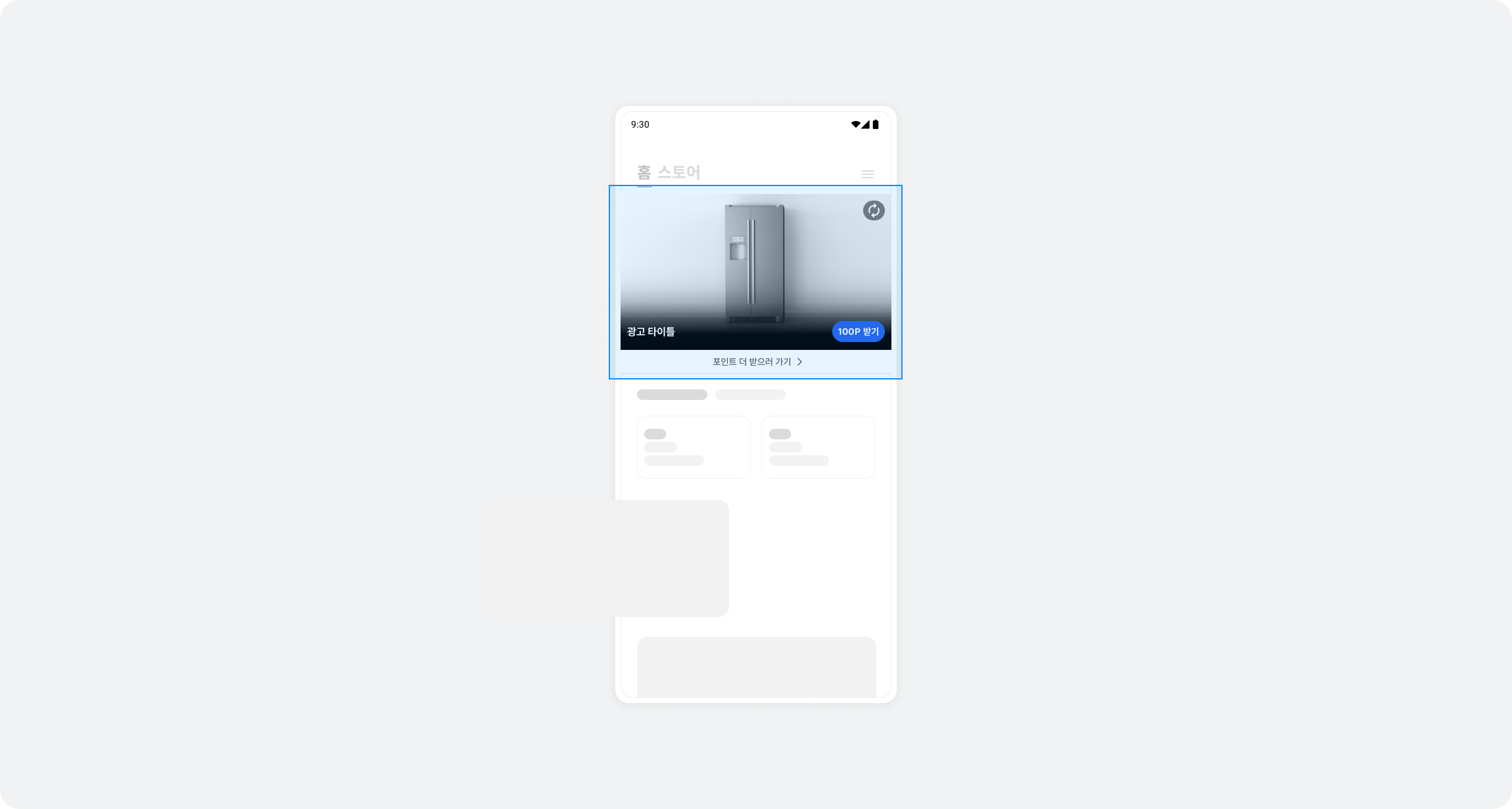
- **Multiple ad formats**: Unified support for VAST video, static images, and network ads in one placement
- **Automatic ad refresh**: Automatically switches to the next ad when the user completes participation
- **Viewability tracking**: Automatically pauses and resumes based on viewability (at least 50% visible)
## Integration
Follow these steps to integrate FlexAd into your app.
### Step 1. Prepare
- Buzzvil SDK version
- Single-ad type (`NORMAL`, default): v6.7.0 or later
- Carousel type (`CAROUSEL`): v6.9.1 or later
- Complete [Getting started](https://docs.buzzvil.com/en/docs/buzzbenefit-android/v6/getting-started).
- Obtain a Unit ID for the FlexAd placement (referred to below as `YOUR_FLEXAD_UNIT_ID`).
### Step 2. Configure the ad layout
Review the FlexAd layout structure and add `BuzzFlexAdView` in XML. 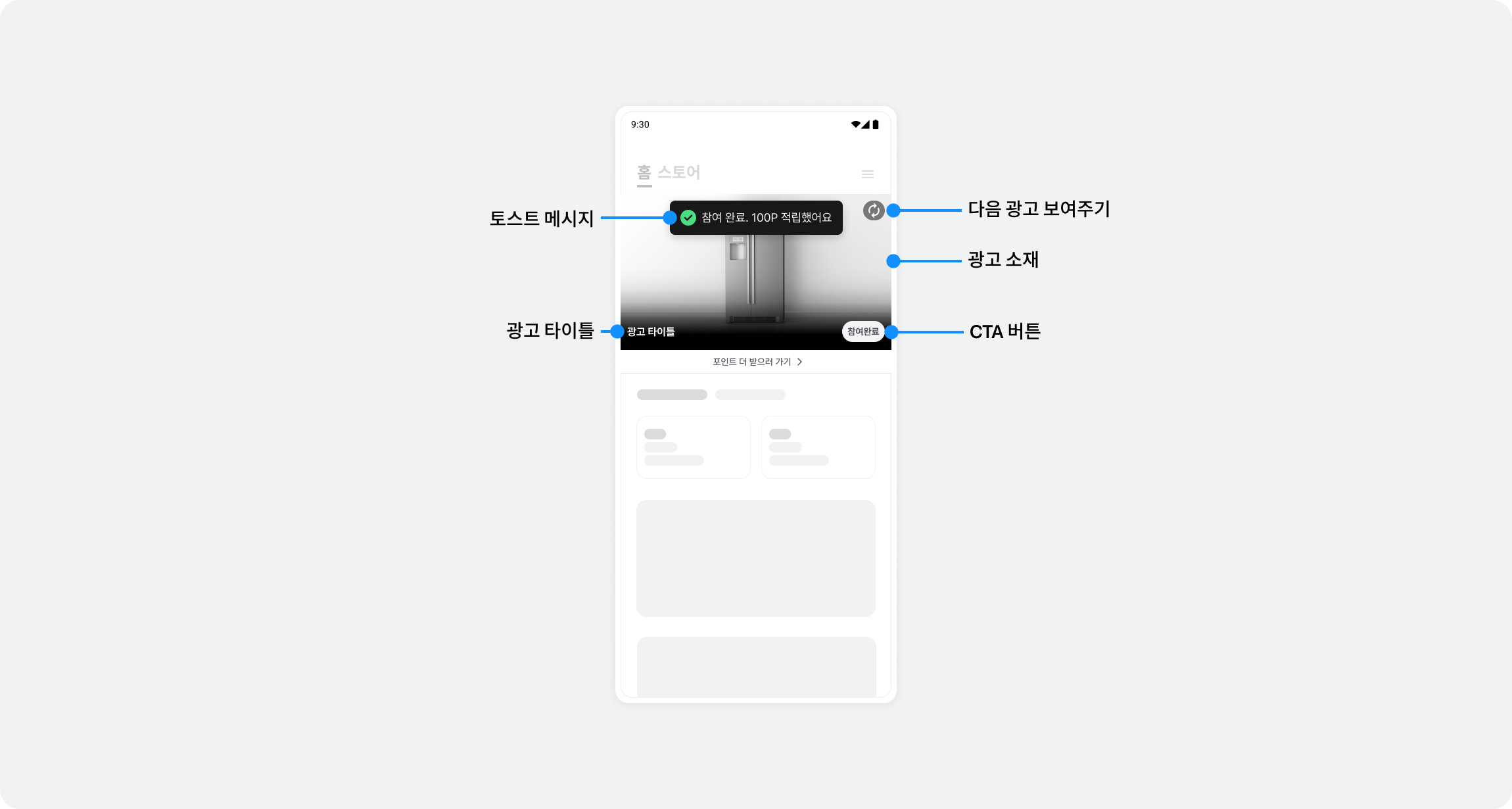
#### Layout structure
`BuzzFlexAdView` consists of the following areas:
| Area | Description | Size |
| ------------------ | ----------------------------------------------------------------------- | --------------------- |
| **Ad content** | Displays loading states, VAST video, static images, and other content | **16:9 aspect ratio** |
| **BenefitHub CTA** | Bottom button that opens BenefitHub (included automatically) | Approximately 40dp |
| **Divider** | Separates the placement from the content below (included automatically) | 1dp |
Therefore, **the ad content is 16:9, but the total height of `BuzzFlexAdView` is the 16:9 height plus approximately 41dp**.
#### XML layout example
```xml
```
> ✏️ **Note**
>
> - Set `BuzzFlexAdView` to `wrap_content`. The ad content automatically maintains a 16:9 ratio, and the bottom CTA and divider are included automatically.
> - You do not need to enforce a specific height. The view occupies only the height it needs.
> - Leave enough space when placing additional content below `BuzzFlexAdView`.
### Step 3. Display ads
Create a `BuzzFlex` object, register a listener, and load an ad. Call `bind()` inside a listener callback.
```kotlin
import com.buzzvil.buzzbenefit.flexad.BuzzFlex
import com.buzzvil.buzzbenefit.flexad.BuzzFlexAdView
import com.buzzvil.buzzbenefit.BuzzAdError
import com.buzzvil.buzzbenefit.benefithub.BuzzBenefitHub
val buzzFlexAdView = findViewById(R.id.buzzFlexAdView)
// 1. BuzzFlex 객체 생성 (기본값: 단일형 NORMAL)
val buzzFlex = BuzzFlex(YOUR_FLEXAD_UNIT_ID)
// 캐러셀형으로 표시하려면 아래처럼 생성하세요 (v6.9.1 이상)
// val buzzFlex = BuzzFlex(YOUR_FLEXAD_UNIT_ID, BuzzFlex.BuzzFlexType.CAROUSEL)
// 2. Listener 등록 (반드시 load() 이전에)
buzzFlex.setListener(object : BuzzFlex.Listener {
override fun onSuccess() {
// load() 완료 후 호출됨
// 여기서 bind() 호출
buzzFlexAdView.bind(buzzFlex)
}
override fun onFailure(error: BuzzAdError) {
// 광고 할당에 실패했습니다
when (error.type) {
BuzzAdError.Type.GOOGLE_AGE_POLICY -> {
// age policy 위반: UI 숨김
buzzFlexAdView.visibility = View.GONE
}
BuzzAdError.Type.EMPTY_RESPONSE -> {
// 할당 가능한 광고 없음: 일시적 상황으로 bind() 호출
buzzFlexAdView.bind(buzzFlex)
}
else -> {
// 기타 에러: bind() 호출
buzzFlexAdView.bind(buzzFlex)
}
}
}
override fun onClicked() {
// 유저가 광고를 클릭했습니다
}
})
// 3. load() 호출 (Listener가 등록된 상태에서)
buzzFlex.load()
```
> ⚠️ **Important**
>
> - Always call `setListener()` **before** `load()`.
> - Call `bind()` only inside the `onSuccess()` or `onFailure()` callback.
> - `BuzzFlexAdView` automatically manages the lifecycle of `BuzzFlex`, so you do not need to explicitly call `handleResume()`, `handlePause()`, or similar methods.
> - `onSuccess()` is called only for the initial ad allocation. Subsequent automatic refreshes only update the UI.
### Step 4. Test the basic integration
After completing the basic integration, check the following:
1. Ads are allocated and displayed correctly.
2. The placement automatically switches to the next ad after participation.
3. The BenefitHub entry point works correctly.
## Additional features
### Customize the primary color
You can set the primary color of the FlexAd UI:
```kotlin
val buzzFlex = BuzzFlex(YOUR_FLEXAD_UNIT_ID)
// 색상 설정
buzzFlex.setPrimaryColor(ContextCompat.getColor(this, R.color.your_primary_color))
buzzFlex.setListener(...)
buzzFlex.load()
```
UI elements such as the reward pill and progress bar use the primary color you configure.
## Ad operation policy (mandatory requirements)
### Ad request policy
- Make the initial ad request only once when the app screen opens.
- Subsequent ad requests (reallocations) are allowed only after a clear user action, such as a screen transition.
- Automatically refreshing ads at fixed time intervals is prohibited.
> Excessive ad requests can harm the user experience, ad performance, and revenue.
## Error handling
This section explains how to handle errors that may occur during FlexAd integration.
### Error codes
Use the `type` property of the `BuzzAdError` returned in the `onFailure()` callback to identify the cause of an error.
| Error code | Description | Cause | Resolution |
| ---------------------------- | ------------------------------------ | ---------------------------------------------------------------------------------------------------------------------------------- | -------------------------------------------------------------------------------------------------------------------------------------- |
| `NOT_INITIALIZED` | SDK not initialized | SDK initialization in [Getting started](https://docs.buzzvil.com/en/docs/buzzbenefit-android/v6/getting-started) was not completed | Check SDK initialization |
| `SERVER_ERROR` | Server error (HTTP 500) | Internal Buzzvil server error | Check the network and retry |
| `CLIENT_ERROR` | Client error (HTTP 400) | Invalid request or expired token | Check the Unit ID and login state |
| `CONNECTION_TIMEOUT` | Network timeout | Unstable or slow network connection | Check the network |
| `EMPTY_RESPONSE` | No ad allocated | No ads are available for allocation | Check whether the FlexAd placement is enabled |
| `WAITING_FOR_RESPONSE` | Awaiting response | The previous request is still in progress | Wait long enough before retrying |
| `GOOGLE_AGE_POLICY` | Google policy requirement not met | The user was identified as aged 14 or younger | Recheck the age information |
| `PRIVACY_POLICY_NOT_GRANTED` | Missing personal information consent | The user has not consented to personal information collection | Ask the user to consent to collection |
| `UNKNOWN` | Unknown error | An exception that cannot be identified | See [Troubleshooting](https://docs.buzzvil.com/en/docs/buzzbenefit-android/v6/troubleshooting) and contact your Buzzvil representative |
For a GOOGLE\_AGE\_POLICY error, remove the placement or customize the subsequent behavior.
### Error handling example
```kotlin
buzzFlex.setListener(object : BuzzFlex.Listener {
override fun onFailure(error: BuzzAdError) {
when (error.type) {
BuzzAdError.Type.EMPTY_RESPONSE -> {
// 광고 미할당: UI 숨김 처리
buzzFlexAdView.visibility = View.GONE
}
BuzzAdError.Type.CONNECTION_TIMEOUT -> {
// 네트워크 오류: 재시도 버튼 제공
showRetryButton()
}
BuzzAdError.Type.SERVER_ERROR -> {
// 서버 오류: 사용자에게 안내
Toast.makeText(context, "서버 오류가 발생했습니다. 잠시 후 다시 시도해주세요.", Toast.LENGTH_LONG).show()
}
else -> {
// 기타 오류
Toast.makeText(context, "광고 로드 실패: ${error.type.name}", Toast.LENGTH_SHORT).show()
}
}
}
override fun onSuccess() {
// 성공 처리
}
override fun onClicked() {
// 클릭 처리
}
})
```
> ✏️ **Note**
>
> - No ad allocation (`EMPTY_RESPONSE`) is a normal condition when the FlexAd placement is not enabled or ads are temporarily unavailable.
> - For detailed troubleshooting steps, see [Troubleshooting](https://docs.buzzvil.com/en/docs/buzzbenefit-android/v6/troubleshooting).
## Frequently asked questions
| Question | Answer |
| --------------------------------------------------------------------------- | ----------------------------------------------------------------------------------------------------------------------------------------------------------------------------------------------- |
| What if no ad is allocated? | Check the error type in the `onFailure()` callback. Check the network connection, or contact your Buzzvil representative at to confirm that the FlexAd placement is enabled. |
| Does the placement automatically switch to the next ad after participation? | Yes. FlexAd automatically switches to the next ad when the user completes participation. No additional implementation is needed. |
| Can I use only specific ad formats? | FlexAd is designed to use all formats together for an optimized ad experience. Selecting only specific formats is not supported. |
| Can I add custom behavior when an ad is clicked? | We recommend only logging or analytics in the `onClicked()` callback. Avoid adding business logic that could conflict with automatic ad behavior. |
| Only BenefitHub ads appear | Check the integration and logs. Integration, configuration, or server errors may cause only BenefitHub in-house ads to appear. |