Design customization
This page explains how to customize the UI provided by BuzzAd SDK for iOS.
Change the Feed background color
You can change Feed's background color.
Use the following example to change Feed's background color.
// BZVBuzzAdFeedTheme 설정을 통해 색상 등 UI 구성 요소를 변경할 수 있습니다.
let buzzAdFeedTheme = BZVBuzzAdFeedTheme { (builder: BZVBuzzAdFeedThemeBuilder) in
  builder.feedBackgroundColor = UIColor.YOUR_BACKGROUND_COLOR
  // ...생략...
}

BZVBuzzAdFeed.setDefaultTheme(buzzAdFeedTheme)
// BZVBuzzAdFeedTheme 설정을 통해 색상 등 UI 구성 요소를 변경할 수 있습니다.
BZVBuzzAdFeedTheme *buzzAdFeedTheme = [BZVBuzzAdFeedTheme themeWithBlock:^(BZVBuzzAdFeedThemeBuilder * _Nonnull builder) {
  builder.feedBackgroundColor = UIColor.YOUR_BACKGROUND_COLOR;
  // ...생략...
}];

[BZVBuzzAdFeed setDefaultTheme:buzzAdFeedTheme];
Customize tabs
If Feed tabs are enabled, you can customize their design.
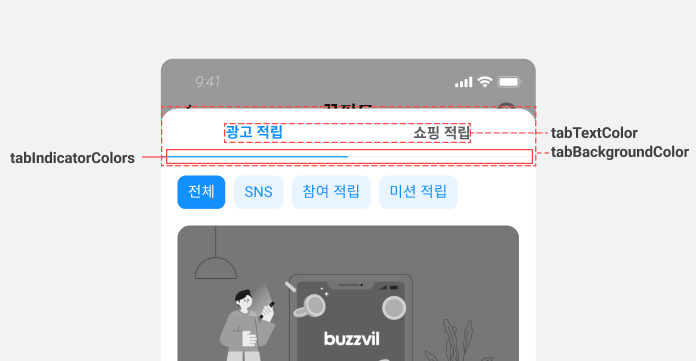
Use the following example to customize tabs.
// BZVBuzzAdFeedTheme 설정을 통해 색상 등 UI 구성 요소를 변경할 수 있습니다.
let buzzAdFeedTheme = BZVBuzzAdFeedTheme { (builder: BZVBuzzAdFeedThemeBuilder) in
  // ...생략...
  builder.tabBackgroundColor = UIColor.YOUR_BACKGROUND_COLOR
  builder.tabTextColor = BZVControlStateResource { builder in
    builder.setValue(UIColor.YOUR_TEXT_NORMAL_COLOR, for: .normal)
    builder.setValue(UIColor.YOUR_TEXT_HIGHLIGHT_COLOR, for: .highlight)
  }
  builder.tabIndicatorColors = BZVControlStateResource { builder in
    builder.setValue(UIColor.YOUR_INDICATOR_NORMAL_COLOR, for: .normal)
    builder.setValue(UIColor.YOUR_INDICATOR_HIGHLIGHT_COLOR, for: .highlight)
  }
}

BZVBuzzAdFeed.setDefaultTheme(buzzAdFeedTheme)
// BZVBuzzAdFeedTheme 설정을 통해 색상 등 UI 구성 요소를 변경할 수 있습니다.
BZVBuzzAdFeedTheme *buzzAdFeedTheme = [BZVBuzzAdFeedTheme themeWithBlock:^(BZVBuzzAdFeedThemeBuilder * _Nonnull builder) {
  // ...생략...
  builder.tabBackgroundColor = UIColor.YOUR_BACKGROUND_COLOR;
  builder.tabTextColor = [BZVControlStateResource resourceWithBlock:^(BZVControlStateResourceBuilder * _Nonnull builder) {
    [builder setValue:UIColor.YOUR_TEXT_NORMAL_COLOR forState:BZVControlStateNormal];
    [builder setValue:UIColor.YOUR_TEXT_HIGHLIGHT_COLOR forState:BZVControlStateHighlight];
  }];
  builder.tabIndicatorColors = [BZVControlStateResource resourceWithBlock:^(BZVControlStateResourceBuilder * _Nonnull builder) {
    [builder setValue:UIColor.YOUR_INDICATOR_NORMAL_COLOR forState:BZVControlStateNormal];
    [builder setValue:UIColor.YOUR_INDICATOR_HIGHLIGHT_COLOR forState:BZVControlStateHighlight];
  }];
}];

[BZVBuzzAdFeed setDefaultTheme:buzzAdFeedTheme];
Customize filters
If Feed filters are enabled, you can customize their design.
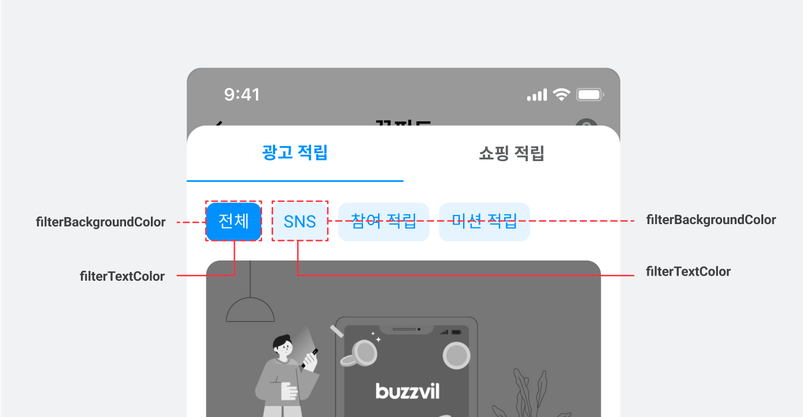
Use the following example to customize filters.
let buzzAdFeedTheme = BZVBuzzAdFeedTheme { (builder: BZVBuzzAdFeedThemeBuilder) in
  // ...생략...
  builder.filterBackgroundColor = BZVControlStateResource { builder in
    builder.setValue(UIColor.YOUR_BACKGROUND_NORMAL_COLOR, for: .normal)
    builder.setValue(UIColor.YOUR_BACKGROUND_HIGHLIGHT_COLOR, for: .highlight)
  }
  builder.filterTextColor = BZVControlStateResource { builder in
    builder.setValue(UIColor.YOUR_TEXT_NORMAL_COLOR, for: .normal)
    builder.setValue(UIColor.YOUR_TEXT_HIGHLIGHT_COLOR, for: .highlight)
  }
}

BZVBuzzAdFeed.setDefaultTheme(buzzAdFeedTheme)
BZVBuzzAdFeedTheme *buzzAdFeedTheme = [BZVBuzzAdFeedTheme themeWithBlock:^(BZVBuzzAdFeedThemeBuilder * _Nonnull builder) {
  // ...생략...
  builder.filterBackgroundColor = [BZVControlStateResource resourceWithBlock:^(BZVControlStateResourceBuilder * _Nonnull builder) {
    [builder setValue:UIColor.YOUR_BACKGROUND_NORMAL_COLOR forState:BZVControlStateNormal];
    [builder setValue:UIColor.YOUR_BACKGROUND_HIGHLIGHT_COLOR forState:BZVControlStateHighlight];
  }];
  builder.filterTextColor = [BZVControlStateResource resourceWithBlock:^(BZVControlStateResourceBuilder * _Nonnull builder) {
    [builder setValue:UIColor.YOUR_TEXT_NORMAL_COLOR forState:BZVControlStateNormal];
    [builder setValue:UIColor.YOUR_TEXT_HIGHLIGHT_COLOR forState:BZVControlStateHighlight];
  }];
}];

[BZVBuzzAdFeed setDefaultTheme:buzzAdFeedTheme];
Customize placement dividers
You can change the dividers between Feed ads and content.
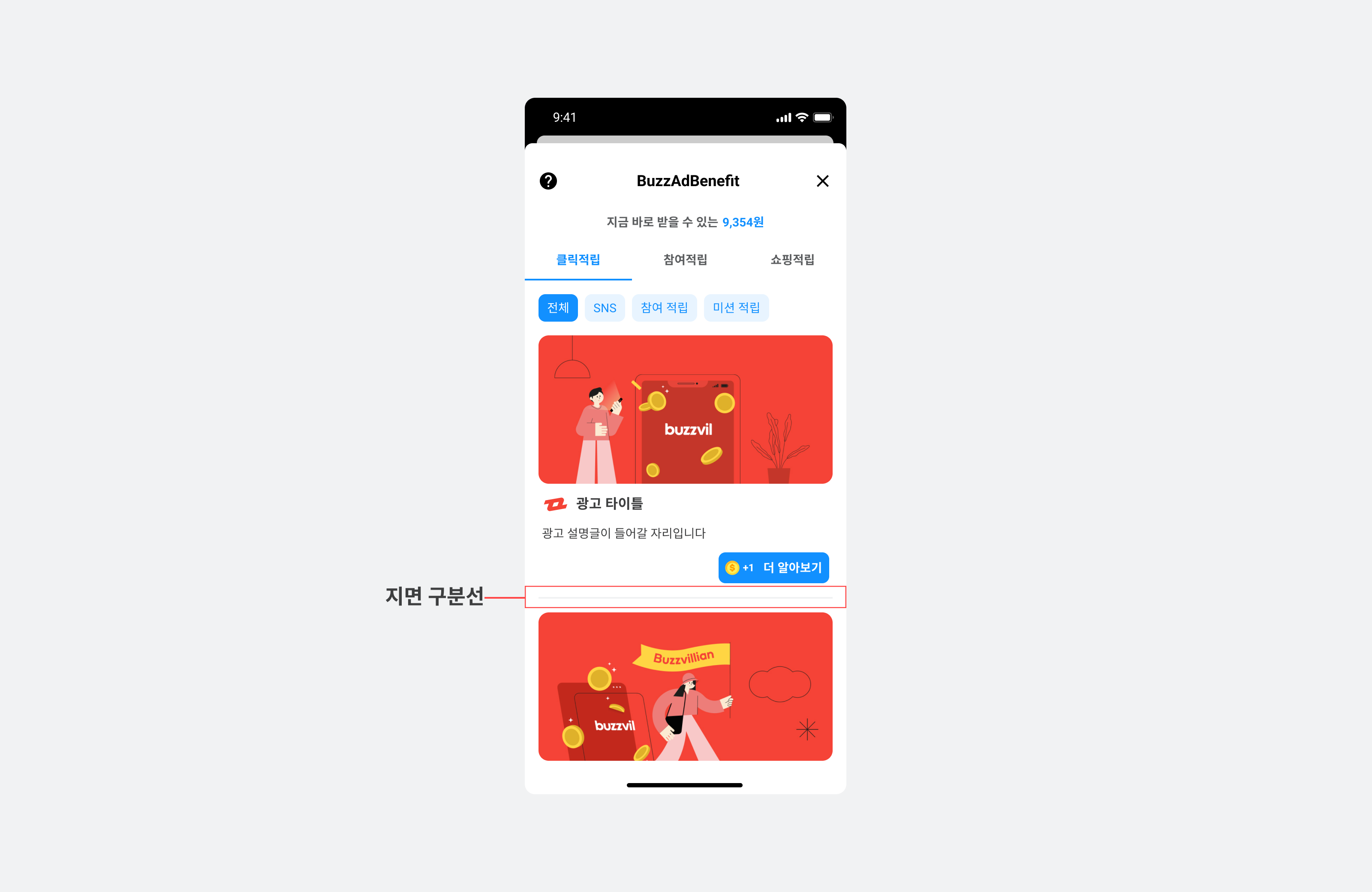
Use the following example to customize placement dividers.
// BZVBuzzAdFeedTheme 설정을 통해 색상 등 UI 구성 요소를 변경할 수 있습니다.
let buzzAdFeedTheme = BZVBuzzAdFeedTheme { (builder: BZVBuzzAdFeedThemeBuilder) in
  // ...생략...
  builder.separatorColor = UIColor.YOUR_SEPARATOR_COLOR
  builder.separatorHeight = YOUR_SEPARATOR_HEIGHT
  builder.separatorHorizontalMargin = YOUR_SEPARATOR_HORIZONTAL_MARGIN
}

BZVBuzzAdFeed.setDefaultTheme(buzzAdFeedTheme)
BZVBuzzAdFeedTheme *buzzAdFeedTheme = [BZVBuzzAdFeedTheme themeWithBlock:^(BZVBuzzAdFeedThemeBuilder * _Nonnull builder) {
  // ...생략...
  builder.separatorColor = UIColor.YOUR_SEPARATOR_COLOR;
  builder.separatorHeight = YOUR_SEPARATOR_HEIGHT;
  builder.separatorHorizontalMargin = YOUR_SEPARATOR_HORIZONTAL_MARGIN;
}];

[BZVBuzzAdFeed setDefaultTheme:buzzAdFeedTheme];
Change the CTA button design
You can customize the CTA button provided by BuzzAd SDK for iOS.

The following example configures components in BZVBuzzAdFeedTheme to customize Feed's CTA button.
let buzzAdFeedTheme = BZVBuzzAdFeedTheme { (builder: BZVBuzzAdFeedThemeBuilder) in
  // ...생략...
  builder.rewardIcon = UIImage(named: "YOUR_REWARD_ICON")!
  builder.participatedIcon = UIImage(named: "YOUR_PARTICIPATED_ICON")!
  builder.ctaTextColor = BZVControlStateResource { builder in
    builder.setValue(UIColor.YOUR_CTA_TEXT_NORMAL_COLOR, for: .normal)
  }
  builder.ctaBackgroundColor = BZVControlStateResource { builder in
    builder.setValue(UIColor.YOUR_CTA_BACKGROUND_NORMAL_COLOR, for: .normal)
  }
}

BZVBuzzAdFeed.setDefaultTheme(buzzAdFeedTheme)
BZVBuzzAdFeedTheme *buzzAdFeedTheme = [BZVBuzzAdFeedTheme themeWithBlock:^(BZVBuzzAdFeedThemeBuilder * _Nonnull builder) {
  // ...생략...
  builder.rewardIcon = [UIImage imageNamed:@"YOUR_REWARD_ICON"];
  builder.participatedIcon = [UIImage imageNamed:@"YOUR_PARTICIPATED_ICON"];
  builder.ctaTextColor = [BZVControlStateResource resourceWithBlock:^(BZVControlStateResourceBuilder * _Nonnull builder) {
    [builder setValue:UIColor.YOUR_CTA_TEXT_NORMAL_COLOR forState:BZVControlStateNormal];
  }];
  builder.ctaBackgroundColor = [BZVControlStateResource resourceWithBlock:^(BZVControlStateResourceBuilder * _Nonnull builder) {
    [builder setValue:UIColor.YOUR_CTA_BACKGROUND_NORMAL_COLOR forState:BZVControlStateNormal];
  }];
}];

[BZVBuzzAdFeed setDefaultTheme:buzzAdFeedTheme];
Implement a custom privacy policy UI
If you implement your own privacy policy UI, you must pass the user's consent status to the SDK. Refer to the table below and call the appropriate function.
| Class | API | Description |
|---|---|---|
BuzzAdBenefit | privacyPolicyManager (static variable) | Returns a BZVPrivacyPolicyManager instance. |
BZVPrivacyPolicyManager | grantConsent() | Consent to personal information collection. |
revokeConsent() | Revokes consent to collect personal information. | |
isConsentGranted() | Check whether the user has consented to personal information collection. |
Usage example
let privacyPolicyManager = BuzzAdBenefit.privacyPolicyManager

// 직접 구현한 개인정보 제3자 제공 동의 UI에서 동의를 받았을 경우 아래 코드를 실행하면, 피드 화면에서 개인정보 제3자 제공 동의 UI가 노출되지 않으면서 광고 할당이 정상적으로 진행 됩니다.
// 아래의 코드를 실행하지 않을 경우 피드 진입 시 개인정보 제3자 제공 동의 UI가 노출되기 때문에 필수적으로 실행이 필요합니다.
privacyPolicyManager.grantConsent()

// 아래 코드를 통해서 수집 동의를 철회할 수 있습니다. 이 코드가 실행되면 피드에서 광고 할당이 이루어지지 않습니다.
privacyPolicyManager.revokeConsent()
BZVPrivacyPolicyManager *privacyPolicyManager = [BuzzAdBenefit privacyPolicyManager];

// 직접 구현한 개인정보 제3자 제공 동의 UI 에서 동의를 받았을 경우 아래 코드를 실행하면, 피드 화면에서 개인정보 제3자 제공 동의 UI가 노출되지 않으면서 광고 할당이 정상적으로 진행 됩니다.
// 아래의 코드를 실행하지 않을 경우 피드 진입 시 개인정보 제3자 제공 동의 UI가 노출되기 때문에 필수적으로 실행이 필요합니다.
[privacyPolicyManager grantConsent];

// 아래 코드를 통해서 수집 동의를 철회할 수 있습니다. 이 코드가 실행되면 피드에서 광고 할당이 이루어지지 않습니다.
[privacyPolicyManager revokeConsent];