Getting started
Complete these settings before integrating placements provided by the BuzzAd iOS SDK.
Requirements
- Deployment target iOS 11 or later.
- Xcode 14 or later.
Obtain integration IDs
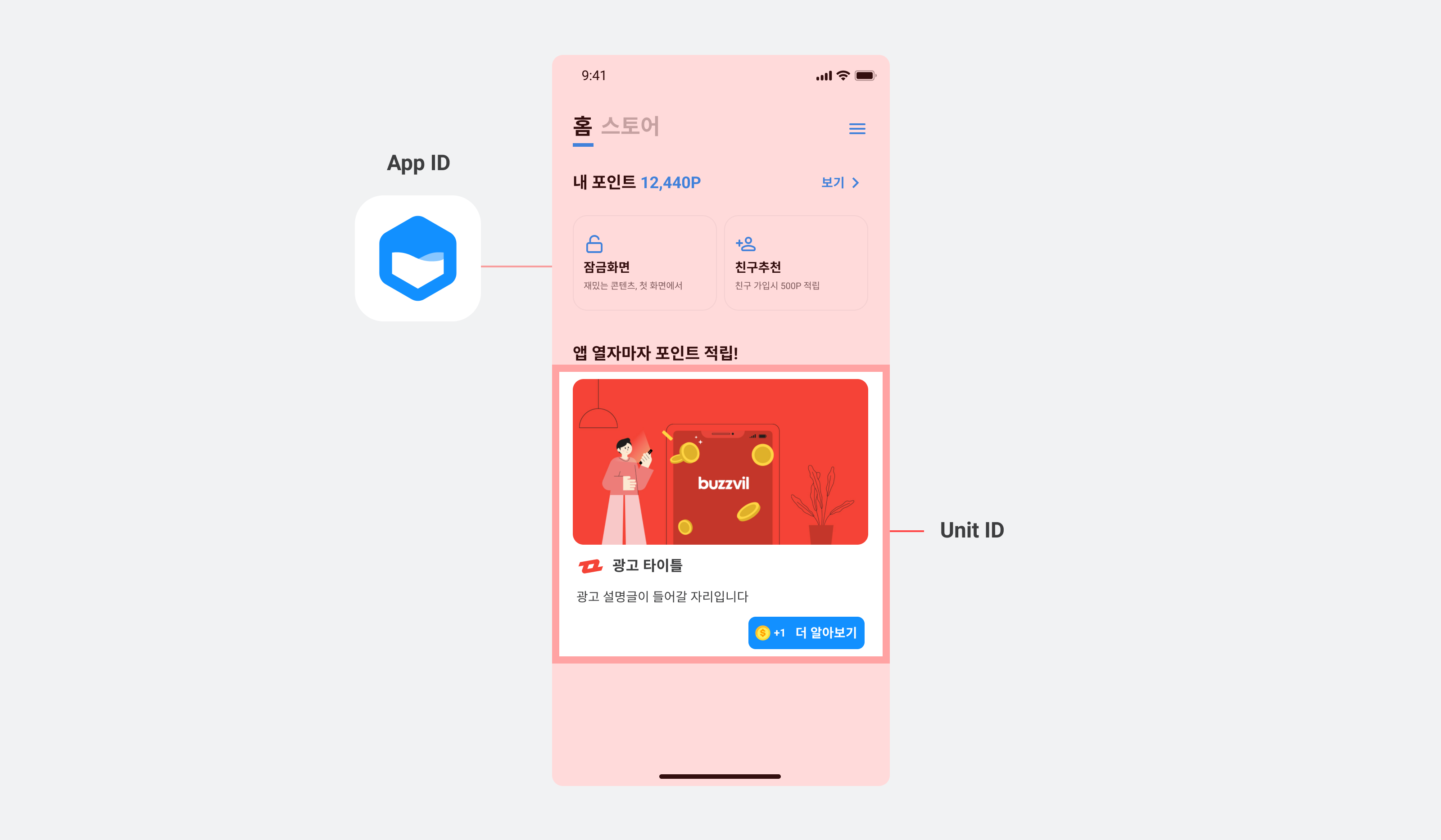
You need an App ID for your app and a Unit ID for each placement to integrate the BuzzAd iOS SDK. Contact your Buzzvil representative to obtain them.
| ID type | Description |
|---|---|
| App ID | A unique identifier assigned to each app integrated with the BuzzAd iOS SDK. |
| Unit ID | A unique identifier assigned to each placement created through the BuzzAd iOS SDK. |
Integrate a reward server
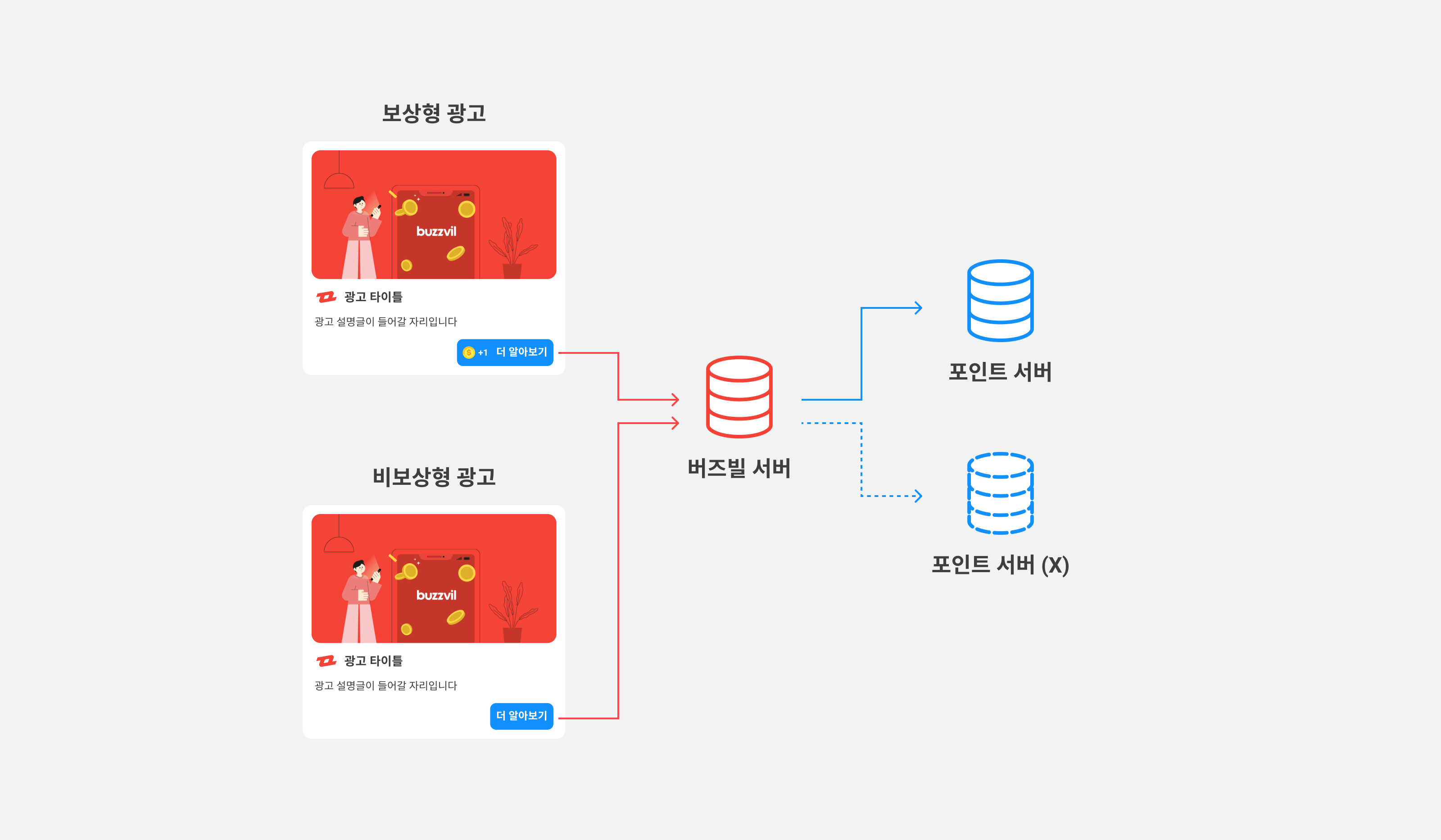
Buzzvil offers rewarded ads, which grant points to users, and non-rewarded ads, which do not.
- Non-rewarded ads: No points are awarded for participation, so a points processing server is not required.
- Rewarded ads: Users receive points for participation, so you need a server to process reward requests from the client.
If you have your own server that can process reward requests for rewarded ads, integrate it by following the postback integration guide.
Install the SDK
Use CocoaPods to add BuzzAd SDK to Podfile.
pod 'BuzzAdBenefit', '= 3.45.13'
Initialize the SDK
After installing the BuzzAd iOS SDK, initialize it with the required information, including the App ID and user profile.
Initialize the BuzzAd SDK
Call [BuzzAdBenefit initializeWithConfig:] in application:didFinishLaunchingWithOptions of AppDelegate to initialize the BuzzAd iOS SDK.
import BuzzAdBenefit

@main
final class AppDelegateSwift: UIResponder, UIApplicationDelegate {
  func application(_ application: UIApplication, didFinishLaunchingWithOptions launchOptions: [UIApplication.LaunchOptionsKey : Any]? = nil) -> Bool {
    let config = BZVConfig { builder in
      builder.appId = "YOUR_APP_ID"
    }
    BuzzAdBenefit.initialize(with: config)
    return true
  }
}
@import BuzzAdBenefit;

@implementation AppDelegate

- (BOOL)application:(UIApplication *)application didFinishLaunchingWithOptions:(NSDictionary *)launchOptions {
  BZVConfig *config = [BZVConfig configWithBlock:^(BZVConfigBuilder * _Nonnull builder) {
    builder.appId = @"YOUR_APP_ID";
  }];
  [BuzzAdBenefit initializeWithConfig:config];
  return YES;
}

@end
Configure dark mode
After initialization, call [BuzzAdBenefit setUserInterfaceStyle:] to configure the SDK's dark mode. The available options are listed below.
| Dark mode option | Description |
|---|---|
BZVUserInterfaceStyleLight | The default SDK dark mode setting. Uses light mode regardless of the system setting. |
BZVUserInterfaceStyleDark | Always use dark mode, regardless of the system setting. |
BZVUserInterfaceStyleSystem | Follows the system dark mode setting. |
The following example makes the SDK follow the system dark mode setting.
import BuzzAdBenefit

@main
final class AppDelegateSwift: UIResponder, UIApplicationDelegate {
  func application(_ application: UIApplication, didFinishLaunchingWithOptions launchOptions: [UIApplication.LaunchOptionsKey : Any]? = nil) -> Bool {
    // ...생략...
    BuzzAdBenefit.setUserInterfaceStyle(.system)
    return true
  }
}
@import BuzzAdBenefit;

@implementation AppDelegate

- (BOOL)application:(UIApplication *)application didFinishLaunchingWithOptions:(NSDictionary *)launchOptions {
  // ...생략...
  [BuzzAdBenefit setUserInterfaceStyle:BZVUserInterfaceStyleSystem];
  return YES;
}

@end
Log in
You must log in before requesting an ad allocation. See the table below for the fields in a login request.
❗️❗️❗️ Important ❗️❗️❗️
Although gender and birth year are marked as recommended, targeted ads cannot be served without them. Most Buzzvil ads are targeted, so provide these fields to receive ads reliably.
| Requirement | Profile field | Description |
|---|---|---|
| Required | userId | A unique, non-identifying ID for each user. Do not use a login ID or email address. It must remain stable throughout service use and is required for ad allocation. ⚠️ Caution ❗️❗️❗️ If the ID changes after reinstalling the app or cannot remain stable for another reason, action-based ads cannot be served because of the risk of abuse. Contact your Buzzvil business representative if user identifiers can change. |
| Recommended | gender | The user's gender. Male: BZVUserGenderMale., Female: BZVUserGenderFemale. |
| Recommended | birthYear | The user's birth year. |
| Recommended | showAppTrackingTransparencyDialog | Controls whether the tracking authorization prompt appears. Recommended, not required. See iOS 14 support. |
The following example registers a user profile with the SDK. You can also remove a registered profile.
// 로그인을 요청하는 코드입니다.
BuzzAdBenefit.login { builder in
  builder.userId = "USER_ID"
  builder.gender = .male // 남성 사용자
  builder.birthYear = YYYY
} onSuccess: {
} onFailure: { error in
}

// 로그인 상태를 확인하는 코드입니다.
BuzzAdBenefit.isLoggedIn()

// 로그아웃하는 코드입니다.
BuzzAdBenefit.logout()
// 로그인을 요청하는 코드입니다.
[BuzzAdBenefit loginWithBlock:^(BZVLoginRequestBuilder * _Nonnull builder) {
  builder.userId = @"USER_ID";
  builder.birthYear = YYYY;
  builder.gender = BZVUserGenderMale; // 남성 사용자
} onSuccess:^{
} onFailure:^(NSError * _Nonnull error) {
}];

// 로그인 상태를 확인하는 코드입니다.
[BuzzAdBenefit isLoggedIn];

// 로그아웃하는 코드입니다.
[BuzzAdBenefit logout];
Sample code
See the GitHub sample code for implementation examples.
Error codes
For errors returned by BuzzAd SDK for iOS methods, see Error codes in Troubleshooting.
Frequently asked questions
| Question | Answer |
|---|---|
| How do I configure support for iOS 14? | On iOS 14 and later, BuzzAd SDK for iOS can display the tracking authorization prompt and supports Apple's SKAdNetwork for tracking app-install conversions. See Support for iOS 14. |
| Why do I need to add a support button? | A support feature is required when serving action-based ads to ensure reliable service. See Add user support for action-based ads. |
| How do I autoplay video ads on Wi-Fi or mobile data? | You can change the conditions for video autoplay. See Change video autoplay settings. |
| How do I integrate BuzzAd SDK for iOS offline? | Obtain the frameworks provided by Buzzvil, then add them and a run script to your project. See Offline builds. |
| How do I open ads in a WebView? | Use a custom launcher to open ad landing pages in an in-app browser. See Custom in-app browser. |
| I want to identify the ad type in Feed or Native. | See Check the ad type. |