Getting started
Complete these settings before integrating placements provided by the BuzzAd Android SDK.
Requirements
- Android 4.1 Jelly Bean (API level 16) or later.
- Android Studio 3.2 or later.
- Gradle 4.0.1 or later.
- compileSdkVersion 33 or later
- AndroidX
- JDK 1.11
Obtain integration IDs
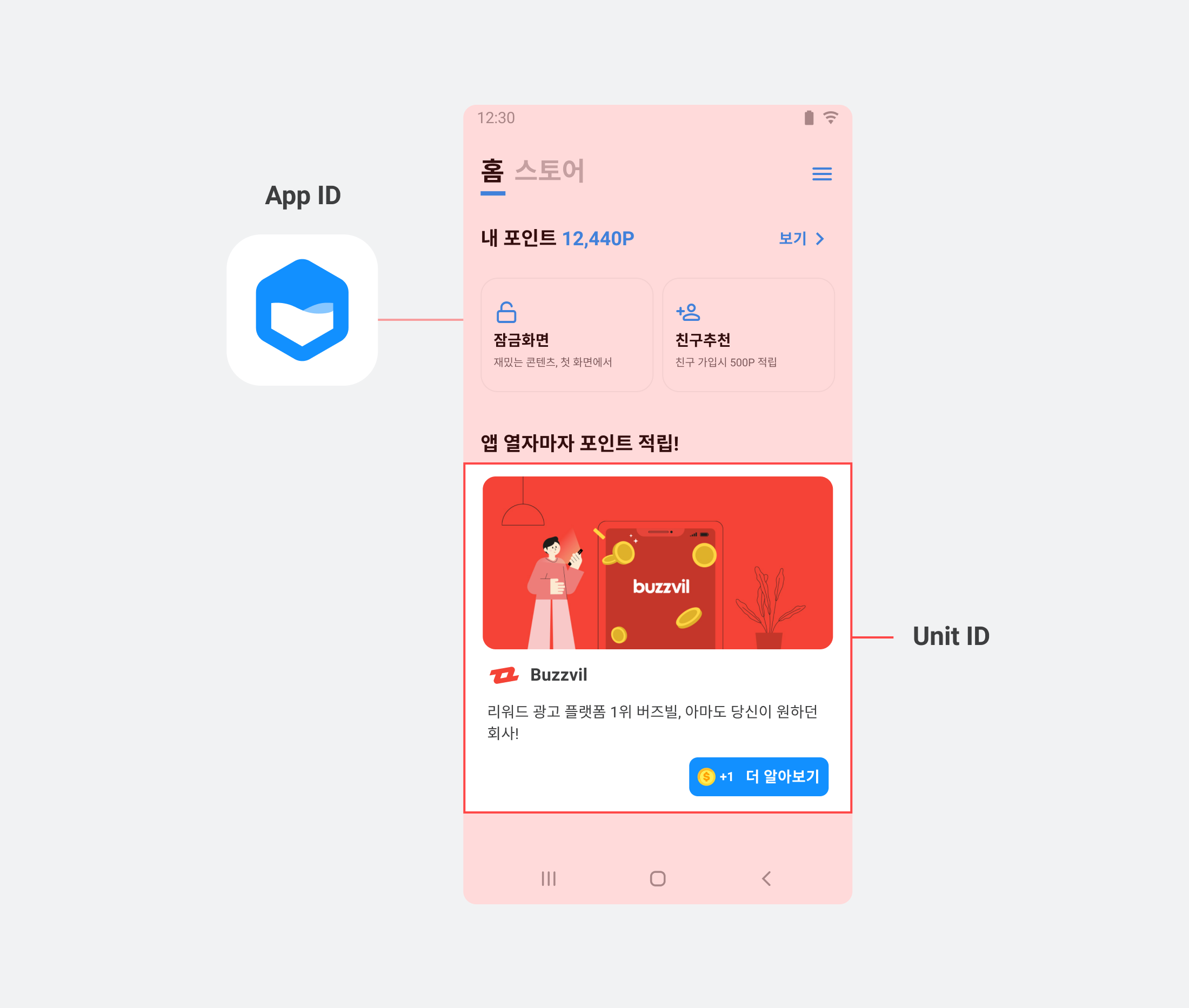
You need an App ID for your app and a Unit ID for each ad placement to integrate the BuzzAd Android SDK. Contact your Buzzvil representative to obtain them.
| ID type | Description |
|---|---|
| App ID | A unique identifier assigned to each app integrated with the BuzzAd Android SDK. |
| Unit ID | A unique identifier assigned to each placement created through the BuzzAd Android SDK. |
Integrate a reward server
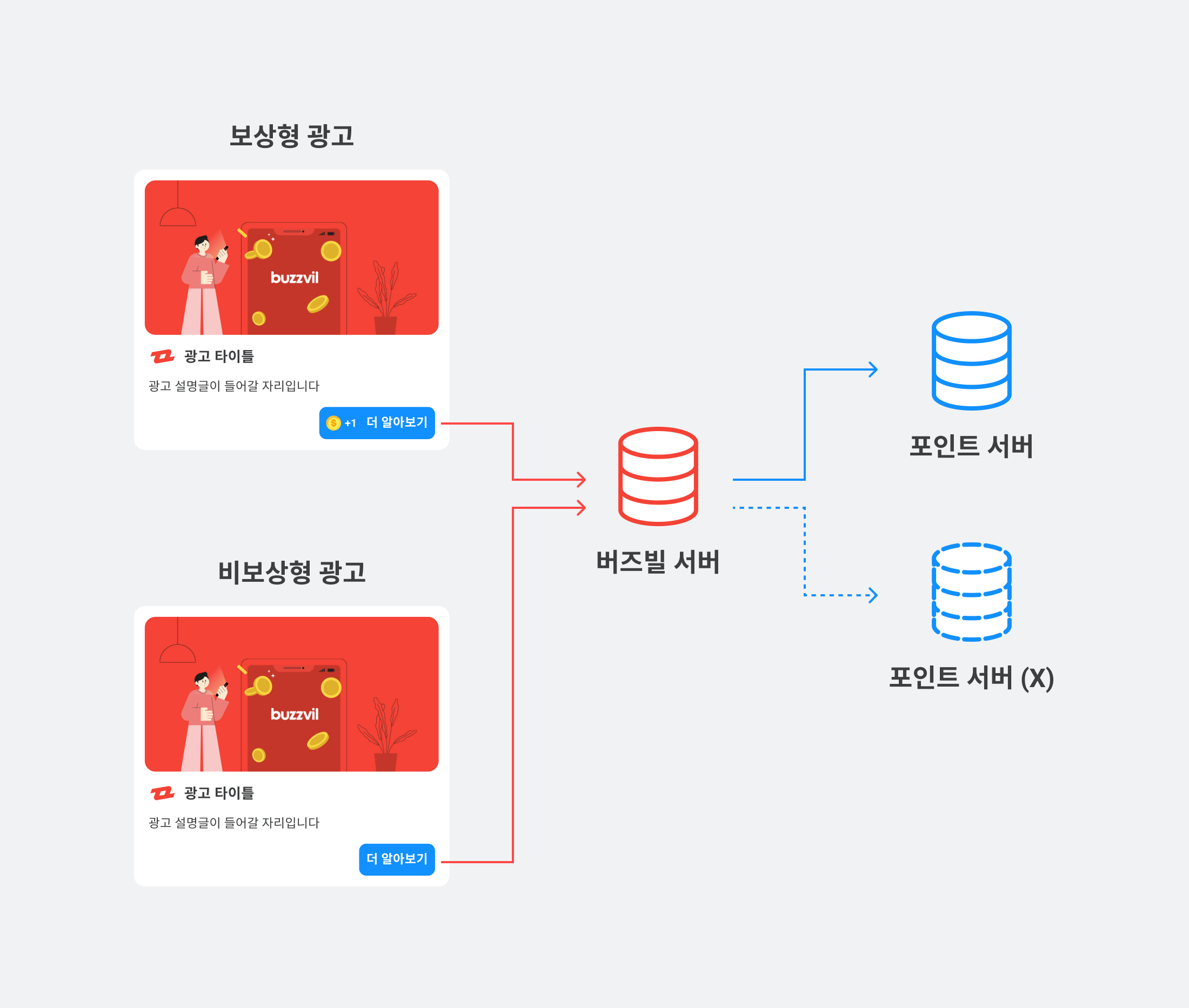
Buzzvil offers rewarded ads, which grant points to users, and non-rewarded ads, which do not.
- Non-rewarded ads: No points are awarded for participation, so a points processing server is not required.
- Rewarded ads: Users receive points for participation, so you need a server to process reward requests from the client.
If you have your own server that can process reward requests for rewarded ads, integrate it by following the postback integration guide.
Install the SDK
Follow these steps to install the BuzzAd Android SDK.
- Configure the BuzzAd SDK repository in the project-level
build.gradlefile.
// 프로젝트 레벨의 build.gradle

allprojects {
    repositories {
        maven { url "https://dl.buzzvil.com/public/maven" } // 버즈빌 저장소
    }
}
Configure the BuzzAd SDK repository in Android Studio Bumblebee or later
Method 1. Add maven { ... } to settings.gradle.
// settings.gradle

pluginManagement {
    repositories {
        gradlePluginPortal()
        google()
        mavenCentral()
    }
}
dependencyResolutionManagement {
    repositoriesMode.set(RepositoriesMode.FAIL_ON_PROJECT_REPOS)
    repositories {
        google()
        mavenCentral()
        maven { url "https://dl.buzzvil.com/public/maven" } // 버즈빌 저장소
    }
}
Method 2. Remove the dependencyResolutionManagement { repositories {...}} block from the settings.gradle file above, then add the dependencies in the project-level build.gralde.
// 프로젝트 레벨의 build.gradle

allprojects {
    repositories {
        maven { url "https://dl.buzzvil.com/public/maven" } // 버즈빌 저장소
    }
}
- Add the BuzzAd SDK library to the module-level
build.gradlefile.
// 모듈 레벨의 build.gradle


dependencies {

    implementation ("com.buzzvil:buzzad-benefit:3.54.+") // BuzzAd SDK 라이브러리

}
- Update
compileSdkVersionandtargetSdkVersionto 33 in the module-levelbuild.gradlefile.
// 모듈 레벨의 build.gradle

android {
    compileSdkVersion 33

    defaultConfig {
        minSdkVersion 16
        targetSdkVersion 33
    }
}
Initialize the SDK
After installing the BuzzAd Android SDK, initialize it with the required information, including the App ID and user profile.
Add the App ID
In AndroidManifest.xml, replace 000000000000 in app-pub-000000000000 with the App ID issued by your Buzzvil representative.
<manifest>
    <application>


        <meta-data
          android:name="com.buzzvil.APP_KEY"
          android:value="app-pub-{YOUR_APP_ID}" />

    </application>
</manifest>
Collect app crash information
Buzzvil uses Sentry to collect SDK crash reports and improve the reliability of the BuzzAd Android SDK and your app. Reports include stack traces containing the com.buzzvil package path, the SDK version, app information and device information excluding unique identifiers. Crash reporting is enabled automatically without additional steps if your app does not use Sentry, or uses Sentry without automatic initialization.
If your app already uses Sentry with automatic initialization through ContentProvider, add tools:node="replace" to AndroidManifest.xml.
<manifest>
    <application>

        <meta-data
           android:name="io.sentry.dsn"
           android:value="YOUR DSN" //퍼블리셔 DSN
           tools:node="replace" />

    </application>
</manifest>
Initialize the BuzzAd SDK
Call BuzzAdBenefit.init() in onCreate() of Application to initialize the BuzzAd Android SDK.
public class App extends Application {
    @Override
    public void onCreate() {
        super.onCreate();

        // BuzzAdBenefit 초기화
        final BuzzAdBenefitConfig buzzAdBenefitConfig = new BuzzAdBenefitConfig.Builder(getApplicationContext())
                .build();
        BuzzAdBenefit.init(getApplicationContext(), buzzAdBenefitConfig);
    }
}
Configure your app in AndroidManifest.xml.
<manifest>
    <application
        android:name=".App">

        ...

    </application>
</manifest>
Register a user profile
Register a user profile before requesting ads. The profile fields are listed below.
❗️❗️❗️ Important ❗️❗️❗️
Although gender and birth year are marked as recommended, targeted ads cannot be served without them. Most Buzzvil ads are targeted, so provide these fields to receive ads reliably.
| Requirement | Profile field | Description |
|---|---|---|
| Required | userId | A unique, non-identifying ID for each user. Do not use a login ID or email address. It must remain stable throughout service use and is required for ad allocation. ⚠️ Caution ❗️❗️❗️ If the ID changes after reinstalling the app or cannot remain stable for another reason, action-based ads cannot be served because of the risk of abuse. Contact your Buzzvil business representative if user identifiers can change. |
| Recommended | gender | The user's gender.
|
| Recommended | birthYear | The user's birth year. |
The following example registers a user profile with the SDK. You can also remove a registered profile.
// 사용자 정보를 등록하는 코드입니다.
final UserProfile.Builder builder = new UserProfile.Builder(BuzzAdBenefit.getUserProfile());
final UserProfile userProfile = builder
        .userId("USER_ID")
        .gender(UserProfile.Gender.MALE) //남성 사용자
        .birthYear(YYYY)
        .build();
BuzzAdBenefit.setUserProfile(userProfile);

// SDK에 등록한 사용자 프로필을 삭제하는 코드입니다.
// BuzzAdBenefit.setUserProfile(null);
Sample code
See the GitHub sample code for implementation examples.
Frequently asked questions
| Question | Answer |
|---|---|
| Only the BuzzAd Android SDK UI uses dark mode, which looks inconsistent. | You can disable the app's dark theme. See Disable dark theme in your app. |
| I want to change the BuzzAd Android SDK UI across all placements. | Use a theme to change the SDK's overall colors and icons. See Change the global theme. |
| Which ad libraries does the BuzzAd Android SDK use? | See Ad libraries used by BuzzAd. |
| Why do action-based ads need an inquiry button? | An inquiry feature is required when serving action-based ads to support reliable service operations. See Add user inquiries for action-based ads. |
| I want ads to open in a WebView. | Use a custom launcher to open ad landing pages in an in-app browser. See Use a custom in-app browser. |
| I want to change video ad playback options. | See Change video ad playback conditions. |
| I want to identify the ad type in Feed or Native. | See Check the ad type. |