Push
This guide explains how to add Push, implement its features and customize its design.
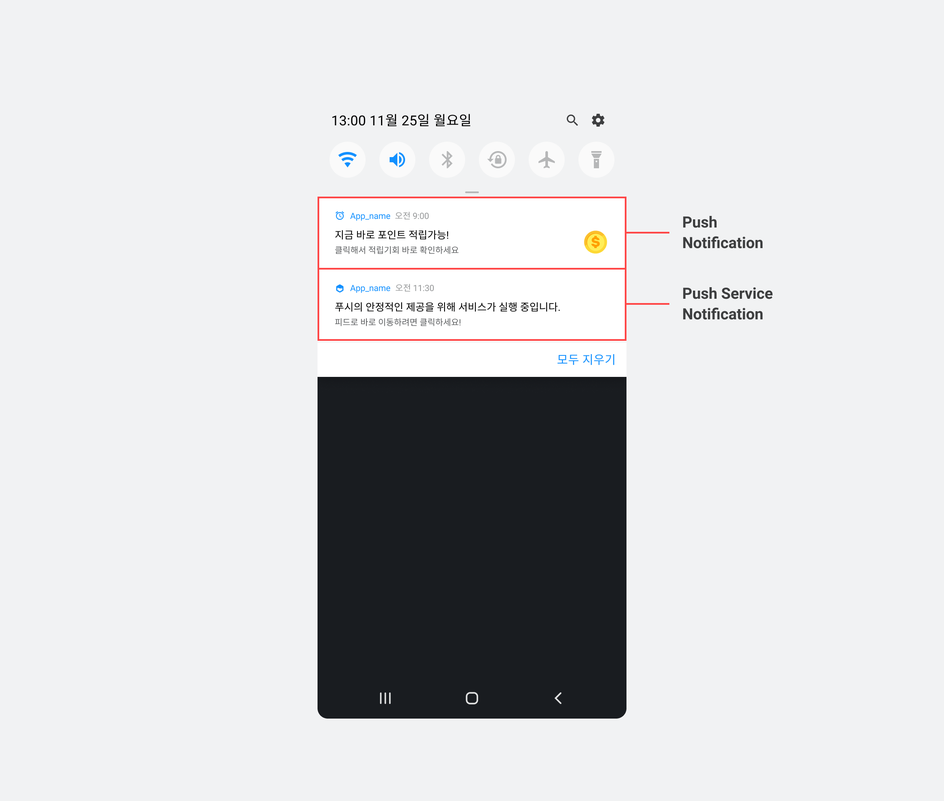
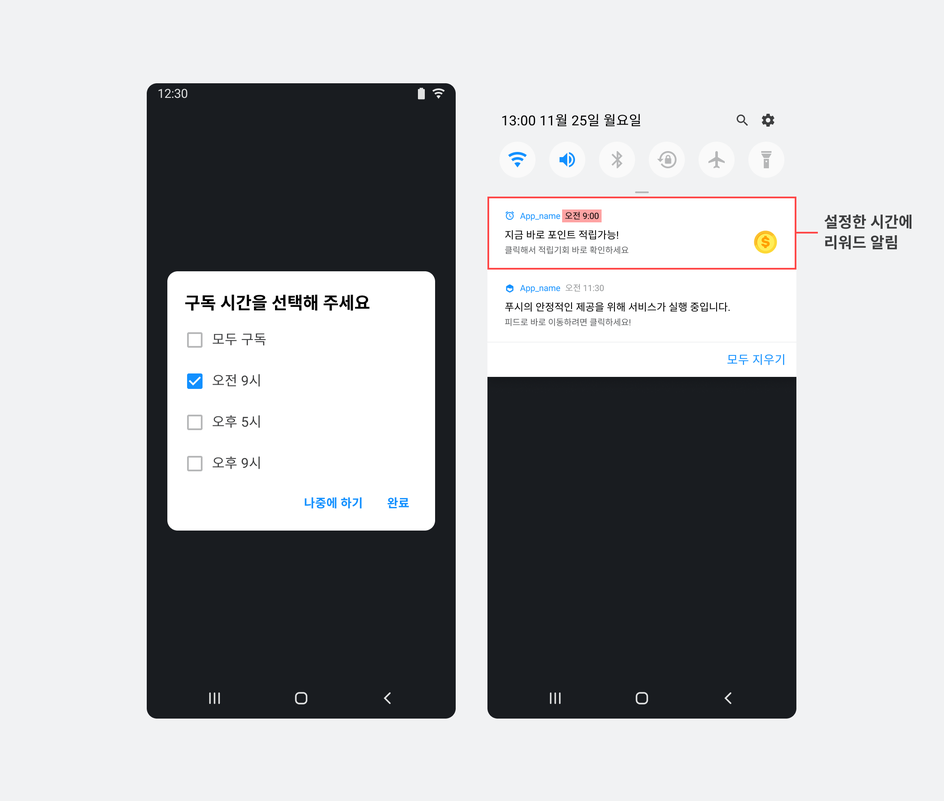
Push sends local notifications at user-selected times to announce available points and encourage users to enter Feed. Push notifications and foreground service notifications appear in the device's notification panel.
Basic settings
Prerequisites
-
Complete Feed basic setup.
-
Define the notification times users can select and the UI text for each time.
Initialize push notifications
Configure push notification behavior and UI through PushConfig and BuzzAdPushTheme.
The following settings are available through PushConfig.
| Item | Description |
|---|---|
openFeedFromLaunchActivity | ✅ Important Supported through BuzzAd Android SDK v3.3.x; no longer supported from v3.5.x. Controls whether the launcher activity starts when a user taps a push notification to open Feed.
|
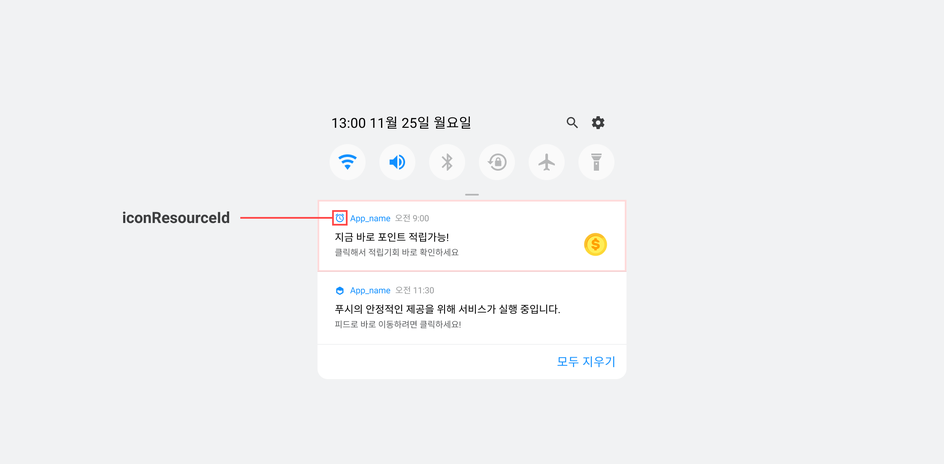
iconResourceId | The resource ID of the icon shown at the upper left of a push notification. Define this ID yourself. |
notificationId | An ID used by your app to control push notifications. Define this ID yourself. |
The following example adds PushConfig.
final PushConfig pushConfig = new PushConfig.Builder().build();

final BuzzAdBenefitConfig buzzAdBenefitConfig = new BuzzAdBenefitConfig.Builder(context)
        .setPushConfig(pushConfig)
        .build();
BuzzAdBenefit.init(context, buzzAdBenefitConfig);
Show the notification subscription dialog
Use the dialog to explain notifications and let users select subscription times. When users select times and tap Done, rewarded ad notifications are enabled on their device.
You can change notification times, content and other settings. The defaults are listed below.
| Setting | Default |
|---|---|
| Notification times |
|
| Title | 지금 바로 적립 가능한 포인트가 있어요! |
| Content | 앞으로 한 시간 적립의 기획! 포인트 챙겨가세요~ |
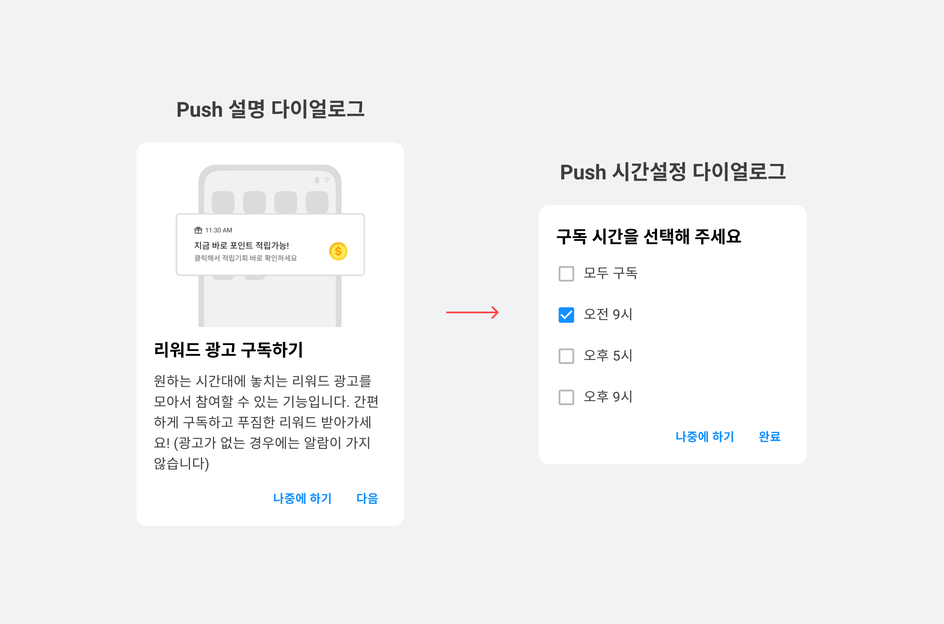
The following example prompts users to subscribe to rewarded ad notifications.
BuzzAdPush.getInstance().registerWithDialog(MyActivity.this, new BuzzAdPush.OnRegisterListener() {
    @Override
    public void onSuccess() {
        // 구독 성공 시 호출
    }

    @Override
    public void onCanceled() {
        // 구독 실패 시 호출
    }
});
Show the unsubscribe dialog
Provide a dialog that lets users unsubscribe from rewarded ads. Unsubscribing disables push notifications.
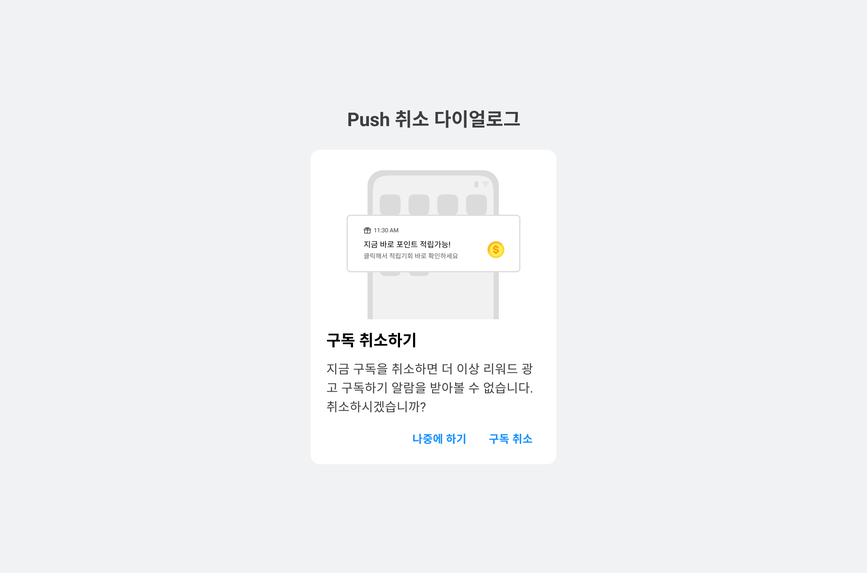
The following example lets users unsubscribe through the rewarded ad unsubscribe dialog.
BuzzAdPush.getInstance().unregisterWithDialog(MyActivity.this, new BuzzAdPush.OnRegisterListener() {
    @Override
    public void onSuccess() {
        // 구독 취소 성공 시 호출
    }

    @Override
    public void onCanceled() {
        // 구독 취소 실패 시 호출
    }
});
Advanced settings
Learn how to implement and customize push notification features in the BuzzAd Android SDK.
Skip the rewarded ad subscription dialog
You can show only the time selection dialog without first showing the rewarded ad subscription dialog.
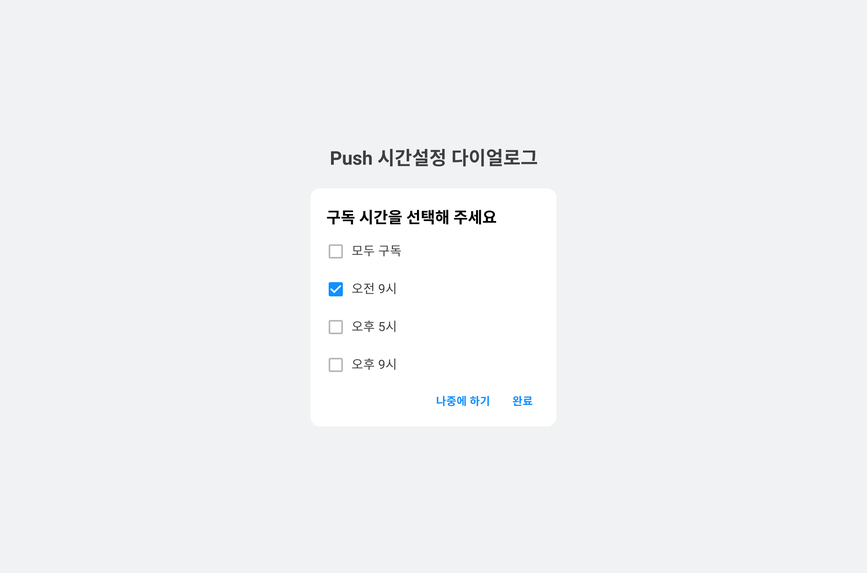
The following example skips the rewarded ad subscription dialog.
BuzzAdPush.getInstance().registerWithDialog(MyActivity.this, false, new BuzzAdPush.OnRegisterListener() {
    @Override
    public void onSuccess() {
       // 구독 성공 시 호출
    }

    @Override
    public void onCanceled() {
        // 구독 실패 시 호출
    }
});
Implement a custom rewarded ad subscription flow
Follow these steps to implement your own subscription flow using BuzzAd Android SDK APIs.
- In
getInstance(), callfetchPushHoursOptionIfNeeded()to retrieve available subscription times from the Buzzvil server and save them.
-
If no subscription times are stored, call
buzzAdPush.getPushHoursOption()to retrieve the SDK's defaults.// 버즈빌 서버로부터 구독 가능한 시간을 미리 불러와 저장합니다. BuzzAdPush.getInstance().fetchPushHoursOptionIfNeeded( MainActivity.this, new PushRepository.OnFetchResultListener() { @Override public void onFetchFail() { // 저장된 구독 가능한 시간이 없다면 SDK에서 기본으로 제공하는 값을 읽어옵니다. List<Integer> list = buzzAdPush.getPushHoursOption(MainActivity.this); } @Override public void onFetchSuccess() { List<Integer> list = buzzAdPush.getPushHoursOption(MainActivity.this); } });
-
Call
setPushHours()to register the user's selected subscription times with the SDK.List<Integer> selectedHours = new ArrayList<>(); selectedHours.add(hour); // 0 <= hour < 24 BuzzAdPush.getInstance().setPushHours(activity, selectedHours); // 설정 가능한 시간 중 사용자가 선택한 시간을 Push SDK에 등록합니다. BuzzAdPush.getInstance().register(activity); // 위 단계 설정이 끝나면 Push를 등록하여 활성화합니다.
Use the rewarded ad unsubscribe API
Unsubscribe from rewarded ads without using the SDK's dialog UI. Use this API with your own subscription management UI to cancel a subscription.
BuzzAdPush.getInstance().unregister(MyActivity.this);
Check notification subscription status
Check whether a user is subscribed to rewarded ads and display that status in your UI.
BuzzAdPush.getInstance().isRegistered(context);
Implement a custom Push foreground service notification
A foreground service notification runs alongside Push to keep it operating reliably.
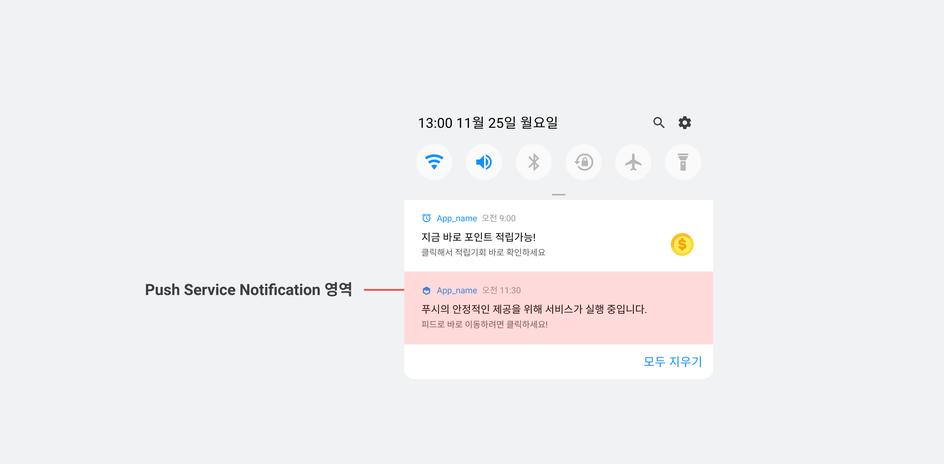
Follow these steps to implement a custom Push foreground service notification.
- Implement
CustomPushService.
-
Create a class that extends
PushService. -
In
createYourNotificationChannel(), create a notification channel following Android's Create and manage notification channels guide. All notifications must belong to a channel from Android 8.0 (API level 26). -
In
getFeedPendingIntent(), configurePendingIntentto open Feed.public class CustomPushService extends PushService { @NonNull @Override public Notification buildForegroundNotification(Context context) { if (Build.VERSION.SDK_INT >= Build.VERSION_CODES.O) { createYourNotificationChannel(); } return new NotificationCompat.Builder( context, YOUR_NOTIFICATION_CHANNEL_ID ) .setSmallIcon(context.getApplicationInfo().icon) .setContentIntent(getFeedPendingIntent()) // 3.3.x까지는 true 나 false를 설정할 수 있으며, 3.5.x부터는 false로 고정됩니다. .setForegroundServiceBehavior(NotificationCompat.FOREGROUND_SERVICE_IMMEDIATE) // v3.3.x부터 지원되는 인터페이스입니다. .build(); } private void createYourNotificationChannel() { if (Build.VERSION.SDK_INT >= Build.VERSION_CODES.O) { NotificationChannel channel = new NotificationChannel(YOUR_NOTIFICATION_CHANNEL_ID, YOUR_NOTIFICATION_CHANNEL_NAME, NotificationManager.IMPORTANCE_LOW); NotificationManager notificationManager = (NotificationManager)getSystemService(Context.NOTIFICATION_SERVICE); notificationManager.createNotificationChannel(channel); } } }
-
Register the custom service class.
// Push 초기화 참조 final PushConfig pushConfig = new PushConfig.Builder() .pushServiceClass(CustomPushService.class) ... .build(); final BuzzAdBenefitConfig buzzAdBenefitConfig = new BuzzAdBenefitConfig.Builder(context) ...생략... .setPushConfig(pushConfig) .build(); BuzzAdBenefit.init(context, buzzAdBenefitConfig); -
Register
CustomPushServiceinAndroidManifest.xml.<application> ...생략... <service android:name=".custom.CustomPushService" /> </application>
Change how Feed opens from notifications
When users tap a notification, Feed can open in the app's launcher activity. The default is False. With False, Feed is placed at the top of the view hierarchy and displayed over the app.
APIs provided by PushService
| API | Description |
|---|---|
getFeedPendingIntent(Boolean) | Creates an intent to display Feed.
|
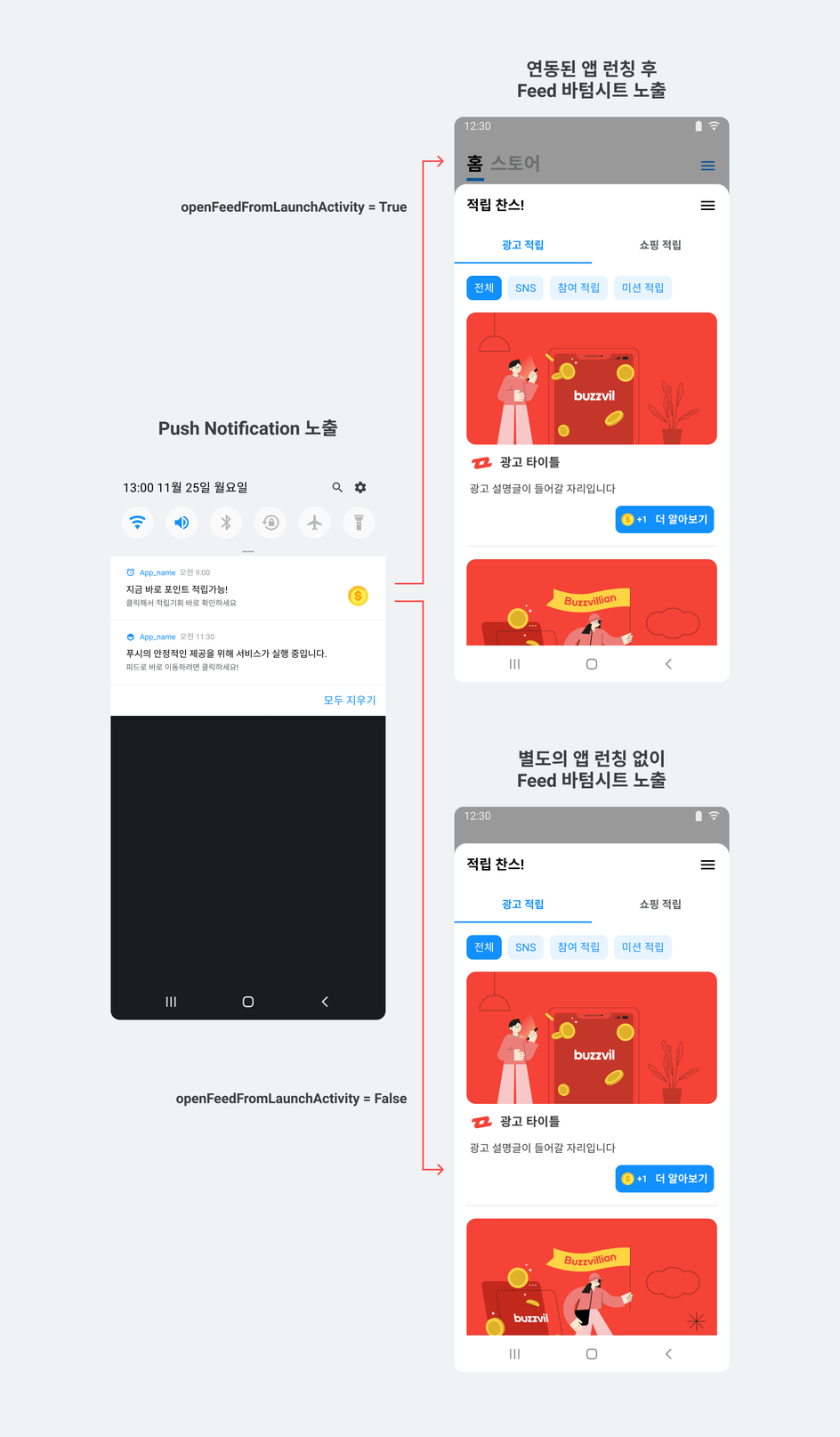
The following example opens Feed in the app's launcher activity.
// Push 초기화 참조
final PushConfig pushConfig = new PushConfig.Builder()
    .openFeedFromLaunchActivity(true)
    .build();

final BuzzAdBenefitConfig buzzAdBenefitConfig = new BuzzAdBenefitConfig.Builder(context)
        .setPushConfig(pushConfig)
        .build();
BuzzAdBenefit.init(context, buzzAdBenefitConfig);
Design customization
Learn how to customize the design of Push features provided by the BuzzAd Android SDK.
Rewarded ad subscription dialog
Configure BuzzAdPushTheme to change the icons and colors of the SDK's subscription dialog.
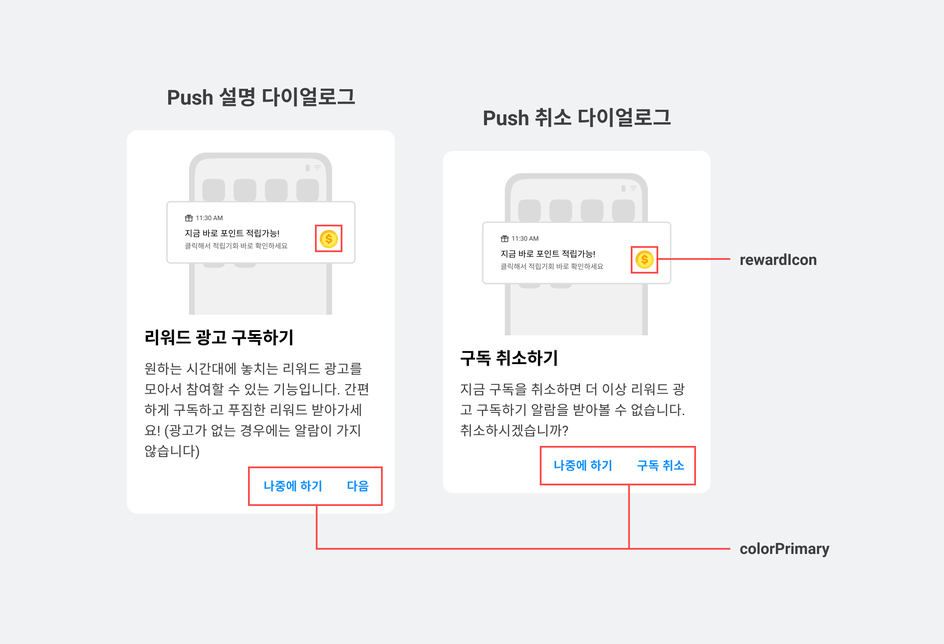
| Code | Description |
|---|---|
rewardIcon | The notification icon shown when points are available to earn. See Change the global theme to customize it. |
colorPrimary | Uses the primary color from the SDK's global theme. |
colorConfirm | The Next button color. Defaults to buzzvilPrimaryColor. |
colorCancel | The Unsubscribe button color. Defaults to buzzvilPrimaryColor. |
registerLogoImage | The image at the top of the subscription dialog.
|
unregisterLogoImage | The image at the top of the unsubscribe dialog.
|
The following example customizes the rewarded ad subscription dialog.
BuzzAdPushTheme buzzAdPushTheme = BuzzAdPushTheme.getDefault()
      .colorConfirm(R.color.colorAccent) // 확인 버튼의 색상을 변경하고 싶을 경우 설정; 기본값은 primaryColor
      .colorCancel(R.color.colorPrimary) // 취소 버튼의 색상을 변경하고 싶을 경우 설정; 기본값은 primaryColor
      .registerLogoImage(R.drawable.benefit_push_dialog_image_logo) // Push 설명 다이얼로그 상단 image
      .unregisterLogoImage(R.drawable.benefit_push_dialog_image_logo); // Push 취소 다이얼로그 상단 image
BuzzAdPush.getInstance().setTheme(buzzAdPushTheme);
Push notification icon
Set iconResourceId() when initializing Push to change the app icon shown at the upper left of notifications.
final PushConfig pushConfig = new PushConfig.Builder()
    .iconResourceId(R.drawable.your_push_icon)
    .build();

final BuzzAdBenefitConfig buzzAdBenefitConfig = new BuzzAdBenefitConfig.Builder(context)
    .setPushConfig(pushConfig)
    .build();
BuzzAdBenefit.init(context, buzzAdBenefitConfig);