User experience features
Learn how to implement additional user experience features after integrating the Buzzvil SDK.
Support for iOS 17
This section describes the changes made to the Buzzvil SDK to support iOS 17.
Privacy manifest
Starting May 1, 2024, all App Store apps and SDKs must specify their privacy-related information in a privacy manifest.
Use BuzzvilSDK 버전 5.9.6 or later for an SDK that includes a privacy manifest.
XCFramework signatures
Starting May 1, 2024, all App Store apps must use signed SDKs when adding them as binary dependencies.
Use BuzzvilSDK 버전 5.9.6 or later for a signed SDK.
Add user support for action-based ads
The Buzzvil SDK provides action-based ads that reward users for actions such as watching videos, installing apps, and liking Facebook pages. If a user completes an action-based ad but does not receive points, the SDK provides a service that automates the submission and handling of support requests (VOC).
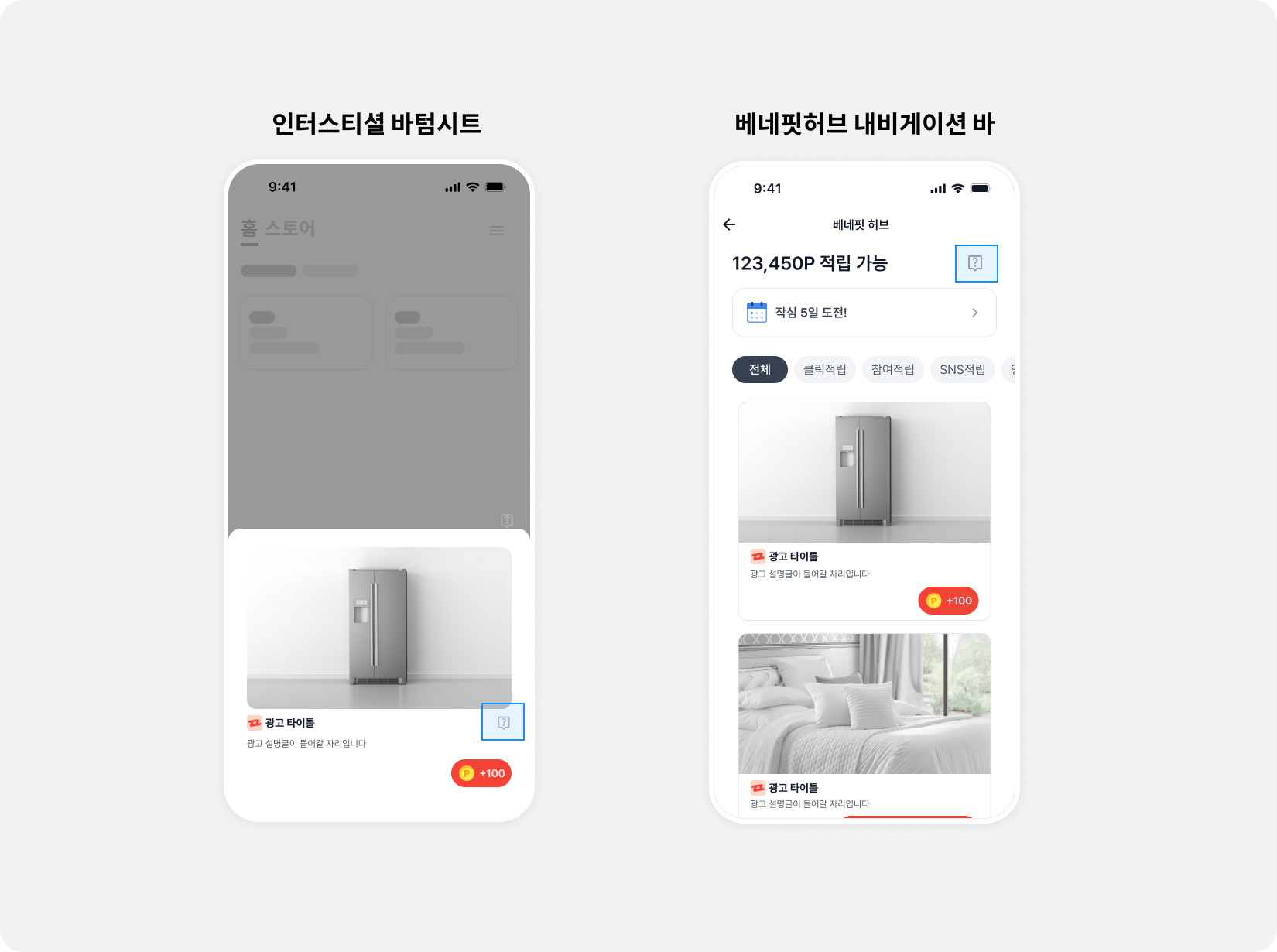
Follow these steps to add VOC support.
-
Design a UI element (an icon or tab) that opens the VOC support page.
-
Call the code below when the user clicks the UI you designed in step 1.
- The
YOUR_UNIT_IDargument is required. Use the Unit ID for the relevant placement.
- The
import BuzzAdBenefitSDK

BuzzAdBenefit.presentInquiryPage(on: YOUR_VIEW_CONTROLLER, unitId: "YOUR_UNIT_ID")
@import BuzzvilSDK;

[BuzzAdBenefit presentInquiryPageOnViewController:YOUR_VIEW_CONTROLLER unitId:@"YOUR_UNIT_ID"]
Change video ad playback conditions
By default, video ads play automatically only when the device is connected to Wi-Fi. Choose one of the following autoplay settings.
| Autoplay setting | Description |
|---|---|
BZVVideoAutoPlayOnWifi | Autoplay only on Wi-Fi., This is the default. |
BZVVideoAutoPlayEnabled | Always autoplay, regardless of connection type. |
BZVVideoAutoPlayDisabled | Never autoplay, regardless of connection type. |
The following example enables autoplay only on Wi-Fi.
let userPreferences = BZVUserPreferences { builder in
  builder.autoPlayType = .onWifi
}
BuzzAdBenefit.setUserPreferences(userPreferences)
BZVUserPreferences *userPreferences = [BZVUserPreferences userPreferencesWithBlock:^(BZVUserPreferencesBuilder * _Nonnull builder) {
  builder.autoPlayType = BZVVideoAutoPlayOnWifi;
}];
[BuzzAdBenefit setUserPreferences:userPreferences];
Offline builds
You can integrate and build Buzzvil SDK offline. Obtain the frameworks from Buzzvil, then add them and a Run Script to your project.
Frameworks for offline builds
Buzzvil provides the following frameworks for offline builds. Add all the frameworks listed below to your project for a successful build.
| Category | File name | Description |
|---|---|---|
| BuzzvilSDK Framework | BuzzvilSDK.framework | Buzzvil integrated framework |
| BuzzAdBenefitSDK Framework | BuzzAdBenefitSDK.framework | Framework for using ad placements |
| BuzzBoosterSDK Framework | BuzzBoosterSDK.framework | Framework for the marketing solution. |
| BuzzRxSwift Framework | BuzzRxSwift.framework | Buzzvil's RxSwift wrapper framework. |
Add frameworks for offline builds
Follow these steps to add the offline build frameworks to your project.
- In the project menu, click the General tab.
- Click + in Embedded Binaries to add Buzzvil's offline-build frameworks.
Run the SDK only on iOS 13 and later
The Buzzvil SDK runs on devices with iOS 13 or later. If your app supports older devices, call Buzzvil SDK code only on iOS 13 and later.
The following example calls Buzzvil SDK code only on iOS 13 and later.
if #available(iOS 13.0, *) {
  // Buzzvil SDK 코드
}
if (@available(iOS 13.0, *)) {
  // Buzzvil SDK 코드
}
Check the ad type
Use the functions provided by BZVNativeAd to identify ad types in BenefitHub and Native.
The following ad type functions are available in BZVNativeAd.
| Function | Description | Return value |
|---|---|---|
BZVNativeAd.revenueType | Returns revenueType as a string. | cpinsta: Awards points for following an Instagram account., cpa: Awards points for completing a specific action, such as signing up or requesting an insurance quote., cpe: Awards points for installing and launching an app., cpi: Awards points for installing an app., cpl: Awards points for following a Facebook account., cps: Awards points for completing a purchase., cpyoutube: Awards points for subscribing to a YouTube channel., cpylike: Awards points for subscribing to a YouTube channel and liking a video., cptiktok: Awards points for following a TikTok account., cpnstore: Awards points for favoriting a Naver Smart Store., cpq, cpqlite, cpcquiz: Awards points for answering a quiz correctly., cpk: Awards points for adding a Kakao page., cpc: Awards points for clicking through to the advertiser's page., cpm: The advertiser pays for every 1,000 ad impressions., cpv: Awards points for watching a video to completion., -cps: Includes all ads except cps ads. |
BZVNativeAd.isActionType | Returns a boolean indicating whether this is an action-based (cpa) ad. | true: A cpa ad., false: Not a cpa ad. |
BZVNativeAd.isCps | Returns a boolean indicating whether this is a shopping (cps) ad. | true: A cps ad., false: Not a cps ad. |
The following example checks the ad type using BZVNativeAd.
let isActionType = nativeAd.isActionType()
let isCps = nativeAd.isCps()
let revenueType = nativeAd.revenueType
BOOL isActionType = [nativeAd isActionType];
BOOL isCps = [nativeAd isCps];
BZVRevenueType revenueType = nativeAd.revenueType;