Migrate from v3 to v5
Learn how to migrate from BuzzAd iOS SDK v3 to Buzzvil iOS SDK v5.
Getting started
Requirements
- Review the updated Buzzvil SDK v5 requirements below and apply them to your project.
- iOS deployment target 13 or later
- Xcode 15.3 or later.
Obtain integration IDs
You can keep your existing App ID and Unit IDs.
Install the SDK
Swift Package Manager
Follow these steps to import the Swift package.
-
In Xcode, go to
File > Add Package Dependencies. -
Search for the Buzzvil SDK Swift Package GitHub repository.
https://github.com/Buzzvil/buzzvil-ios-sdk
- Select a version. We recommend “Up to Next Major Version.”
For details about adding package dependencies, see the official Apple Developer documentation.
Cocoapods
To install the Buzzvil SDK using CocoaPods, add BuzzvilSDK to your Podfile.
pod 'BuzzvilSDK', '= 5.36.0'
Reference: previous code (BuzzAdBenefit SDK v3)
pod 'BuzzAdBenefit', '= 3.45.13'
Initialize the SDK
The initialization class BuzzAdBenefit has been replaced by BuzzBenefit. Follow the instructions below to migrate from BuzzAdBenefit to BuzzBenefit.
import BuzzvilSDK

@main
class AppDelegate: UIResponder, UIApplicationDelegate {
    func application(_ application: UIApplication, didFinishLaunchingWithOptions launchOptions: [UIApplication.LaunchOptionsKey: Any]? = nil) -> Bool {
        let config = BuzzBenefitConfig.Builder(appID: "YOUR_APP_ID")
            .build()
        BuzzBenefit.shared.initialize(with: config)
        return true
    }
}
@import BuzzvilSDK;

@implementation AppDelegate

- (BOOL)application:(UIApplication *)application didFinishLaunchingWithOptions:(NSDictionary *)launchOptions {
    BuzzBenefitConfig *config = [BuzzBenefitConfig configWithBlock:^(BuzzBenefitConfigBuilder * _Nonnull builder) {
      builder.appID = @"YOUR_APP_ID";
    }];
    [[BuzzBenefit sharedInstance] initializeWithConfig:config];
    return YES;
}

@end
Reference: previous code (BuzzAdBenefit SDK v3)
/** 참고 - 변경 전 코드(BuzzAdBenefit v3) **/

import BuzzAdBenefit

@main
final class AppDelegateSwift: UIResponder, UIApplicationDelegate {
  func application(_ application: UIApplication, didFinishLaunchingWithOptions launchOptions: [UIApplication.LaunchOptionsKey : Any]? = nil) -> Bool {
    let config = BZVConfig { builder in
      builder.appId = "YOUR_APP_ID"
    }
    BuzzAdBenefit.initialize(with: config)
    return true
  }
}
/** 참고 - 변경 전 코드(BuzzAdBenefit v3) **/

@import BuzzAdBenefit;

@implementation AppDelegate

- (BOOL)application:(UIApplication *)application didFinishLaunchingWithOptions:(NSDictionary *)launchOptions {
  BZVConfig *config = [BZVConfig configWithBlock:^(BZVConfigBuilder * _Nonnull builder) {
    builder.appId = @"YOUR_APP_ID";
  }];
  [BuzzAdBenefit initializeWithConfig:config];
  return YES;
}

@end
Configure dark mode
The dark mode enum name and default value have changed. Update your calls accordingly.
| Dark mode option | Description |
|---|---|
BuzzBenefitUserInterfaceStyleLight | Uses light mode regardless of the system's dark mode setting. |
BuzzBenefitUserInterfaceStyleDark | Uses dark mode regardless of the system's dark mode setting. |
BuzzBenefitUserInterfaceStyleSystem | The SDK's default dark mode setting (기본 값). Uses the system's dark mode setting. |
The following example makes the SDK follow the system dark mode setting.
import BuzzvilSDK

@main
final class AppDelegate: UIResponder, UIApplicationDelegate {
  func application(_ application: UIApplication, didFinishLaunchingWithOptions launchOptions: [UIApplication.LaunchOptionsKey : Any]? = nil) -> Bool {
    // ...생략...
    BuzzBenefit.shared.setUserInterfaceStyle(.system)
    return true
  }
}
@import BuzzvilSDK;

@implementation AppDelegate

- (BOOL)application:(UIApplication *)application didFinishLaunchingWithOptions:(NSDictionary *)launchOptions {
  // ...생략...
  [[BuzzBenefit sharedInstance] setUserInterfaceStyle:BuzzBenefitUserInterfaceStyleSystem];
  return YES;
}

@end
Reference: previous code (BuzzAdBenefit SDK v3)
| Dark mode option | Description |
|---|---|
BZVUserInterfaceStyleLight | The SDK's 기본 값 dark mode setting. Uses light mode regardless of the system setting. |
BZVUserInterfaceStyleDark | Uses dark mode regardless of the system's dark mode setting. |
BZVUserInterfaceStyleSystem | Follows the system dark mode setting. |
The following example makes the SDK follow the system dark mode setting.
/** 참고 - 변경 전 코드(BuzzAdBenefit v3) **/

import BuzzAdBenefit

@main
final class AppDelegateSwift: UIResponder, UIApplicationDelegate {
  func application(_ application: UIApplication, didFinishLaunchingWithOptions launchOptions: [UIApplication.LaunchOptionsKey : Any]? = nil) -> Bool {
    // ...생략...
    BuzzAdBenefit.setUserInterfaceStyle(.system)
    return true
  }
}
/** 참고 - 변경 전 코드(BuzzAdBenefit v3) **/

@import BuzzAdBenefit;

@implementation AppDelegate

- (BOOL)application:(UIApplication *)application didFinishLaunchingWithOptions:(NSDictionary *)launchOptions {
  // ...생략...
  [BuzzAdBenefit setUserInterfaceStyle:BZVUserInterfaceStyleSystem];
  return YES;
}

@end
Log in
BuzzAdBenefit's login parameters have changed. Migrate using the following code.
The showAppTrackingTransparencyDialog parameter has been removed.
| Requirement | Profile field | Description |
|---|---|---|
| Required | userId | A unique, non-identifying user ID. Do not use a login ID or email address. It must remain stable throughout service use and is required for ad allocation. Limited to 255 ASCII characters. ⚠️ Caution ❗️❗️❗️ If the ID changes after reinstalling the app or cannot remain stable for another reason, action-based ads cannot be served because of the risk of abuse. Contact your Buzzvil business representative if user identifiers can change. |
| Recommended | gender | The user's gender. Male: BZVUserGenderMale, Female: BZVUserGenderFemale |
| Recommended | birthYear | The user's birth year. |
The following example registers a user profile with the SDK. You can also remove a registered profile.
// 로그인을 요청하는 코드입니다.
let buzzBenefitUser = BuzzBenefitUser.Builder(userID: "USER_ID")
  .setGender(.male)
  .setBirthYear(YYYY)
  .build()

BuzzBenefit.shared.login(
  with: buzzBenefitUser,
  onSuccess: {
    // 로그인이 성공한 경우 호출됩니다.
  },
  onFailure: { error in
    // 로그인이 실패한 경우 호출됩니다.
  }
)

// 로그인 상태를 확인하는 코드입니다.
BuzzBenefit.shared.isLoggedIn()

// 로그아웃하는 코드입니다.
BuzzBenefit.shared.logout()
BuzzBenefitUser *buzzBenefitUser = [BuzzBenefitUser userWithBlock:^(BuzzBenefitUserBuilder * _Nonnull builder) {
  builder.userID = @"USER_ID";
  builder.gender = BuzzBenefitUserGenderMale;
  builder.birthYear = YYYY;
}];

[[BuzzBenefit sharedInstance] loginWithUser:buzzBenefitUser onSuccess:^{
  // 로그인이 성공한 경우 호출됩니다.
} onFailure:^(NSError * _Nonnull error) {
  // 로그인이 실패한 경우 호출됩니다.
}];

// 로그인 상태를 확인하는 코드입니다.
[[BuzzBenefit sharedInstance] isLoggedIn];

// 로그아웃하는 코드입니다.
[[BuzzBenefit sharedInstance] logout];
Reference: previous code (BuzzAdBenefit SDK v3)
| Requirement | Profile field | Description |
|---|---|---|
| Required | userId | A unique, non-identifying user ID. Do not use a login ID or email address. It must remain stable throughout service use and is required for ad allocation. Limited to 255 ASCII characters. ⚠️ Caution ❗️❗️❗️ If the ID changes after reinstalling the app or cannot remain stable for another reason, action-based ads cannot be served because of the risk of abuse. Contact your Buzzvil business representative if user identifiers can change. |
| Recommended | gender | The user's gender. Male: BZVUserGenderMale, Female: BZVUserGenderFemale |
| Recommended | birthYear | The user's birth year. |
| Recommended | showAppTrackingTransparencyDialog | Controls whether the tracking authorization prompt appears. Recommended, not required. See iOS 14 support. |
The following example registers a user profile with the SDK. You can also remove a registered profile.
/** 참고 - 변경 전 코드(BuzzAdBenefit v3) **/

// 로그인을 요청하는 코드입니다.
BuzzAdBenefit.login { builder in
  builder.userId = "USER_ID"
  builder.gender = .male // 남성 사용자
  builder.birthYear = YYYY
} onSuccess: {
} onFailure: { error in
}

// 로그인 상태를 확인하는 코드입니다.
BuzzAdBenefit.isLoggedIn()

// 로그아웃하는 코드입니다.
BuzzAdBenefit.logout()
/** 참고 - 변경 전 코드(BuzzAdBenefit v3) **/

// 로그인을 요청하는 코드입니다.
[BuzzAdBenefit loginWithBlock:^(BZVLoginRequestBuilder * _Nonnull builder) {
  builder.userId = @"USER_ID";
  builder.birthYear = YYYY;
  builder.gender = BZVUserGenderMale; // 남성 사용자
} onSuccess:^{
} onFailure:^(NSError * _Nonnull error) {
}];

// 로그인 상태를 확인하는 코드입니다.
[BuzzAdBenefit isLoggedIn];

// 로그아웃하는 코드입니다.
[BuzzAdBenefit logout];
Migrate BenefitHub (Feed)
v3 Basic setup → v5 Integration
Features previously documented under “Basic setup” in v3 are now under “Integration” in v5. Without additional features, initializing and displaying BenefitHub works the same way.
Initialize BenefitHub
Continue using BZVFeedConfig to configure BenefitHub and register it in BuzzBenefitConfig.
import BuzzvilSDK

@main
class AppDelegate: UIResponder, UIApplicationDelegate {
    func application(_ application: UIApplication, didFinishLaunchingWithOptions launchOptions: [UIApplication.LaunchOptionsKey: Any]? = nil) -> Bool {
        let feedConfig = BZVFeedConfig { builder in
            builder.unitID = "YOUR_FEED_UNIT_ID"
        }
        let config = BuzzBenefitConfig.Builder("YOUR_APP_ID")
            .setDefaultFeedConfig(feedConfig)
            .build()
        BuzzBenefit.shared.initialize(with: config)
        return true
    }
}
@import BuzzvilSDK;

@implementation AppDelegate

- (BOOL)application:(UIApplication *)application didFinishLaunchingWithOptions:(NSDictionary *)launchOptions {
    BZVFeedConfig *feedConfig = [BZVFeedConfig configWithBlock:^(BZVFeedConfigBuilder * _Nonnull builder) {
        builder.unitID = @"YOUR_FEED_UNIT_ID";
    }];
    BuzzBenefitConfig *config = [BuzzBenefitConfig configWithBlock:^(BuzzBenefitConfigBuilder * _Nonnull builder) {
        builder.appID = @"YOUR_APP_ID";
        builder.defaultFeedConfig = feedConfig;
    }];
    [BuzzBenefit sharedInstance] initializeWithConfig:config];
    return YES;
}

@end
Reference: previous code (BuzzAdBenefit SDK v3)
/** 참고 - 변경 전 코드(BuzzAdBenefit v3) **/

import BuzzAdBenefit

@main
final class AppDelegate: UIResponder, UIApplicationDelegate {
  func application(_ application: UIApplication, didFinishLaunchingWithOptions launchOptions: [UIApplication.LaunchOptionsKey : Any]? = nil) -> Bool {
    let config = BZVConfig { builder in
      builder.appId = "YOUR_APP_ID"
      builder.defaultFeedConfig = BZVFeedConfig { builder in
        builder.unitId = "YOUR_FEED_UNIT_ID"
      }
    }
    BuzzAdBenefit.initialize(with: config)
    return true
  }
}
/** 참고 - 변경 전 코드(BuzzAdBenefit v3) **/

@import BuzzAdBenefit;

@implementation AppDelegate

- (BOOL)application:(UIApplication *)application didFinishLaunchingWithOptions:(NSDictionary *)launchOptions {
  BZVConfig *config = [BZVConfig configWithBlock:^(BZVConfigBuilder * _Nonnull builder) {
    builder.appId = @"YOUR_APP_ID";
    builder.defaultFeedConfig = [BZVFeedConfig configWithBlock:^(BZVFeedConfigBuilder * _Nonnull builder) {
      builder.unitId = @"YOUR_FEED_UNIT_ID";
    }];
  }];
  [BuzzAdBenefit initializeWithConfig:config];
  return YES;
}

@end
Display BenefitHub
The previous ViewController presentation and navigation push methods are combined into BZVBuzzAdFeed.show(), which displays BenefitHub.
Retrieving the ViewController and using it as a child view controller is still supported.
let yourViewController = UIViewController()
let buzzAdFeed = BZVBuzzAdFeed { _ in }
buzzAdFeed.show(on: yourViewController)
UIViewController *yourViewController = [[UIViewController alloc] init];
BZVBuzzAdFeed *buzzAdFeed = [BZVBuzzAdFeed feedWithBlock:^(BZVBuzzAdFeedBuilder * _Nonnull builder) {}];
[buzzAdFeed showOn:yourViewController];
Reference: previous code (BuzzAdBenefit SDK v3)
/** 참고 - 변경 전 코드(BuzzAdBenefit v3) **/

import BuzzAdBenefit

final class ViewController: UIViewController {
  let buzzAdFeed = BZVBuzzAdFeed { builder in }

  override func viewDidLoad() {
    super.viewDidLoad()
  }

  // navigationController를 사용하는 경우
  private func pushFeedViewController() {
    let feedViewController = buzzAdFeed.viewController
    self.navigationController?.pushViewController(feedViewController, animated: true)
  }

  // navigationController를 사용하지 않는 경우
  private func presentFeedViewController() {
    let feedViewController = buzzAdFeed.viewController
    self.present(feedViewController, animated: true, completion: nil)
  }
}
/** 참고 - 변경 전 코드(BuzzAdBenefit v3) **/

@import BuzzAdBenefit;

@interface ViewController ()

@property (nonatomic, strong, readonly) BZVBuzzAdFeed *buzzAdFeed;

@end

@implementation ViewController

- (void)viewDidLoad {
  [super viewDidLoad];

  _buzzAdFeed = [BZVBuzzAdFeed feedWithBlock:^(BZVBuzzAdFeedBuilder * _Nonnull builder) {}];
}

// navigationController를 사용하는 경우
- (void)pushFeedViewController {
  BZVFeedViewController *feedViewController = [_buzzAdFeed viewController];
  [self.navigationController pushViewController:feedViewController animated:YES];
}

// navigationController를 사용하지 않는 경우
- (void)presentFeedViewController {
  BZVFeedViewController *feedViewController = [_buzzAdFeed viewController];
  [self presentViewController:feedViewController animated:YES completion:nil];
}

@end
Display BenefitHub with a non-default configuration
Continue configuring BZVFeedConfig to display BenefitHub with non-default settings.
Display BenefitHub by calling BZVBuzzAdFeed.show().
let yourViewController = UIViewController()
let buzzAdFeed = BZVBuzzAdFeed { builder in
  builder.config = BZVFeedConfig { builder in
    builder.unitID = "SECOND_BENEFIT_HUB_UNIT_ID"
  }
}
buzzAdFeed.show(on: yourViewController)
UIViewController *yourViewController = [[UIViewController alloc] init];
BZVBuzzAdFeed *buzzAdFeed = [BZVBuzzAdFeed feedWithBlock:^(BZVBuzzAdFeedBuilder * _Nonnull builder) {
  builder.config = [BZVFeedConfig configWithBlock:^(BZVFeedConfigBuilder * _Nonnull builder) {
    builder.unitID = @"SECOND_FEED_UNIT_ID";
  }];
}];
[buzzAdFeed showOn:yourViewController];
Reference: previous code (BuzzAdBenefit SDK v3)
/** 참고 - 변경 전 코드(BuzzAdBenefit v3) **/

let buzzAdFeed = BZVBuzzAdFeed { builder in
  builder.config = BZVFeedConfig { builder in
    builder.unitId = "SECOND_FEED_UNIT_ID"
  }
}

let feedViewController = buzzAdFeed.viewController
self.present(feedViewController, animated: true, completion: nil)
/** 참고 - 변경 전 코드(BuzzAdBenefit v3) **/

_buzzAdFeed = [BZVBuzzAdFeed feedWithBlock:^(BZVBuzzAdFeedBuilder * _Nonnull builder) {
  builder.config = [BZVFeedConfig configWithBlock:^(BZVFeedConfigBuilder * _Nonnull builder) {
    builder.unitId = @"SECOND_FEED_UNIT_ID";
  }];
}];

BZVFeedViewController *feedViewController = [_buzzAdFeed viewController];
[self presentViewController:feedViewController animated:YES completion:nil];
v3 Advanced settings → v5 Basic settings
Features previously documented under “Advanced settings” in BuzzAdBenefit v3 are now under “Basic settings” in v5.
v3 Ad category tabs and filters → v5 Ad category filters
Buzzvil SDK v5 removes tabs and displays only filters. Filters cannot be disabled. Contact help@buzzvil.com to change UI strings, filter types or other settings.
v3 Add entry points to app UI → v5 Implement entry points in app UI
User interaction tracking has been removed. Remove setEntryName from BZVFeedEntryView.
v5 Navigation bar
The default navigation bar UI is simplified to allow only title text changes.
Use the following code to change navigation bar UI strings.
let feedTheme = BZVFeedTheme { builder in
  builder.navigationBarTitle = "YOUR_TITLE"
}
BZVBuzzAdFeed.setDefaultTheme(feedTheme)
BZVFeedTheme *feedTheme = [BZVFeedTheme themeWithBlock:^(BZVFeedThemeBuilder * _Nonnull builder) {
  builder.navigationBarTitle = @"YOUR_TITLE";
}];
[BZVBuzzAdFeed setDefaultTheme:feedTheme];
Reference: previous code (BuzzAdBenefit SDK v3)
/** 참고 - 변경 전 코드(BuzzAdBenefit v3) **/

let buzzAdFeed = BZVBuzzAdFeed { builder in
  builder.config = BZVFeedConfig { builder in
    // ...
    builder.title = "YOUR_TITLE"
  }
}
/** 참고 - 변경 전 코드(BuzzAdBenefit v3) **/

_buzzAdFeed = [BZVBuzzAdFeed feedWithBlock:^(BZVBuzzAdFeedBuilder * _Nonnull builder) {
  builder.config = [BZVFeedConfig configWithBlock:^(BZVFeedConfigBuilder * _Nonnull builder) {
    // ...
    builder.title = @"YOUR_TITLE";
  }];
}];
Implement a custom header
Header implementation is unchanged, but spacing around it has changed. Review the design and add spacing as needed.
Implement a custom base reward notification
In v5, the base reward UI is a modal at the bottom of the screen. Remove any custom notification implementation from v3.
- The
BZVFeedBaseRewardViewHolderclass has been removed. FeedConfig.Builder.baseRewardViewHolderClasshas been removed.
Reference: previous code (BuzzAdBenefit SDK v3)
/** 참고 - 변경 전 코드(BuzzAdBenefit v3) **/

final class CustomFeedBaseRewardViewHolder: BZVFeedBaseRewardViewHolder {
  let baseRewardLabel = UILabel(frame: .zero)

  override class func desiredHeight() -> CGFloat {
    return 100.0
  }

  required init?(coder: NSCoder) {
    super.init(coder: coder)
    setUpView()
  }

  override init(frame: CGRect) {
    super.init(frame: frame)
    setUpView()
  }

  func setUpView() {
    addSubview(baseRewardLabel)

    // LayoutConstraint 설정
    ...
  }

  override func didUpdateBaseReward(_ baseReward: Int) {
    baseRewardLabel.text = "Received \(baseReward) points"
  }
}

let config = BZVFeedConfig { builder in
  builder.unitId = "YOUR_FEED_UNIT_ID"
  builder.baseRewardViewHolderClass = CustomFeedBaseRewardViewHolder.self
}
/** 참고 - 변경 전 코드(BuzzAdBenefit v3) **/

@interface CustomFeedBaseRewardViewHolder : BZVFeedBaseRewardViewHolder

@end

@interface CustomFeedBaseRewardViewHolder ()

@property (nonatomic, strong, readonly) UILabel *baseRewardLabel;

@end

@implementation CustomFeedBaseRewardViewHolder

+ (CGFloat)desiredHeight {
  return 100;
}

- (instancetype)initWithCoder:(NSCoder *)coder {
  if (self = [super initWithCoder:coder]) {
    [self setupView];
  }
  return self;
}

- (instancetype)initWithFrame:(CGRect)frame {
  if (self = [super initWithFrame:frame]) {
    [self setupView];
  }
  return self;
}

- (void)setupView {
  _baseRewardLabel = [[UILabel alloc] initWithFrame:CGRectZero];
  [self addSubview:_baseRewardLabel];

  // LayoutConstraint 설정
  ...
}

- (void)didUpdateBaseReward:(NSInteger)baseReward {
  _baseRewardLabel.text = [NSString stringWithFormat:@"Received %@ points", @(baseReward)];
}

@end

BZVFeedConfig *config = [BZVFeedConfig configWithBlock:^(BZVFeedConfigBuilder * _Nonnull builder) {
  builder.unitId = @"YOUR_FEED_UNIT_ID";
  builder.baseRewardViewHolderClass = [CustomFeedBaseRewardViewHolder class];
}];
Implement a custom ad design
In v5, BZVFeedAdViewHolder has been renamed BZVFeedAdView.
Implement a custom CTA button
This feature is unchanged in Buzzvil SDK v5.
Implement a custom no-ads screen
In v5, you can change images and strings instead of replacing the entire view. Remove the following code.
- Your custom error view class extending
BZVFeedErrorViewHolder. errorViewHolderClassinBZVFeedConfig.
Users can retry up to three times when no ads are available. Customize the UI strings and images for each attempt.
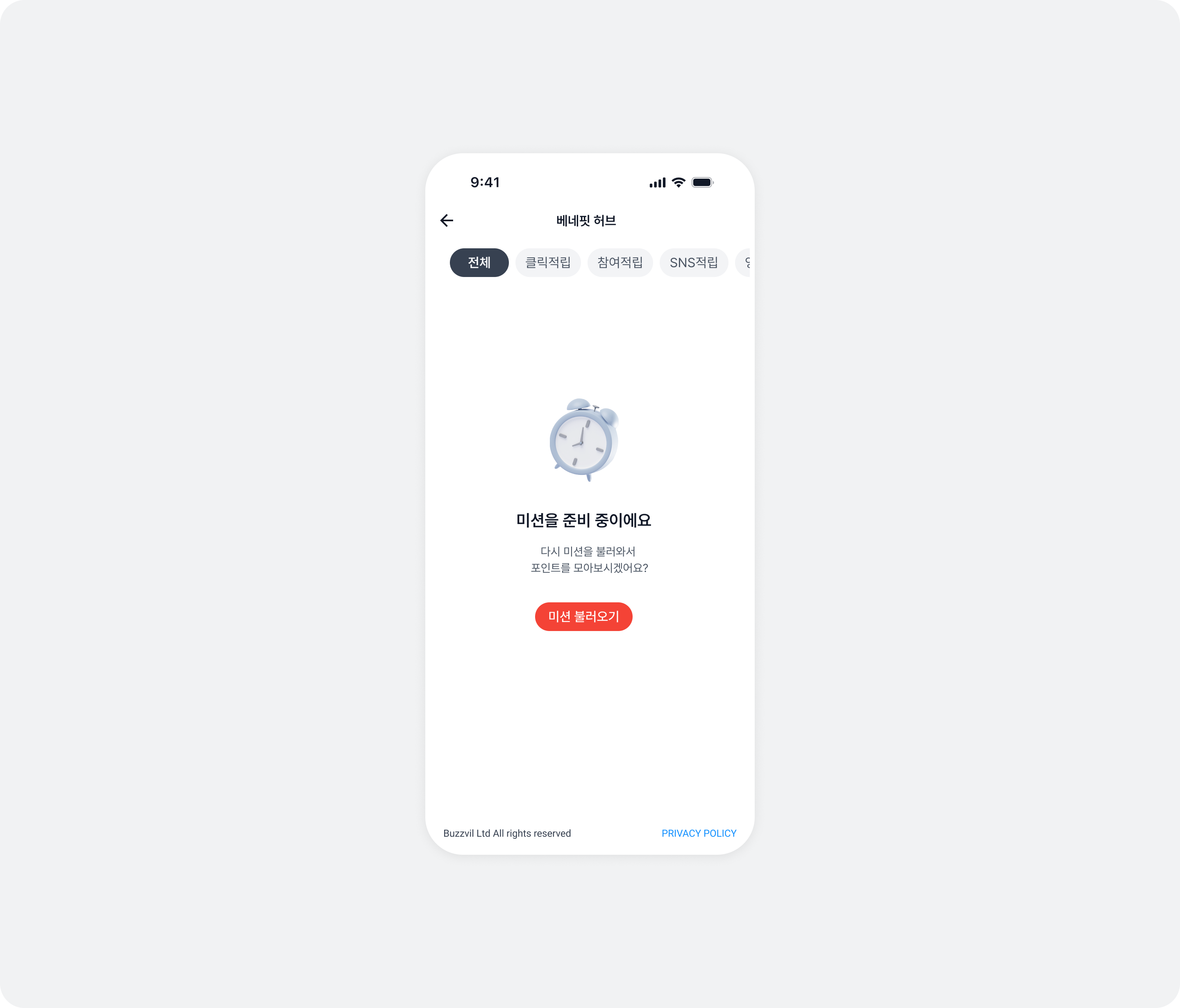
| Retry attempt | Title | Content | Button |
|---|---|---|---|
| Initial attempt | 미션을 준비 중이에요 | 다시 미션을 불러와서 포인트를 모아보시겠어요? | 미션 불러오기 |
| First retry | 미션을 준비 중이에요 | 미션을 로딩 중이에요. 잠시 후 다시 시도해주세요. | 다시 불러오기 |
| Second retry | 미션을 준비 중이에요 | 미션 준비에 시간이 걸리고 있습니다. 잠시 후 다시 시도해주세요. | 한번 더 불러오기 |
| Third retry (last) | 미션을 준비 중이에요 | All filter: 지금은 참여 가능한 미션이 없습니다. 잠시 후 다시 방문해주세요.Other filters: 지금은 참여 가능한 미션이 없습니다. 다른 미션에 참여해서 포인트를 모아보세요! | All filter: 나중에 다시 올게요Other filters: 다른 미션 참여하기 |
let feedTheme = BZVFeedTheme { builder in
  builder.noFillErrorImage = ...
  builder.noFillErrorTitle = ...
  builder.noFillErrorDescription1st = ...
  builder.noFillErrorDescription2nd = ...
  builder.noFillErrorDescription3rd = ...
  builder.noFillErrorDescriptionFinalAllFilter = ...
  builder.noFillErrorDescriptionFinalOtherFilters = ...
  builder.noFillErrorButton1st = ...
  builder.noFillErrorButton2nd = ...
  builder.noFillErrorButton3rd = ...
  builder.noFillErrorButtonFinalAllFilter = ...
  builder.noFillErrorButtonFinalOtherFilters = ...
}
BZVBuzzAdFeed.setDefaultTheme(feedTheme)
BZVFeedTheme *feedTheme = [BZVFeedTheme themeWithBlock:^(BZVFeedThemeBuilder * _Nonnull builder) {
  builder.noFillErrorImage = ...;
  builder.noFillErrorTitle = ...;
  builder.noFillErrorDescription1st = ...;
  builder.noFillErrorDescription2nd = ...;
  builder.noFillErrorDescription3rd = ...;
  builder.noFillErrorDescriptionFinalAllFilter = ...;
  builder.noFillErrorDescriptionFinalOtherFilters = ...;
  builder.noFillErrorButton1st = ...;
  builder.noFillErrorButton2nd = ...;
  builder.noFillErrorButton3rd = ...;
  builder.noFillErrorButtonFinalAllFilter = ...;
  builder.noFillErrorButtonFinalOtherFilters = ...;
}];
[BZVBuzzAdFeed setDefaultTheme:feedTheme];
Reference: previous code (BuzzAdBenefit SDK v3)
/** 참고 - 변경 전 코드(BuzzAdBenefit v3) **/

import BuzzAdBenefit

final class CustomFeedErrorViewHolder: BZVFeedErrorViewHolder {
  let imageView = UIImageView(image: UIImage(named: "YOUR_ERROR_IMAGE_NAME"))

  required init?(coder: NSCoder) {
    super.init(coder: coder)
    setupView()
  }

  override init(frame: CGRect) {
    super.init(frame: frame)
    setupView()
  }

  private func setupView() {
    addSubview(imageView)

    // LayoutConstraint 설정
    ...
  }

  override func updateViewWithError(_ error: Error) {
    // error에 따라 UI를 업데이트 할 수 있는 코드 작성
  }
}

let config = BZVFeedConfig { builder in
  builder.unitId = "YOUR_FEED_UNIT_ID"
  builder.errorViewHolderClass = CustomFeedErrorViewHolder.self
}
/** 참고 - 변경 전 코드(BuzzAdBenefit v3) **/

@import BuzzAdBenefit;

@interface CustomFeedErrorViewHolder : BZVFeedErrorViewHolder

@end

@interface CustomFeedErrorViewHolder ()

@property (nonatomic, strong, readonly) UIImageView *imageView;

@end

@implementation CustomFeedErrorViewHolder

- (instancetype)initWithCoder:(NSCoder *)coder {
  if (self = [super initWithCoder:coder]) {
    [self setupView];
  }
  return self;
}

- (instancetype)initWithFrame:(CGRect)frame {
  if (self = [super initWithFrame:frame]) {
    [self setupView];
  }
  return self;
}

- (void)setupView {
  UIImage *image = [UIImage imageNamed:@"YOUR_ERROR_IMAGE_NAME"];
  _imageView = [[UIImageView alloc] initWithImage:image];
  [self addSubview:_imageView];

  // LayoutConstraint 설정
  ...
}

- (void)updateViewWithError:(NSError *)error {
  // error에 따라 UI를 업데이트 할 수 있는 코드 작성
}

@end

BZVFeedConfig *config = [BZVFeedConfig configWithBlock:^(BZVFeedConfigBuilder * _Nonnull builder) {
  builder.unitId = @"YOUR_FEED_UNIT_ID";
  builder.headerViewHolderClass = [CustomFeedErrorViewHolder class];
}];
Implement custom error screens
In addition to the no-ads UI, v5 adds custom error screen support. See User profile error UI and Other error screens.
Show tracking authorization on Feed entry
BZVFeedConfig.Builder.shouldShowAppTrackingTransparencyDialog has been removed.
This feature is provided by default. Contact help@buzzvil.com to disable it.
Reference: previous code (BuzzAdBenefit SDK v3)
/** 참고 - 변경 전 코드(BuzzAdBenefit v3) **/

let config = BZVFeedConfig { builder in
  builder.unitId = "YOUR_FEED_UNIT_ID"
  builder.shouldShowAppTrackingTransparencyDialog = true
}
/** 참고 - 변경 전 코드(BuzzAdBenefit v3) **/

BZVFeedConfig *config = [BZVFeedConfig configWithBlock:^(BZVFeedConfigBuilder * _Nonnull builder) {
  builder.unitId = @"YOUR_FEED_UNIT_ID";
  builder.shouldShowAppTrackingTransparencyDialog = YES;
}];
UI for consent to share personal information with third parties
In v5, this consent UI is a modal configured remotely without a code deployment. Remove the following code.
BuzzAdBenefit.privacyPolicyManagerBZVPrivacyPolicyManager.showConsentUI()BZVPrivacyPolicyManager.grantConsent()BZVPrivacyPolicyManager.revokeConsent()BZVPrivacyPolicyManager.isConsentGranted()
Reference: previous code (BuzzAdBenefit SDK v3)
/** 참고 - 변경 전 코드(BuzzAdBenefit v3) **/

let privacyPolicyManager = BuzzAdBenefit.privacyPolicyManager

// 직접 구현한 개인정보 제3자 제공 동의 UI에서 동의를 받았을 경우 아래 코드를 실행하면, 피드 화면에서 개인정보 제3자 제공 동의 UI가 노출되지 않으면서 광고 할당이 정상적으로 진행 됩니다.
// 아래의 코드를 실행하지 않을 경우 피드 진입 시 개인정보 제3자 제공 동의 UI가 노출되기 때문에 필수적으로 실행이 필요합니다.
privacyPolicyManager.grantConsent()

// 아래 코드를 통해서 수집 동의를 철회할 수 있습니다. 이 코드가 실행되면 피드에서 광고 할당이 이루어지지 않습니다.
privacyPolicyManager.revokeConsent()

// 만약 피드 이외의 화면에서 개인정보 제3자 제공 동의 UI를 노출하고 싶을 경우 아래와 같이 사용할 수 있습니다.
privacyPolicyManager.presentConsentForm(on: self, onComplete: { isAccepted in
  if isAccepted {
    // 개인정보 제3자 제공 동의 UI에서 동의한 경우
  } else {
    // 개인정보 제3자 제공 동의 UI에서 거절한 경우
  }
})
/** 참고 - 변경 전 코드(BuzzAdBenefit v3) **/

BZVPrivacyPolicyManager *privacyPolicyManager = [BuzzAdBenefit privacyPolicyManager];

// 직접 구현한 개인정보 제3자 제공 동의 UI 에서 동의를 받았을 경우 아래 코드를 실행하면, 피드 화면에서 개인정보 제3자 제공 동의 UI가 노출되지 않으면서 광고 할당이 정상적으로 진행 됩니다.
// 아래의 코드를 실행하지 않을 경우 피드 진입 시 개인정보 제3자 제공 동의 UI가 노출되기 때문에 필수적으로 실행이 필요합니다.
[privacyPolicyManager grantConsent];

// 아래 코드를 통해서 수집 동의를 철회할 수 있습니다. 이 코드가 실행되면 피드에서 광고 할당이 이루어지지 않습니다.
[privacyPolicyManager revokeConsent];

// 만약 피드 이외의 화면에서 개인정보 제3자 제공 동의 UI를 노출하고 싶을 경우 아래와 같이 사용할 수 있습니다.
[privacyPolicyManager presentConsentFormOnViewController:self onComplete:^(BOOL isAccepted) {
  if (isAccepted) {
    // 개인정보 제3자 제공 동의 UI에서 동의한 경우
  } else {
    // 개인정보 제3자 제공 동의 UI에서 거절한 경우
  }
}];
UI settings
Change Feed colors
Buzzvil SDK v5 no longer supports changing Feed colors. Remove the following code.
feedBackgroundColorinBZVBuzzAdFeedTheme.Builder.
Reference: previous code (BuzzAdBenefit SDK v3)
/** 참고 - 변경 전 코드(BuzzAdBenefit v3) **/

// BZVBuzzAdFeedTheme 설정을 통해 색상 등 UI 구성 요소를 변경할 수 있습니다.
let buzzAdFeedTheme = BZVBuzzAdFeedTheme { (builder: BZVBuzzAdFeedThemeBuilder) in
  builder.feedBackgroundColor = UIColor.YOUR_BACKGROUND_COLOR
  // ...생략...
}

BZVBuzzAdFeed.setDefaultTheme(buzzAdFeedTheme)
/** 참고 - 변경 전 코드(BuzzAdBenefit v3) **/

// BZVBuzzAdFeedTheme 설정을 통해 색상 등 UI 구성 요소를 변경할 수 있습니다.
BZVBuzzAdFeedTheme *buzzAdFeedTheme = [BZVBuzzAdFeedTheme themeWithBlock:^(BZVBuzzAdFeedThemeBuilder * _Nonnull builder) {
  builder.feedBackgroundColor = UIColor.YOUR_BACKGROUND_COLOR;
  // ...생략...
}];

[BZVBuzzAdFeed setDefaultTheme:buzzAdFeedTheme];
Customize tabs
Buzzvil SDK v5 no longer supports tab UI. Remove the following code.
tabBackgroundColorinBZVBuzzAdFeedTheme.Builder.tabTextColorinBZVBuzzAdFeedTheme.Builder.tabIndicatorColorsinBZVBuzzAdFeedTheme.Builder.
Reference: previous code (BuzzAdBenefit SDK v3)
/** 참고 - 변경 전 코드(BuzzAdBenefit v3) **/

// BZVBuzzAdFeedTheme 설정을 통해 색상 등 UI 구성 요소를 변경할 수 있습니다.
let buzzAdFeedTheme = BZVBuzzAdFeedTheme { (builder: BZVBuzzAdFeedThemeBuilder) in
  // ...생략...
  builder.tabBackgroundColor = UIColor.YOUR_BACKGROUND_COLOR
  builder.tabTextColor = BZVControlStateResource { builder in
    builder.setValue(UIColor.YOUR_TEXT_NORMAL_COLOR, for: .normal)
    builder.setValue(UIColor.YOUR_TEXT_HIGHLIGHT_COLOR, for: .highlight)
  }
  builder.tabIndicatorColors = BZVControlStateResource { builder in
    builder.setValue(UIColor.YOUR_INDICATOR_NORMAL_COLOR, for: .normal)
    builder.setValue(UIColor.YOUR_INDICATOR_HIGHLIGHT_COLOR, for: .highlight)
  }
}

BZVBuzzAdFeed.setDefaultTheme(buzzAdFeedTheme)
/** 참고 - 변경 전 코드(BuzzAdBenefit v3) **/

// BZVBuzzAdFeedTheme 설정을 통해 색상 등 UI 구성 요소를 변경할 수 있습니다.
BZVBuzzAdFeedTheme *buzzAdFeedTheme = [BZVBuzzAdFeedTheme themeWithBlock:^(BZVBuzzAdFeedThemeBuilder * _Nonnull builder) {
  // ...생략...
  builder.tabBackgroundColor = UIColor.YOUR_BACKGROUND_COLOR;
  builder.tabTextColor = [BZVControlStateResource resourceWithBlock:^(BZVControlStateResourceBuilder * _Nonnull builder) {
    [builder setValue:UIColor.YOUR_TEXT_NORMAL_COLOR forState:BZVControlStateNormal];
    [builder setValue:UIColor.YOUR_TEXT_HIGHLIGHT_COLOR forState:BZVControlStateHighlight];
  }];
  builder.tabIndicatorColors = [BZVControlStateResource resourceWithBlock:^(BZVControlStateResourceBuilder * _Nonnull builder) {
    [builder setValue:UIColor.YOUR_INDICATOR_NORMAL_COLOR forState:BZVControlStateNormal];
    [builder setValue:UIColor.YOUR_INDICATOR_HIGHLIGHT_COLOR forState:BZVControlStateHighlight];
  }];
}];

[BZVBuzzAdFeed setDefaultTheme:buzzAdFeedTheme];
Customize filters
The available filter UI settings have changed in v5. Remove the following code.
filterBackgroundColorinBZVBuzzAdFeedTheme.Builder.filterTextColorinBZVBuzzAdFeedTheme.Builder.
Reference: previous code (BuzzAdBenefit SDK v3)
/** 참고 - 변경 전 코드(BuzzAdBenefit v3) **/

let buzzAdFeedTheme = BZVBuzzAdFeedTheme { (builder: BZVBuzzAdFeedThemeBuilder) in
  // ...생략...
  builder.filterBackgroundColor = BZVControlStateResource { builder in
    builder.setValue(UIColor.YOUR_BACKGROUND_NORMAL_COLOR, for: .normal)
    builder.setValue(UIColor.YOUR_BACKGROUND_HIGHLIGHT_COLOR, for: .highlight)
  }
  builder.filterTextColor = BZVControlStateResource { builder in
    builder.setValue(UIColor.YOUR_TEXT_NORMAL_COLOR, for: .normal)
    builder.setValue(UIColor.YOUR_TEXT_HIGHLIGHT_COLOR, for: .highlight)
  }
}

BZVBuzzAdFeed.setDefaultTheme(buzzAdFeedTheme)
/** 참고 - 변경 전 코드(BuzzAdBenefit v3) **/

BZVBuzzAdFeedTheme *buzzAdFeedTheme = [BZVBuzzAdFeedTheme themeWithBlock:^(BZVBuzzAdFeedThemeBuilder * _Nonnull builder) {
  // ...생략...
  builder.filterBackgroundColor = [BZVControlStateResource resourceWithBlock:^(BZVControlStateResourceBuilder * _Nonnull builder) {
    [builder setValue:UIColor.YOUR_BACKGROUND_NORMAL_COLOR forState:BZVControlStateNormal];
    [builder setValue:UIColor.YOUR_BACKGROUND_HIGHLIGHT_COLOR forState:BZVControlStateHighlight];
  }];
  builder.filterTextColor = [BZVControlStateResource resourceWithBlock:^(BZVControlStateResourceBuilder * _Nonnull builder) {
    [builder setValue:UIColor.YOUR_TEXT_NORMAL_COLOR forState:BZVControlStateNormal];
    [builder setValue:UIColor.YOUR_TEXT_HIGHLIGHT_COLOR forState:BZVControlStateHighlight];
  }];
}];

[BZVBuzzAdFeed setDefaultTheme:buzzAdFeedTheme];
Change the CTA button design
The available CTA UI settings have changed in v5. Remove the following code.
ctaTextColorinBZVBuzzAdFeedTheme.Builder.ctaBackgroundColorinBZVBuzzAdFeedTheme.Builder.
Change the primary color of key SDK UI elements across all placements, including dialog buttons and bottom sheet confirmation buttons.
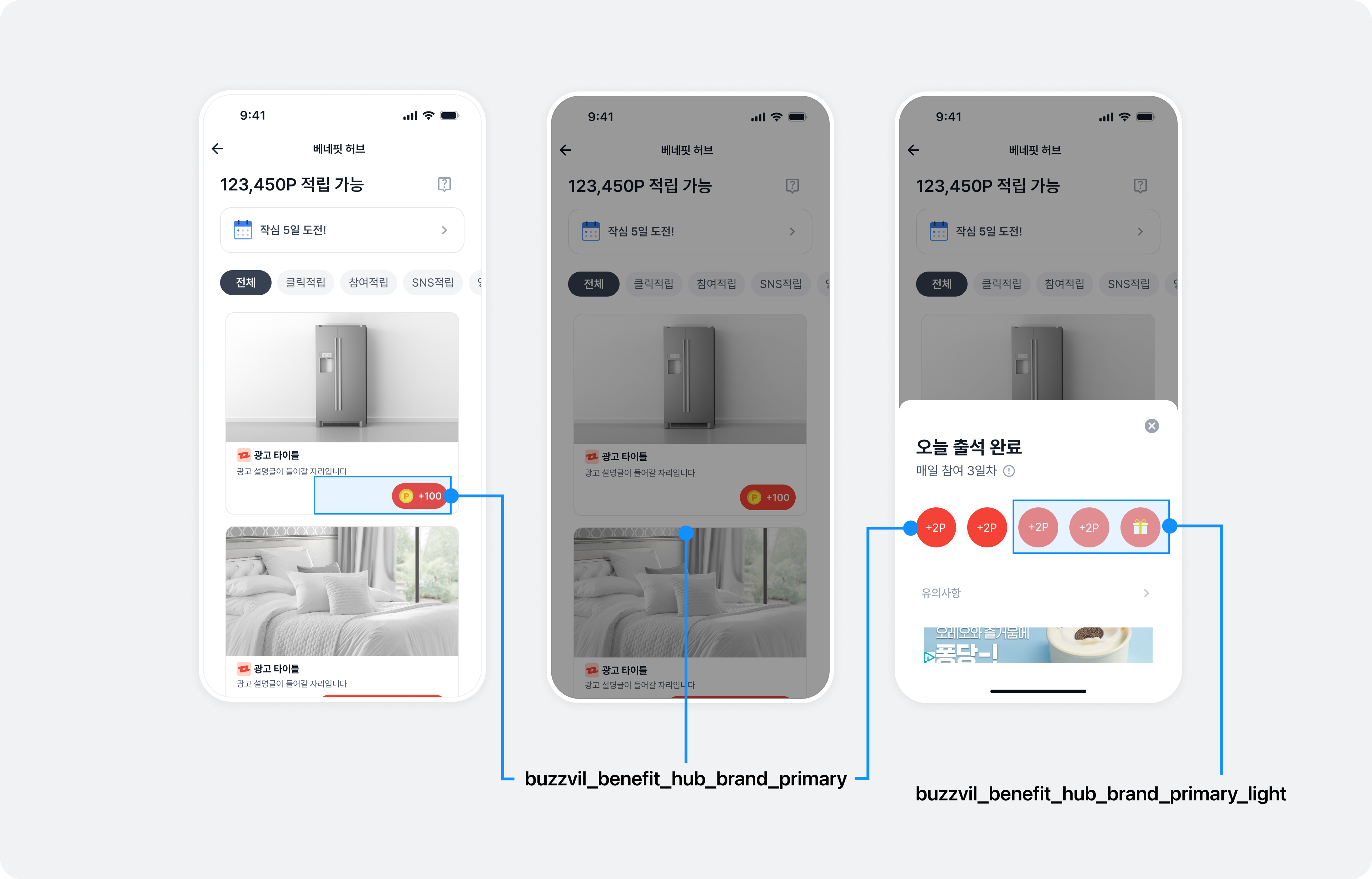
Add color resources as shown below to change the primary color.
import BuzzvilSDK

@main
class AppDelegate: UIResponder, UIApplicationDelegate {
    func application(_ application: UIApplication, didFinishLaunchingWithOptions launchOptions: [UIApplication.LaunchOptionsKey: Any]? = nil) -> Bool {
        let config = ...

        // BuzzBenefit.initialize()를 호출하기 전에  GlobalTheme을 설정합니다.
        let theme = BuzzBenefitTheme { builder in
          builder.primaryColor = YOUR_PRIMARY_COLOR
          builder.primaryLightColor = YOUR_PRIMARY_LIGHT_COLOR
        }

        BuzzBenefit.shared.setGlobalTheme(theme)

        BuzzBenefit.shared.initialize(with: config)
        return true
    }
}
@import BuzzvilSDK;

@implementation AppDelegate

- (BOOL)application:(UIApplication *)application didFinishLaunchingWithOptions:(NSDictionary *)launchOptions {
    BuzzBenefitConfig *config = ...

    // BuzzBenefit.initialize()를 호출하기 전에  GlobalTheme을 설정합니다.
    BuzzBenefitTheme *theme = [BuzzBenefitTheme themeWithBlock:^(BuzzBenefitThemeBuilder * _Nonnull builder) {
      builder.primaryColor = YOUR_PRIMARY_COLOR;
      builder.primaryLightColor = YOUR_PRIMARY_LIGHT_COLOR;
    }];
    [[BuzzBenefit sharedInstance] setGlobalTheme:theme];

    [[BuzzBenefit sharedInstance] initializeWithConfig:config];
    return YES;
}

@end
Change how ads open: custom in-app browser
This feature is unchanged in Buzzvil SDK v5.
Native migration
From v5, the NativeAdView integration guide is no longer supported. Follow the Native 2.0 migration guide to migrate to NativeAd2View.
Interstitial migration
Some UI settings are no longer supported in v5. Remove the following code.
textColorinBZVBuzzAdInterstitialTheme.backgroundColorinBZVBuzzAdInterstitialTheme.