Basic setup
Learn the basic Native integration steps, including displaying the placement, building its layout and allocating ads.
Step 1. Prepare
-
Complete Getting started.
-
A Unit ID for Native, referred to below as
YOUR_NATIVE_UNIT_ID.
Step 2. Build the ad layout
The Native layout components and UI requirements are listed below.
| Component | Description |
|---|---|
| Ad title (required) | The ad's title. We recommend no more than 10 characters. You can replace part of the text with an ellipsis as needed, regardless of character count. |
| Ad creative (required) |
|
| Ad description (required) | A detailed description of the ad. We recommend no more than 40 characters. You can replace part of the text with an ellipsis as needed, regardless of character count. |
| Advertiser icon (required) |
|
| CTA button (required) |
|
| Ad disclosure (recommended) | Text identifying the content as an ad (for example, 광고, ad, 스폰서, or Sponsored). |
Build the native ad layout in an activity or fragment according to the structure below. Implement a layout (your_native_ad.xml) that meets the specifications of NativeAdView.
The following is an example layout for NativeAdView.
<com.buzzvil.buzzad.benefit.presentation.nativead.NativeAdView
    android:id="@+id/native_ad_view">


    <com.buzzvil.buzzad.benefit.presentation.media.MediaView
        android:id="@+id/mediaView"
        ...생략... />
    <TextView
        android:id="@+id/textTitle"
        ...생략... />
    <TextView
        android:id="@+id/textDescription"
        ...생략... />
    <ImageView
        android:id="@+id/imageIcon"
        ...생략... />
    <com.buzzvil.buzzad.benefit.presentation.media.DefaultCtaView
        android:id="@+id/ctaView"
        ...생략... />
</com.buzzvil.buzzad.benefit.presentation.nativead.NativeAdView>
Step 3. Allocate and display ads
Follow these steps and the example code to allocate and display Native ads.
- Call
loadAd()to allocate ads.
-
Set
nativeAdView,MediaViewand all views required to display the ad onNativeAdViewBinder. -
Call
bind()to bind ad data to the layout.
final NativeAdView nativeAdView = findViewById(R.id.your_native_ad_view);
final MediaView mediaView = nativeAdView.findViewById(R.id.mediaView);
final TextView titleTextView = nativeAdView.findViewById(R.id.textTitle);
final ImageView iconImageView = nativeAdView.findViewById(R.id.imageIcon);
final TextView descriptionTextView = nativeAdView.findViewById(R.id.textDescription);
final DefaultCtaView ctaView = nativeAdView.findViewById(R.id.ctaView);

final NativeAdRequest nativeAdRequest = new NativeAdRequest.Builder().build();
final BuzzAdNative buzzAdNative = new BuzzAdNative("YOUR_NATIVE_UNIT_ID");

buzzAdNative.loadAd(nativeAdRequest, new BuzzAdNative.AdLoadListener() {
    @Override
    public void onAdLoaded(@NotNull NativeAd nativeAd) {
        // 할당된 광고가 있으면 호출됩니다.
        // 광고 데이터를 바인딩합니다.
        final NativeAdViewBinder viewBinder = new NativeAdViewBinder.Builder(nativeAdView, mediaView)
            .titleTextView(titleTextView)
            .descriptionTextView(descriptionTextView)
            .iconImageView(iconImageView)
            .ctaView(ctaView)
            .build();
        viewBinder.bind(nativeAd);
    }

    @Override
    public void onLoadFailed(@NotNull AdError adError) {
        // 할당된 광고가 없으면 호출됩니다.
        Log.e(TAG, "Failed to load a native ad.", adError);
    }
});
Step 4. Add a Feed entry layout to Native
Add a UI (NativeToFeedLayout) to the NativeAdView layout that opens Feed when tapped.
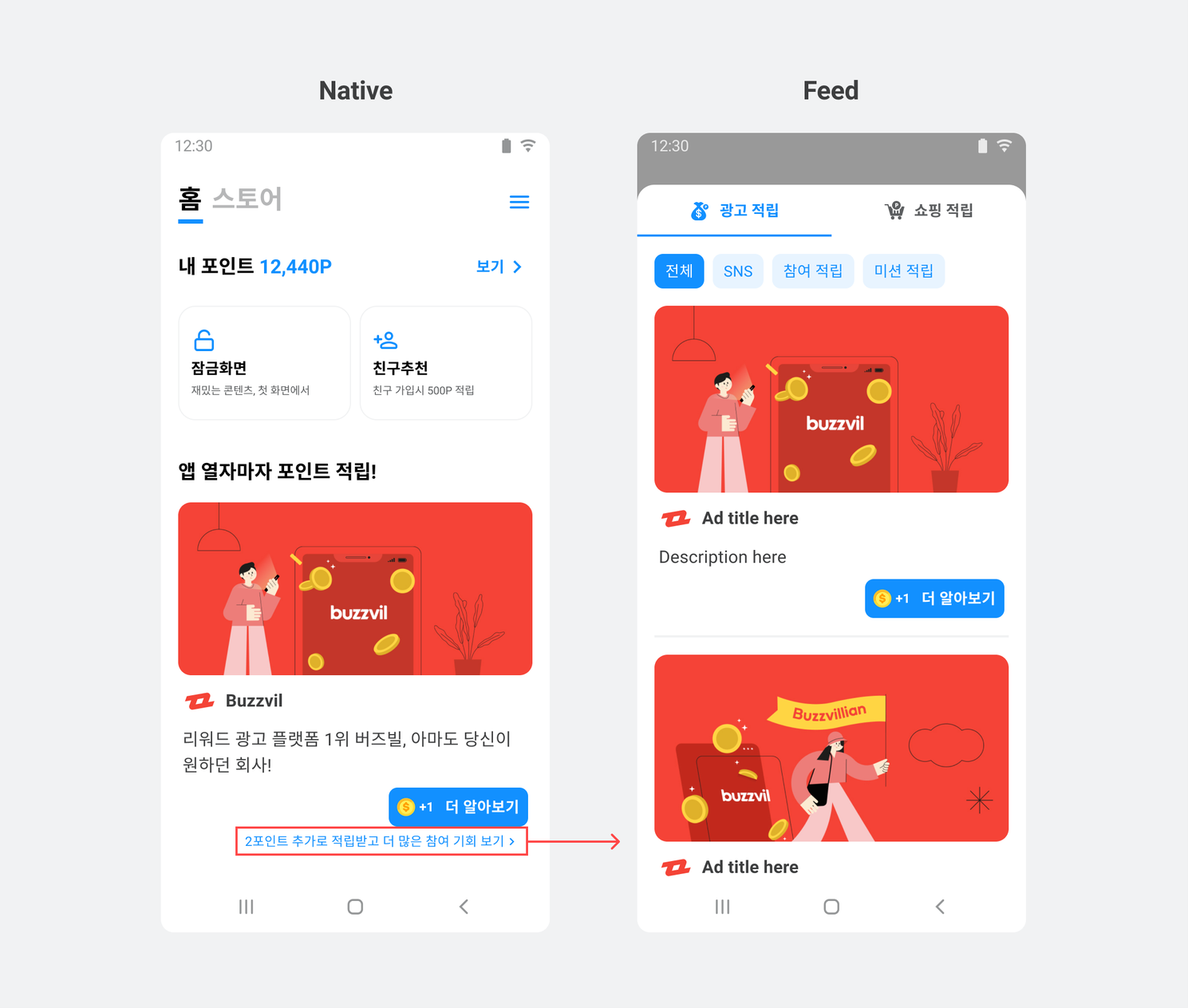
Follow these steps to add a Feed entry layout to Native.
-
Add
NativeToFeedLayoutto theNativeAdViewlayout.<com.buzzvil.buzzad.benefit.presentation.nativead.NativeAdView> <com.buzzvil.buzzad.benefit.presentation.feed.navigation.NativeToFeedLayout android:id="@+id/your_native_to_feed_layout"> <TextView /> <ImageView /> </com.buzzvil.buzzad.benefit.presentation.feed.navigation.NativeToFeedLayout> </com.buzzvil.buzzad.benefit.presentation.nativead.NativeAdView> -
Set the Native Unit ID on
NativeToFeedLayout.// Activity @Override protected void onCreate(Bundle savedInstanceState) { NativeToFeedLayout nativeToFeedLayout = findViewById(R.id.your_native_to_feed_layout); nativeToFeedLayout.setNativeUnitId(YOUR_NATIVE_UNIT_ID); }
Display base reward points
Display the points earned simply by entering Feed (BaseReward) in NativeToFeedLayout to encourage clicks.
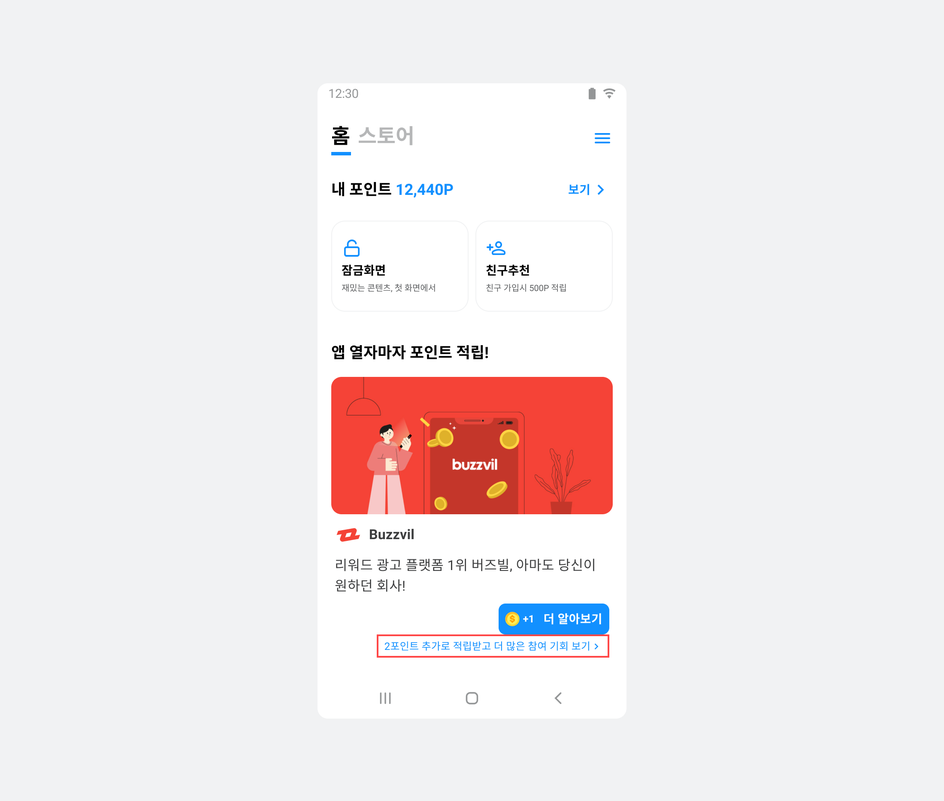
The following example displays base reward points in NativeToFeedLayout.
BaseRewardManager baseRewardManager = BuzzAdBenefit.getBaseRewardManager();

@Override
public void onResume() {
    super.onResume();
    updateNavigationTextView();
}

private void updateNavigationTextView() {
    baseRewardManager.getAvailableFeedBaseReward(
        YOUR_FEED_UNIT_ID,
        reward -> {
            if (reward < 1) {
                navigationTextView.setText("더 많은 참여 기회 보기");
            } else {
                navigationTextView.setText(String.format(Locale.ROOT, "%d 포인트 추가로 적립하고 더 많은 참여 기회 보기", reward));
            }
        }
    );
}
Step 5. Test basic integration
Verify that ads are allocated and displayed correctly, then check that tapping NativeToFeedLayout, the Native-to-Feed layout, opens Feed.