BuzzBanner
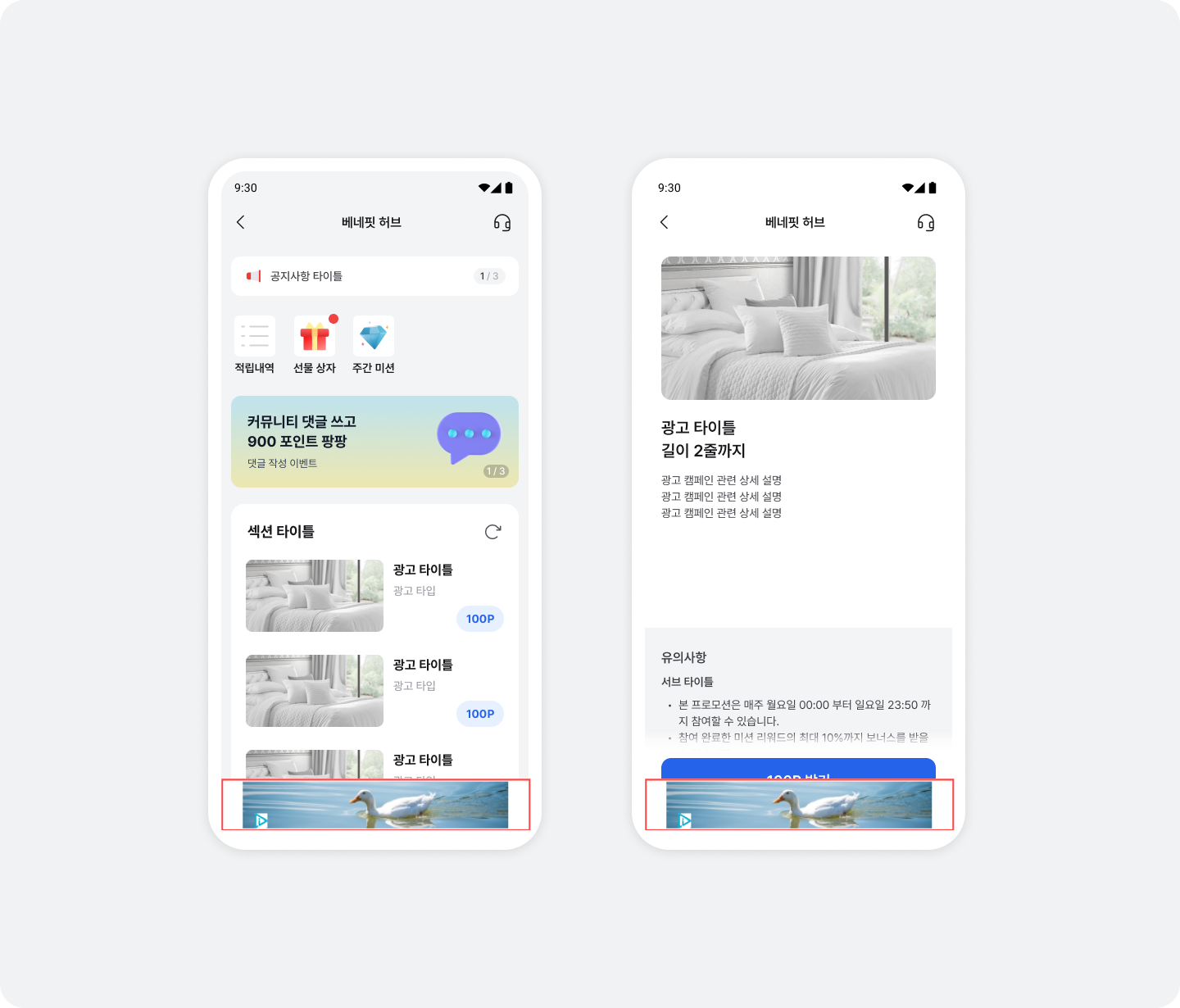
BuzzBanner is a non-rewarded ad product that increases inventory revenue while taking the user experience into account. You can integrate BuzzBanner below BenefitHub, Pop BenefitHub, and the ad participation instructions page, or at any other location you choose.
Integrate BuzzBanner
Integrate below BenefitHub, Pop BenefitHub, and ad participation instructions
You can easily integrate BuzzBanner below BenefitHub, Pop BenefitHub, and the ad participation instructions page without code changes. Contact your Buzzvil representative at help@buzzvil.com.
Integrate BuzzBanner at a custom location
Follow these steps to integrate BuzzBanner wherever you choose.
- Choose a BuzzBanner size.
BuzzBanner sizes
| Size | Enum |
|---|---|
| Banner 320 x 50 | BuzzBanner.BannerSize.W320XH50 |
| Banner 320 x 100 | BuzzBanner.BannerSize.W320XH100 |
| Banner DYNAMIC | BuzzBanner.BannerSize.DYNAMIC |
- Contact your Buzzvil representative to obtain a Placement ID and Banner Size for the integration.
| ID type | Description |
|---|---|
| Placement ID | A unique ID that identifies each ad placement. The banner size must match the Placement ID for ads to be allocated and displayed correctly. |
| Banner Size | Determines the size of the displayed BuzzBanner. |
- Add
BuzzBannerViewat the desired location.
<com.buzzvil.buzzbanner.BuzzBannerView
    android:id="@+id/buzzBannerView"
    android:layout_width="match_parent"
    android:layout_height="wrap_content"/>
Configure the BuzzBanner Placement ID and size
There are two ways to configure the BuzzBanner Placement ID and size.
Set attributes in XML
<com.buzzvil.buzzbanner.BuzzBannerView
    android:id="@+id/buzzBannerView"
    app:bz_placement_id="BANNER_PLACEMENT_ID"
    app:bz_banner_size="size_320x50"
    android:layout_width="match_parent"
    android:layout_height="wrap_content" />
Configure in source code
import com.buzzvil.buzzbanner.BuzzBannerConfig
import com.buzzvil.buzzbanner.BuzzBannerView
import com.buzzvil.buzzbanner.BuzzBanner

fun setBuzzBannerConfig() {
    val buzzBannerConfig = BuzzBannerConfig.Builder()
        .bannerSize(BuzzBanner.BannerSize.W320XH50)  // BuzzBanner.BannerSize.W320XH50 or BuzzBanner.BannerSize.W320XH100 or BuzzBanner.BannerSize.DYNAMIC
        .placementId("BANNER_PLACEMENT_ID")
        .build()

    val buzzBannerView: BuzzBannerView = findViewById(R.id.buzzBannerView)
    buzzBannerView.setBuzzBannerConfig(buzzBannerConfig)
}
Call lifecycle methods on BuzzBannerView
After configuring the banner in XML or source code, you must call the lifecycle methods on BuzzBannerView.
import com.buzzvil.buzzbanner.BuzzBanner
import com.buzzvil.buzzbanner.BuzzBannerConfig
import com.buzzvil.buzzbanner.BuzzBannerView

class YourActivity : AppCompatActivity() {
    ...
    lateinit var buzzBannerView: BuzzBannerView

    override fun onCreate(savedInstanceState: Bundle?) {
        super.onCreate(savedInstanceState)
        setContentView(R.layout.activity_your)

        buzzBannerView = findViewById(R.id.buzzBannerView)
        setBuzzBannerConfig()
    }

    private fun setBuzzBannerConfig() {
        val buzzBannerConfig = BuzzBannerConfig.Builder()
                .bannerSize(BuzzBanner.BannerSize.W320XH50) // BuzzBanner.BannerSize.W320XH50 or BuzzBanner.BannerSize.W320XH100
                .placementId("BANNER_PLACEMENT_ID")
                .build()

        buzzBannerView.setBuzzBannerConfig(buzzBannerConfig)
    }

    override fun onResume() {
        super.onResume()

        buzzBannerView.onResume()
    }

    override fun onPause() {
        super.onPause()

        buzzBannerView.onPause()
    }

    override fun onDestroy() {
        buzzBannerView.onDestroy()

        super.onDestroy()
    }
    ...
}
Optional: Register an ad callback listener
To receive banner ad callbacks, register a listener on BuzzBannerView that follows the loading state.
import com.buzzvil.buzzbanner.AdError
import com.buzzvil.buzzbanner.BuzzBannerViewListener

class YourActivity : AppCompatActivity() {
    ...
    // 배너 광고의 상태를 얻기 위한 리스너
    val buzzBannerViewListener = object: BuzzBannerViewListener {
        override fun onClicked() {
            Log.d("BuzzBannerViewListener", "onClicked()")
        }

        override fun onFailed(adError: AdError) {
            Log.d("BuzzBannerViewListener", "onFailed($adError)")
        }

        override fun onLoaded() {
            Log.d("BuzzBannerViewListener", "onLoaded()")
        }
    }

    override fun onCreate(savedInstanceState: Bundle?) {
        ...

        // 리스너 등록
        buzzBannerView.setBuzzBannerViewListener(buzzBannerViewListener)
    }
    ...
}
Integrate additional ADNs to increase BuzzBanner revenue
This section explains how to integrate ad networks to maximize BuzzBanner revenue.
Adfit(Kakao) & BizBoard
- Add the following code to the project-level
build.gradlefile.
// 프로젝트 레벨의 build.gradle

allprojects {
    repositories {
        maven {
            url 'https://devrepo.kakao.com/nexus/content/groups/public/'
        }
    }
}
- Add the following code to the app-level
build.gradlefile.
// 모듈 레벨의 build.gradle


dependencies {

    implementation "com.avatye.adcash:archive-adfit:3.2.2.32"

}
AdMob & GAM
- Add the following code to the app-level
build.gradlefile.
// 모듈 레벨의 build.gradle


dependencies {

    implementation "com.avatye.adcash:archive-admob:3.2.2.32"

}
- Obtain a key by following the AdMob guide, and add it to the manifest.
<meta-data
    android:name="com.google.android.gms.ads.APPLICATION_ID"
    android:value="ca-app-pub-xxxxxxxxxxxxxxxx~yyyyyyyyyy"/>
AppLovin
Add the following code to the app-level build.gradle file.
// 모듈 레벨의 build.gradle


dependencies {

    implementation "com.avatye.adcash:archive-applovin:3.2.2.32"

}
Cauly
- Add the following code to the project-level
build.gradlefile.
// 프로젝트 레벨의 build.gradle

allprojects {
    repositories {
        maven { url 'https://cauly.github.io/cauly-sdk-android-maven/maven-repo' }
    }
}
- Add the following code to the app-level
build.gradlefile.
// 모듈 레벨의 build.gradle


dependencies {

    implementation "com.avatye.adcash:archive-cauly:3.2.2.32"

}
Facebook Audience Network
Add the following code to the app-level build.gradle file.
// 모듈 레벨의 build.gradle


dependencies {

    implementation "com.avatye.adcash:archive-facebook-audience:3.2.2.32"

}
Fyber
Add the following code to the app-level build.gradle file.
// 모듈 레벨의 build.gradle


dependencies {

    implementation "com.avatye.adcash:archive-fyber:3.2.2.32"

}
Mobwith
Add the following code to the app-level build.gradle file.
// 모듈 레벨의 build.gradle


dependencies {

    implementation "com.avatye.adcash:archive-mobwith:3.2.2.32"

}
Pangle
- Add the following code to the project-level
build.gradlefile.
// 프로젝트 레벨의 build.gradle

allprojects {
    repositories {
        maven { url 'https://artifact.bytedance.com/repository/pangle' }
    }
}
- Add the following code to the app-level
build.gradlefile.
// 모듈 레벨의 build.gradle


dependencies {

    implementation "com.avatye.adcash:archive-pangle:3.2.2.32"

}
UnityAds
Add the following code to the app-level build.gradle file.
// 모듈 레벨의 build.gradle


dependencies {

    implementation "com.avatye.adcash:archive-unity:3.2.2.32"

}
Vungle
Add the following code to the app-level build.gradle file.
// 모듈 레벨의 build.gradle


dependencies {

    implementation ("com.avatye.adcash:archive-vungle:3.2.2.32") {

        exclude group: 'com.squareup.okhttp3', module: 'okhttp'

    }

}
Exclude automatically bundled ADNs
Starting with SDK 6.8.0, the ADN adapters above (com.avatye.adcash:archive-*) are included automatically. You can exclude unused ADNs individually from the buzzvil-sdk dependency as shown below.
| Ad network | Module to exclude |
|---|---|
| Adfit(Kakao) & BizBoard | com.avatye.adcash:archive-adfit |
| AdMob & GAM | com.avatye.adcash:archive-admob |
| AppLovin | com.avatye.adcash:archive-applovin |
| Cauly | com.avatye.adcash:archive-cauly |
| Facebook Audience Network | com.avatye.adcash:archive-facebook-audience |
| Fyber | com.avatye.adcash:archive-fyber |
| Mobwith | com.avatye.adcash:archive-mobwith |
| Pangle | com.avatye.adcash:archive-pangle |
| UnityAds | com.avatye.adcash:archive-unity |
| Vungle | com.avatye.adcash:archive-vungle |
// 모듈 레벨의 build.gradle


dependencies {

    api(platform("com.buzzvil:buzzvil-bom:$buzzvilBomVersion"))

    implementation("com.buzzvil:buzzvil-sdk") {

        // 예: Pangle · UnityAds 를 사용하지 않는 경우

        exclude group: 'com.avatye.adcash', module: 'archive-pangle'

        exclude group: 'com.avatye.adcash', module: 'archive-unity'

    }

}