Migrate from v5 to v6
This guide explains the configuration changes needed to migrate from Buzzvil Android SDK v5 to v6.
See the GitHub sample code for examples of actual implementations.
Getting started
Requirements
No changes.
Obtain integration IDs
Feed (BenefitHub) has become web-based BenefitHub. Feed Unit IDs and Pop Unit IDs are no longer used directly in integration code.
You can continue using your existing App ID, Native Unit ID, and Interstitial Unit ID.
Integrate a reward server
With the addition of Lucky Box and Mission Pack, you must handle the request parameters described in the postback integration guide.
Install the SDK
Update buzzvil-bom to the latest version.
def buzzvilBomVersion = 6.9.+


implementation platform("com.buzzvil:buzzvil-bom:$buzzvilBomVersion")
Initialize the SDK
Feed (BenefitHub) has become web-based BenefitHub. Related settings are now configured in the Buzzvil dashboard instead of FeedConfig.
- The name and package path of
BuzzAdBenefitConfighave changed. FeedConfighas been removed.
  import android.app.Application
- import com.buzzvil.buzzad.benefit.BuzzAdBenefitConfig
+ import com.buzzvil.buzzbenefit.BuzzBenefitConfig
  import com.buzzvil.sdk.BuzzvilSdk

  class App : Application() {
      override fun onCreate() {
          super.onCreate()

-         // Feed(베네핏허브) 설정
-         val feedConfig = FeedConfig.Builder("YOUR_FEED_UNIT_ID")
-             .build()

          // BuzzBenefit 설정
-         val buzzAdBenefitConfig = BuzzAdBenefitConfig.Builder("YOUR_APP_ID")
-             .setDefaultFeedConfig(feedConfig)
-             .build()
+         val buzzBenefitConfig = BuzzBenefitConfig.Builder("YOUR_APP_ID")
+             .build()

          // Buzzvil SDK 초기화
          BuzzvilSdk.initialize(
              application = this@App,
-             buzzAdBenefitConfig = buzzAdBenefitConfig
+             buzzBenefitConfig = buzzBenefitConfig
          )
      }
  }
Register a user profile (log in)
- The names and package paths of
UserProfileandBuzzvilSetUserProfileListenerhave changed. - Use
BuzzvilSdk.login()andBuzzvilSdk.logout()instead ofBuzzvilSdk.setUserProfile(). - The new
BuzzvilSdk.isLoggedInproperty lets you check the login state.
  import com.buzzvil.sdk.BuzzvilSdk
- import com.buzzvil.sdk.BuzzvilSetUserProfileListener
+ import com.buzzvil.sdk.BuzzvilSdkLoginListener
- import com.buzzvil.buzzad.benefit.core.models.UserProfile
+ import com.buzzvil.sdk.BuzzvilSdkUser

+ // 유저 정보를 구성합니다.
+ val buzzvilSdkUser = BuzzvilSdkUser(
+     userId = "YOUR_USER_ID",
+     gender = BuzzvilSdkUser.Gender.MALE,
+     birthYear = 1980,
+ )

- // 유저 정보를 등록합니다.
- BuzzvilSdk.setUserProfile(
+ // 유저 정보로 로그인을 요청합니다.
+ BuzzvilSdk.login(
-     userId = "SAMPLE_USER_ID",
-     gender = UserProfile.Gender.MALE,
-     birthYear = 1980,
+     buzzvilSdkUser = buzzvilSdkUser,
      // (선택) 로그인 상태를 확인할 수 있는 리스너를 등록합니다.
-     listener = object : BuzzvilSetUserProfileListener {
-         override fun loggedIn() {
-             // 유저 정보가 정상적으로 등록된 경우 호출됩니다.
-         }
-
-         override fun loggedOut() {
-             // 유저 정보를 삭제하는 경우 호출됩니다.
-         }
-
-         override fun onSessionReady() {
-             // loggedIn() 이후에 버즈빌 서버에서 auth token을 정상적으로 받아오면   호출됩니다.
-             // onSessionReady가 호출된 이후부터 광고 할당이 가능합니다.
-         }
-
-         override fun onFailure(errorType: BuzzvilSetUserProfileListener.ErrorType) {
-             // 유저 정보를 정상적으로 등록하지 못한 경우 호출됩니다.
-         }
-     }
+     listener = object : BuzzvilSdkLoginListener {
+         override fun onSuccess() {
+             // 로그인에 성공한 경우 호출됩니다.
+             // `BuzzvilSdk.isLoggedIn`이 true 상태가 됩니다.
+             // onSuccess가 호출된 이후부터 광고 할당이 가능합니다.
+         }
+
+         override fun onFailure(errorType: BuzzvilSdkLoginListener.ErrorType) {
+             // 로그인에 실패한 경우 호출됩니다.
+             // NOT_INITIALIZED: SDK 초기화를 하지 않고 로그인을 시도한 경우
+             // INVALID_USER_ID: 적절하지 않은 값을 입력한 경우 (e.g. userId가 빈 문자열인 경우)
+             // UNKNOWN: 그 외 알 수 없는 오류
+         }
+     }
  )

+ // 로그인 상태를 확인합니다.
+ val isLoggedIn: Boolean = BuzzvilSdk.isLoggedIn

- // 유저 정보를 삭제합니다.
- BuzzvilSdk.setUserProfile(null)
+ // 로그아웃을 호출하면 로컬에 저장된 모든 유저 정보가 삭제됩니다.
+ BuzzvilSdk.logout()
Collect app crash information
The Buzzvil SDK no longer uses Sentry.
BuzzBooster removal
BuzzBooster support has ended, and its code was removed starting with v6.6.0. Remove any BuzzBooster-related code from your app.
BenefitHub
Integration
Step 1. Prepare
Feed (BenefitHub) has become web-based BenefitHub. The Feed Unit ID is no longer used in integration code.
Step 2. Initialize BenefitHub
Feed (BenefitHub) has become web-based BenefitHub. Related settings are now configured in the Buzzvil dashboard instead of FeedConfig.
Step 3. Display BenefitHub
- The name and package path of
BuzzAdFeedhave changed. show()is now called directly without creating an object instance.
- import com.buzzvil.buzzad.benefit.presentation.feed.BuzzAdFeed
+ import com.buzzvil.buzzbenefit.benefithub.BuzzBenefitHub

- val buzzAdFeed = BuzzAdFeed.Builder().build()
- buzzAdFeed.show(activity)
+ BuzzBenefitHub.show(context)
Basic settings
Feed (BenefitHub) has become web-based BenefitHub. Related settings are now configured in the Buzzvil dashboard.
See BenefitHub for details about Lucky Box, Mission Pack, reward history, ad-type sections, and other features.
Implement entry paths in your app UI
FeedEntryViewhas been removed.
Replace FeedEntryView with FrameLayout and add a click listener to open BenefitHub.
- <com.buzzvil.buzzad.benefit.presentation.feed.entrypoint.FeedEntryView
+ <FrameLayout
+     android:id="@+id/yourEntryPoint"
      android:layout_width="wrap_content"
      android:layout_height="wrap_content">


      <ImageView
          android:layout_width="wrap_content"
          android:layout_height="wrap_content"
          android:src="@drawable/your_image" />
-  </com.buzzvil.buzzad.benefit.presentation.feed.entrypoint.FeedEntryView>
+  </FrameLayout>

+ // 베네핏허브 진입점에 클릭 리스너를 추가하세요.
+ binding.yourEntryPoint.setOnClickListener {
+     BuzzBenefitHub.show(context)
+ }
- Feed (BenefitHub) has become web-based BenefitHub, and preloading and the display of available reward points have been removed.
- import com.buzzvil.buzzad.benefit.core.ad.AdError
- import com.buzzvil.buzzad.benefit.presentation.feed.BuzzAdFeed
-
- buzzAdFeed.load(object : BuzzAdFeed.FeedLoadListener {
-     override fun onSuccess() {
-         val availableReward = buzzAdFeed.getAvailableRewards()
-         // 적립 가능한 포인트를 직접 구현한 UI에 업데이트합니다.
-     }
-
-     override fun onError(error: AdError?) {
-         // 적립 가능한 포인트를 가져올 수 없는 경우
-     }
- })
Additional features
Check ad types
With the transition from Feed (BenefitHub) to web-based BenefitHub, checking ad types is no longer supported.
Integrate BenefitHub as a fragment
- You can now create
BuzzBenefitHubFragmentwithout creating aBuzzAdFeedobject instance.
- import com.buzzvil.buzzad.benefit.presentation.feed.BuzzAdFeed
+ import com.buzzvil.buzzbenefit.benefithub.BuzzBenefitHub

  class YourBenefitHubActivity : Activity() {
      override fun onCreate(savedInstanceState: Bundle?) {
          super.onCreate(savedInstanceState)
          setContentView(R.layout.activity_your_benefit_hub)

          if (savedInstanceState == null) {
-             val buzzAdFeed = BuzzAdFeed.Builder().build()
-             val benefitHubFragment = buzzAdFeed.getBenefitHubFragment()
+             // SDK를 초기화 하지 않은 경우 null이 반환됩니다.
+             val buzzBenefitHubFragment: BuzzBenefitHubFragment? = BuzzBenefitHubFragment.newInstance()

+             if (buzzBenefitHubFragment != null) {
                  supportFragmentManager.beginTransaction().apply {
                      add(R.id.yourFragmentContainer, buzzBenefitHubFragment)
                      commit()
                  }
+             } else {
+                 // 적절한 예외 처리를 추가하세요.
+             }
          }
      }
  }
Reallocate ads
With the transition from Feed (BenefitHub) to web-based BenefitHub, ad reallocation has been removed.
- import com.buzzvil.buzzad.benefit.core.ad.AdError
- import com.buzzvil.buzzad.benefit.presentation.feed.BuzzAdFeed
-
- buzzAdFeed.load(object : BuzzAdFeed.FeedLoadListener {
-     override fun onSuccess() {
-         // 광고 재할당에 성공한 경우 호출됩니다.
-     }
-     override fun onError(error: AdError?) {
-         // 광고 재할당에 실패한 경우 호출됩니다.
-     }
- })
Change the page shown in BenefitHub
🆕 With the transition from Feed (BenefitHub) to web-based BenefitHub, opening a specific page directly is now officially supported.
- Selecting a filter while displaying BenefitHub has been removed.
- import com.buzzvil.buzzad.benefit.presentation.feed.FeedConfig
-
- // Feed(베네핏허브) 설정
- val feedConfig = FeedConfig.Builder("YOUR_FEED_UNIT_ID")
-     .initialSelectedFilterName("쇼핑적립")
-     .build()
- The way to open Lucky Box and Mission Pack directly has changed.
- import com.buzzvil.buzzad.benefit.annotation.BuzzExperimentalApi
- import com.buzzvil.buzzad.benefit.presentation.feed.BuzzAdFeed
- import com.buzzvil.buzzad.benefit.presentation.feed.FeedConfig
- import com.buzzvil.buzzad.benefit.presentation.feed.FeedInitialNavigationPage
-
- @OptIn(BuzzExperimentalApi::class) // 실험 기능을 사용하기 위한 어노테이션
- private fun getCustomBuzzAdFeed(): BuzzAdFeed {
-     if (customBuzzAdFeed == null) {
-         val feedConfig = FeedConfig.Builder(Constant.YOUR_FEED_UNIT_ID)
-             .initialNavigationPage(FeedInitialNavigationPage.LUCKYBOX) // (실험 기능) 초기 페이지 선택하기
-             .build()
-
-         // 하나의 피드에 하나의 buzzAdFeed 인스턴스를 생성하여 사용합니다.
-         customBuzzAdFeed = BuzzAdFeed.Builder()
-             .feedConfig(feedConfig)
-             .build()
-     }
-
-     return customBuzzAdFeed!!
- }

+ import com.buzzvil.buzzbenefit.benefithub.BuzzBenefitHub
+ import com.buzzvil.buzzbenefit.benefithub.BuzzBenefitHubConfig
+ import com.buzzvil.buzzbenefit.benefithub.BuzzBenefitHubPage
+
+ val benefitHubConfig = BuzzBenefitHubConfig.Builder()
+     .queryParams(BuzzBenefitHubPage.LUCKY_BOX.toRedirectQueryParams()) // 초기 페이지 선택하기
+     .build()
+ BuzzBenefitHub.show(context = requireContext(), benefitHubConfig = benefitHubConfig)
Native
Step 1. Prepare
No changes.
Step 2. Configure the ad layout
- The names and package paths of
MediaView,DefaultCtaView, andNativeAd2Viewhave changed. DefaultCtaViewnow uses a design without a reward icon.NativeToFeedLayouthas been removed.
- <com.buzzvil.buzzad.benefit.nativead2.api.NativeAd2View
+ <com.buzzvil.buzzbenefit.buzznative.BuzzNativeAdView
      android:id="@+id/nativeAd2View">

-     <com.buzzvil.buzzad.benefit.presentation.media.MediaView
+     <com.buzzvil.buzzbenefit.buzznative.BuzzMediaView
          android:id="@+id/mediaView"
          ...

-     <com.buzzvil.buzzad.benefit.presentation.media.DefaultCtaView
+     <com.buzzvil.buzzbenefit.DefaultBuzzCtaView
          android:id="@+id/ctaView"
          ...

-     <com.buzzvil.buzzad.benefit.presentation.feed.navigation.NativeToFeedLayout
+     <View
          android:id="@+id/yourNativeToBenefitHubEntryPoint">

          ...
-     </com.buzzvil.buzzad.benefit.presentation.feed.navigation.NativeToFeedLayout>
+     </View>
- </com.buzzvil.buzzad.benefit.nativead2.api.NativeAd2View>
+ </com.buzzvil.buzzbenefit.buzznative.BuzzNativeAdView>

+ // 베네핏허브 진입점에 클릭 리스너를 추가하세요.
+ binding.yourNativeToBenefitHubEntryPoint.setOnClickListener {
+     BuzzBenefitHub.show(context)
+ }
Display the base reward amount
With the transition from Feed (BenefitHub) to web-based BenefitHub, displaying the base reward amount is no longer supported.
- import com.buzzvil.buzzad.benefit.BaseRewardManager
- import com.buzzvil.buzzad.benefit.BuzzAdBenefit
-
- BuzzAdBenefit.getBaseRewardManager()?.getAvailableFeedBaseReward(YOUR_FEED_ID, object : BaseRewardManager.BaseRewardListener {
-     override fun onBaseRewardLoaded(reward: Int) {
-         if (reward < 1) {
-             nativeToFeedText.text = "더 많은 참여 기회 보기"
-         } else {
-             nativeToFeedText.text = "$reward 포인트 받고 더 많은 참여 기회 보기"
-         }
-     }
- })
Step 3. Display ads
- import com.buzzvil.buzzad.benefit.core.ad.AdError
- import com.buzzvil.buzzad.benefit.nativead2.api.NativeAd2
- import com.buzzvil.buzzad.benefit.nativead2.api.NativeAd2StateChangedListener
- import com.buzzvil.buzzad.benefit.nativead2.api.NativeAd2ViewBinder
+ import com.buzzvil.buzzbenefit.BuzzAdError
+ import com.buzzvil.buzzbenefit.buzznative.BuzzNative
+ import com.buzzvil.buzzbenefit.buzznative.BuzzNativeAd
+ import com.buzzvil.buzzbenefit.buzznative.BuzzNativeRefreshEventsListener
+ import com.buzzvil.buzzbenefit.buzznative.BuzzNativeViewBinder

  // 광고 레이아웃을 설정합니다.
- val binder: NativeAd2ViewBinder = NativeAd2ViewBinder.Builder()
+ val binder: BuzzNativeViewBinder = BuzzNativeViewBinder.Builder()
      .nativeAd2View(nativeAd2View)
      .mediaView(mediaView)
      .titleTextView(titleTextView)
      .descriptionTextView(descriptionTextView)
      .iconImageView(iconImageView)
      .ctaView(ctaView)
      .build(Constant.YOUR_NATIVE_ID)

+ // BuzzNative 객체를 생성합니다.
+ val buzzNative = BuzzNative(Constant.YOUR_NATIVE_ID)
- // 광고 할당 및 표시를 자동으로 수행합니다.
- binder.bind()
+ // BuzzNative에서 광고를 할당받습니다.
+ buzzNative.load(
+     onSuccess = { nativeAd ->
+       // 할당받은 광고를 화면에 표시합니다.
+       binder.bind(buzzNative)
+     },
+     onFailure = { adError -> ... }
+ )

// (Optional) 광고 요청 상태에 따른 UI를 구현합니다. load() 이후에 Listener 등록해주세요.
- binder.addNativeAd2StateChangedListener(object : NativeAd2StateChangedListener {
+ buzzNative.setRefreshEventsListener(object : BuzzNativeRefreshEventsListener {
-     override fun onRequested() { ... }
+     override fun onRequest() { ... }

-     override fun onNext(nativeAd2: NativeAd2) { ... }
+     override fun onSuccess(buzzNativeAd: BuzzNativeAd) { ... }

-     override fun onComplete() { ... }
+     override fun onFailure(adError: BuzzAdError) { ... }

-     override fun onError(adError: AdError) { ... }
+     // 최초 광고 할당 성공, 실패 여부는 `BuzzNative.load(onSuccess, onFailure)` 에서 확인하세요.
  })
Additional features
Register an ad event listener
- The names and package paths of
NativeAd2,NativeAd2EventListener,NativeAd2ViewBinder, andRewardResulthave changed. - Some enum values in
RewardResult(BuzzRewardResult) have been renamed to match iOS. See Changes toRewardResultbelow. - Ad event listeners are now registered using
BuzzNative. NativeAd2ViewBinder.addNativeAd2EventListener()has been removed, and only one listener can be registered throughBuzzNative.setAdEventsListener().
- import com.buzzvil.buzzad.benefit.nativead2.api.NativeAd2
- import com.buzzvil.buzzad.benefit.nativead2.api.NativeAd2EventListener
- import com.buzzvil.buzzad.benefit.nativead2.api.NativeAd2ViewBinder
- import com.buzzvil.buzzad.benefit.presentation.reward.RewardResult
+ import com.buzzvil.buzzbenefit.buzznative.BuzzNativeAdEventsListener
+ import com.buzzvil.buzzbenefit.buzznative.BuzzRewardResult
+ import com.buzzvil.buzzbenefit.buzznative.BuzzNative
+ import com.buzzvil.buzzbenefit.buzznative.BuzzNativeAd
+ import com.buzzvil.buzzbenefit.buzznative.BuzzNativeViewBinder

- val binder: NativeAd2ViewBinder = NativeAd2ViewBinder.Builder() ...
+ val binder: BuzzNativeViewBinder = BuzzNativeViewBinder.Builder() ...

+ // BuzzNative 객체를 생성합니다.
+ val buzzNative = BuzzNative(Constant.YOUR_NATIVE_ID)

- binder.bind()
+ buzzNative.load(
+   onSuccess = { binder.bind(buzzNative) },
+   onFailure = { /* 에러 처리 */ }
+ )

  // (Optional) 광고 이벤트 리스너를 등록합니다. load() 이후에 Listener 등록해주세요.
  // 로그 기록, 단순 알림 외에 다른 동작을 추가하는 것을 권장하지 않습니다. 직접 구현한 동작이 네이티브에서 제공하는 기능(광고 자동 갱신 등)과 충돌할 수 있습니다.
- binder.addNativeAd2EventListener(object : NativeAd2EventListener {
+ buzzNative.setAdEventsListener(object : BuzzNativeAdEventsListener {
-     override fun onImpressed(nativeAd2: NativeAd2) {
+     override fun onImpressed(buzzNativeAd: BuzzNativeAd) {
        // Native 광고가 유저에게 노출되었을 때 호출됩니다.
      }

-     override fun onClicked(nativeAd2: NativeAd2) {
+     override fun onClicked(buzzNativeAd: BuzzNativeAd) {
          // 유저가 Native 광고를 클릭했을 때 호출됩니다.
      }

-     override fun onRewardRequested(nativeAd2: NativeAd2) {
+     override fun onRewardRequested(buzzNativeAd: BuzzNativeAd) {
          // 리워드 적립을 요청했을 때 호출됩니다.
      }

-     override fun onParticipated(nativeAd2: NativeAd2) {
+     override fun onParticipated(buzzNativeAd: BuzzNativeAd) {
          // 유저가 광고 참여를 완료하였을 때 호출됩니다.
      }

-     override fun onRewarded(nativeAd2: NativeAd2, rewardResult: RewardResult) {
+     override fun onRewarded(buzzNativeAd: BuzzNativeAd, buzzRewardResult: BuzzRewardResult) {
          // 리워드가 적립되었을 때 호출됩니다.
+         // BuzzRewardResult의 변경된 열거 값을 확인하세요.
      }
  })
Changes to RewardResult
Some enum values in RewardResult (BuzzRewardResult) have been renamed to match iOS. See Changes to BuzzRewardResult below for details.
| Before | After |
|---|---|
RewardResult | BuzzRewardResult |
NETWORK_TIMEOUT | CONNECTION_TIMEOUT |
NETWORK_TIMEOUT_IN_POWER_SAVE_MODE | CONNECTION_TIMEOUT_IN_POWER_SAVE_MODE |
UNKNOWN_NETWORK_ERROR | NETWORK_ERROR |
UNKNOWN_SERVER_ERROR | SERVER_ERROR |
UNKNOWN_CLIENT_ERROR | CLIENT_ERROR |
UNKNOWN_ERROR | UNKNOWN |
Add clickable areas
- The entire native placement is now clickable, so
NativeAd2ViewBinder.Builder.addClickableView()has been removed.
Implement a carousel
1. Initialize the carousel
- The class controlling duplicate ad allocation has changed from
NativeAd2PooltoBuzzNativeGroup.
- import com.buzzvil.buzzad.benefit.core.ad.AdError
- import com.buzzvil.buzzad.benefit.nativead2.api.NativeAd2Pool
- import com.buzzvil.buzzad.benefit.nativead2.api.NativeAd2PoolInitListener
+ import com.buzzvil.buzzbenefit.BuzzAdError
+ import com.buzzvil.buzzbenefit.buzznative.BuzzNativeGroup

+ // 캐러셀 광고에서 광고 중복 할당을 방지하기 위한 BuzzNativeGroup 인스턴스입니다.
+ // Fragment의 생명 주기에 맞추어 생성 및 해제하세요.
+ private var buzzNativeGroup: BuzzNativeGroup? = null

-  private fun initCarouselPool() {
+  private fun initCarouselNativeGroup() {
      // 광고 중복 할당을 막기 위해 하나의 캐러셀에 하나의 BuzzNativeGroup 인스턴스를 생성하여 사용합니다.
-     val carouselPool = NativeAd2Pool(YOUR_NATIVE_UNIT_ID)
+     buzzNativeGroup = BuzzNativeGroup(YOUR_NATIVE_UNIT_ID)
      val REQUEST_AD_COUNT = 5

      // 현재 할당 받을 수 있는 광고의 갯수를 확인합니다.
-     carouselPool.init(REQUEST_AD_COUNT, object : NativeAd2PoolInitListener {
-         override fun onLoaded(adCount: Int) {
-             // TODO 할당 받은 광고 갯수(adCount)만큼 아이템 리스트를 만들어 RecyclerView 어댑터를 초기화 합니다.
-         }
-
-         override fun onError(adError: AdError) {
-             // TODO 광고 레이아웃을 숨김 처리 하는 등 적절한 에러 처리를 할 수 있습니다.
-         }
-     })
+     buzzNativeGroup?.let {
+         it.load(
+             REQUEST_AD_COUNT,
+             onSuccess = { adCount ->
+                 // TODO 할당 받은 광고 갯수(adCount)만큼 아이템 리스트를 만들어 RecyclerView 어댑터를 초기화 합니다.
+             },
+             onFailure = { adError ->
+                 // TODO 광고 레이아웃을 숨김 처리 하는 등 적절한 에러 처리를 할 수 있습니다.
+             }
+         )
+     }
+ }

  override fun onDestroyView() {
      super.onDestroyView()

+     // BuzzNativeGroup의 리소스를 해제합니다.
+     buzzNativeGroup?.dispose()
  }
2. Implement RecyclerView.Holder
- Use
BuzzNativeViewBinderinstead ofNativeAd2ViewBinder.- Register listeners in
ViewHolder.bind()instead ofViewHolder.init().
- Register listeners in
FeedPromotion,FeedPromotionFactory, andFeedPromotionViewBinder, which made up the BenefitHub entry slide, have been removed.
- import com.buzzvil.buzzad.benefit.nativead2.api.NativeAd2Pool
- import com.buzzvil.buzzad.benefit.nativead2.api.NativeAd2ViewBinder
- import com.buzzvil.buzzad.benefit.presentation.feed.entrypoint.FeedPromotion
- import com.buzzvil.buzzad.benefit.presentation.feed.entrypoint.FeedPromotionViewBinder
+ import com.buzzvil.buzzbenefit.BuzzAdError
+ import com.buzzvil.buzzbenefit.buzznative.BuzzNative
+ import com.buzzvil.buzzbenefit.buzznative.BuzzNativeAd
+ import com.buzzvil.buzzbenefit.buzznative.BuzzNativeAdEventsListener
+ import com.buzzvil.buzzbenefit.buzznative.BuzzNativeRefreshEventsListener
+ import com.buzzvil.buzzbenefit.buzznative.BuzzNativeViewBinder
+ import com.buzzvil.buzzbenefit.buzznative.BuzzRewardResult

  class BuzzNativeCarouselViewHolder(
      private val binding: CarouselItemBinding,
  ) : RecyclerView.ViewHolder(binding.root) {
-     private val nativeAd2ViewBinder: NativeAd2ViewBinder
-     private val carouselToFeedViewBinder: FeedPromotionViewBinder
+     private var buzzNativeViewBinder: BuzzNativeViewBinder? = null

      init {
          // NativeView와 하위 컴포넌트를 바인드합니다.
-         nativeAd2ViewBinder = NativeAd2ViewBinder.Builder()
+         buzzNativeViewBinder = BuzzNativeViewBinder.Builder()
              .buzzNativeView(binding.buzzNativeView)
              .buzzMediaView(binding.buzzMediaView)
              .titleTextView(binding.adTitleText)
              .descriptionTextView(binding.adDescriptionText)
              .iconImageView(binding.adIconImage)
              .buzzCtaView(binding.adCtaView)
              .build()

-         // FeedPromotion 관련 클래스가 모두 삭제되었습니다.
-         carouselToFeedViewBinder = FeedPromotionViewBinder.Builder(nativeAd2View, mediaView)
-             ...

-         // bind() 에서 BuzzNativeRefreshEventsListener를 등록하는 것으로 대체되었습니다.
-         nativeAd2ViewBinder.addNativeAd2StateChangedListener(object : NativeAd2StateChangedListener {
-             override fun onComplete() {}
-             override fun onError(adError: AdError) {}
-             override fun onNext(nativeAd2: NativeAd2) {}
-             override fun onRequested() {}
-         })

-         // bind() 에서 BuzzNativeAdEventsListener를 등록하는 것으로 대체되었습니다.
-         nativeAd2ViewBinder.addNativeAd2EventListener(object : NativeAd2EventListener {
-             override fun onClicked(nativeAd2: NativeAd2) {}
-             override fun onImpressed(nativeAd2: NativeAd2) {}
-             override fun onParticipated(nativeAd2: NativeAd2) {}
-             override fun onRewardRequested(nativeAd2: NativeAd2) {}
-             override fun onRewarded(nativeAd2: NativeAd2, rewardResult: RewardResult) {}
-         })
      }

-     fun setPool(carouselPool: NativeAd2Pool, adKey: Int) {
-         nativeAd2ViewBinder.setPool(adKey, carouselPool)
-         carouselToFeedViewBinder.setPool(carouselPool)
-     }

-     fun bind(position: Int) {
      fun bind(native: BuzzNative, position: Int) {
+         // NativeAd2ViewBinder.addNativeAd2StateChangedListener() 대신 사용합니다.
+         native.setRefreshEventsListener(
+             object : BuzzNativeRefreshEventsListener {
+                 override fun onRequest() {}
+                 override fun onSuccess(buzzNativeAd: BuzzNativeAd) {}
+                 override fun onFailure(adError: BuzzAdError) {}
+             }
+         )

+         // NativeAd2ViewBinder.addNativeAd2EventListener() 대신 사용합니다.
+         native.setAdEventsListener(object : BuzzNativeAdEventsListener {
+             override fun onClicked(buzzNativeAd: BuzzNativeAd) {}
+             override fun onImpressed(buzzNativeAd: BuzzNativeAd) {}
+             override fun onParticipated(buzzNativeAd: BuzzNativeAd) {}
+             override fun onRewardRequested(buzzNativeAd: BuzzNativeAd) {}
+             override fun onRewarded(buzzNativeAd: BuzzNativeAd, buzzRewardResult: BuzzRewardResult) {}
+         })

          // BuzzNativeViewBinder.bind()를 호출하면 광고 할당 및 갱신이 자동으로 수행됩니다.
-         nativeAd2ViewBinder.bind(position)
          buzzNativeViewBinder?.bind(native)
      }

-     fun unbind(position: Int) {
+     fun unbind() {
          // unbind를 반드시 호출하여 뷰를 재사용할 때 문제가 발생하지 않게 합니다.
-         nativeAd2ViewBinder.unbind(position)
+         buzzNativeViewBinder?.unbind()
      }
  }
3. Implement RecyclerView.Adapter
- Apply the ViewHolder changes to the Adapter as well.
- import com.buzzvil.buzzad.benefit.nativead2.api.NativeAd2Pool
+ import com.buzzvil.buzzbenefit.buzznative.BuzzNative

  class BuzzNativeCarouselAdapter(
-     private val list: List<NativeAd2CarouselItem>,
+     private val list: List<BuzzNative> // 구현 여하에 따라 List<NativeAd2CarouselItem>를 계속 사용하실 수도 있습니다.
-     private val carouselPool: NativeAd2Pool
- ) : RecyclerView.Adapter<NativeAd2CarouselViewHolder?>() {
+ ) : RecyclerView.Adapter<BuzzNativeCarouselViewHolder>() {

-     override fun onCreateViewHolder(parent: ViewGroup, viewType: Int): NativeAd2CarouselViewHolder {
+     override fun onCreateViewHolder(parent: ViewGroup, viewType: Int): BuzzNativeCarouselViewHolder {
          val inflater = parent.context.getSystemService(Context.LAYOUT_INFLATER_SERVICE) as LayoutInflater
          val binding = BuzzNativeAdViewBinding.inflate(inflater, parent, false)

-         return NativeAd2CarouselViewHolder(binding)
+         return BuzzNativeCarouselViewHolder(binding)
      }

      override fun getItemCount(): Int {
          return list.size
      }

-     override fun onBindViewHolder(holder: NativeAd2CarouselViewHolder, position: Int) {
+     override fun onBindViewHolder(holder: BuzzNativeCarouselViewHolder, position: Int) {
-         holder.setPool(carouselPool, position)
+         val item = list[position]
+         holder.bind(item)
      }

-     override fun onViewRecycled(holder: NativeAd2CarouselViewHolder) {
+     override fun onViewRecycled(holder: BuzzNativeCarouselViewHolder) {
          super.onViewRecycled(holder)

          // unbind를 반드시 호출하여 뷰를 재사용할 때 문제가 발생하지 않게 합니다.
-         holder.unbind(holder.adapterPosition)
+         holder.unbind()
      }
  }
4. Apply the Adapter to the RecyclerView
Apply the Adapter in your initialization code.
- import com.buzzvil.buzzad.benefit.core.ad.AdError
- import com.buzzvil.buzzad.benefit.nativead2.api.NativeAd2Pool
- import com.buzzvil.buzzad.benefit.nativead2.api.NativeAd2PoolInitListener
+ import com.buzzvil.buzzbenefit.BuzzAdError
+ import com.buzzvil.buzzbenefit.buzznative.BuzzNative
+ import com.buzzvil.buzzbenefit.buzznative.BuzzNativeGroup

+ private var buzzNativeGroup: BuzzNativeGroup? = null

  // 캐러셀 초기화
- private fun initCarouselPool() { ... }
+ private fun initCarouselNativeGroup() { ... }

  // 초기화 코드에 Adapter를 적용하세요.
- private fun initCarouselAdapter(adCount: Int, carouselPool: NativeAd2Pool) {
+ private fun initCarouselAdapter(natives: List<BuzzNative>, adCount: Int) {
      // 할당 받은 광고 리스트로 BuzzNativeCarouselAdapter를 생성합니다.
-     val list: List<NativeAd2CarouselItem> = buildCarouselItems(adCount)
-     val adapter = NativeAd2CarouselAdapter(list, carouselPool)
+     val adapter = BuzzNativeCarouselAdapter(natives) // 구현 여하에 따라 List<NativeAd2CarouselItem>를 계속 사용하실 수도 있습니다.

      // RecyclerView에 어댑터를 설정합니다.
      binding.carouselRecyclerView.adapter = adapter
    }

  // 캐러셀 초기화
+ override fun onDestroyView() { ... }
Carousel BenefitHub entry point
FeedEntryViewhas been removed.
  <androidx.recyclerview.widget.RecyclerView
      android:id="@+id/carouselRecyclerView"
      ... />


- <com.buzzvil.buzzad.benefit.presentation.feed.entrypoint.FeedEntryView
-     android:id="@+id/toFeedLink"
-     android:layout_width="wrap_content"
-     android:layout_height="wrap_content"
-     android:layout_gravity="right"
-     android:layout_marginTop="16dp"
-     android:layout_marginEnd="36dp"
-     app:buzzvilFeedEntryViewName="carousel_to_feed_link">
-
-
+
      <LinearLayout
+         android:id="@+id/carouselToBenefitHubEntryView"
          android:layout_width="wrap_content"
          android:layout_height="wrap_content"
          android:orientation="horizontal">

          <TextView
              android:layout_width="wrap_content"
              android:layout_height="wrap_content"
              android:text="포인트 더 받으러 가기 >" />
      </LinearLayout>
- </com.buzzvil.buzzad.benefit.presentation.feed.entrypoint.FeedEntryView>

+ // 베네핏허브 진입점에 클릭 리스너를 추가하세요.
+ binding.carouselToBenefitHubEntryView.setOnClickListener {
+     BuzzBenefitHub.show(context)
+ }
Interstitial
The names and package paths of BuzzAdInterstitial and InterstitialAdListener have changed.
- import com.buzzvil.buzzad.benefit.presentation.interstitial.BuzzAdInterstitial
+ import com.buzzvil.buzzbenefit.interstitial.BuzzInterstitial

- import com.buzzvil.buzzad.benefit.presentation.interstitial.InterstitialAdListener
+ import com.buzzvil.buzzbenefit.interstitial.BuzzInterstitialListener
Pop
Standard Pop
| Before (v5) | After (v6) |
|---|---|
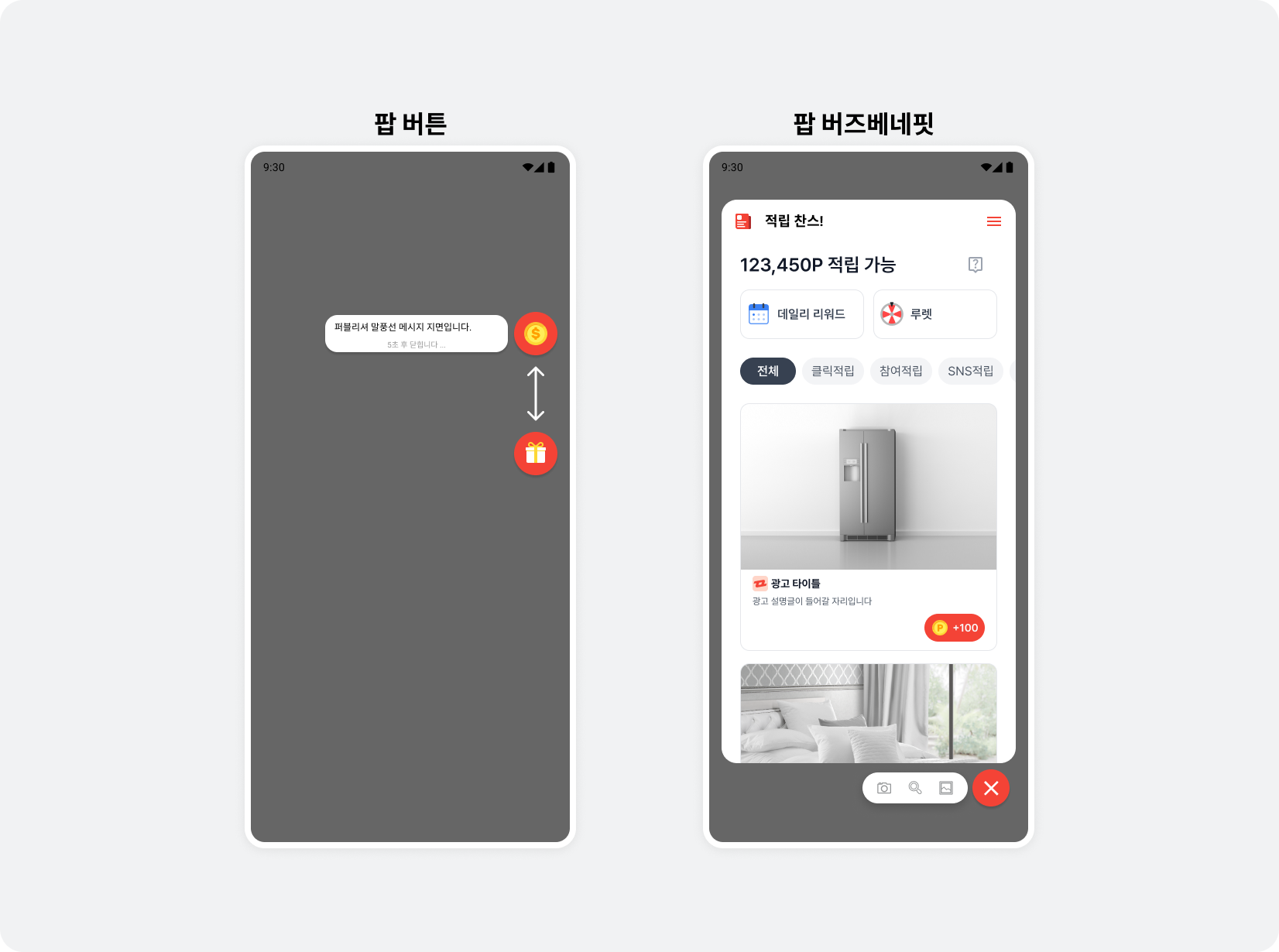 | 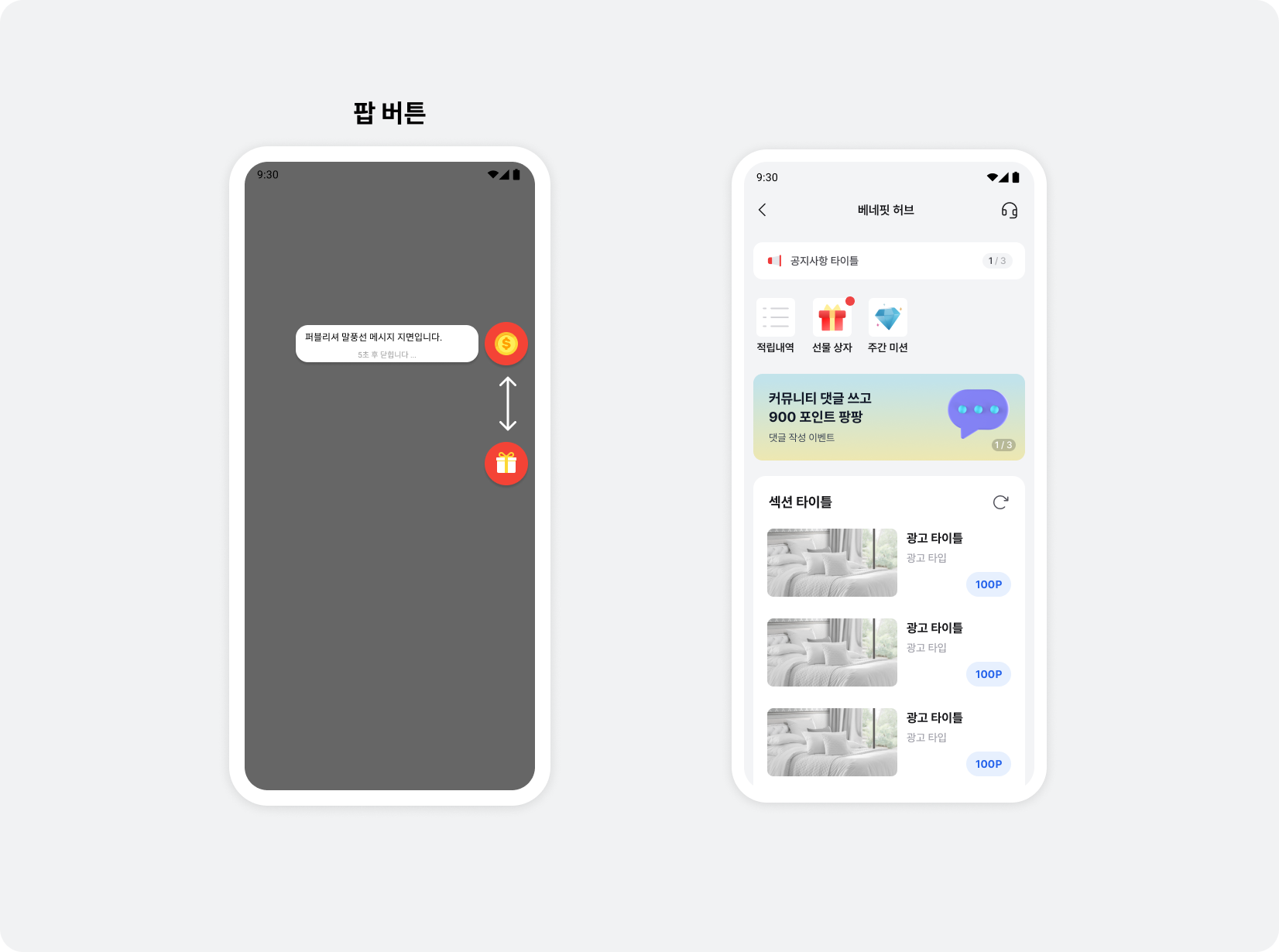 |
1. Pop initialization code has been removed
- A Pop Unit ID is no longer required.
- import com.buzzvil.buzzad.benefit.BuzzAdBenefitConfig
- import com.buzzvil.buzzad.benefit.presentation.feed.FeedConfig
- import com.buzzvil.buzzad.benefit.presentation.feed.config.OptInFeature
- import com.buzzvil.sdk.BuzzvilSdk
-
- val popFeedConfig = FeedConfig.Builder("YOUR_POP_UNIT_ID")
-     .optInFeatureList(mutableListOf(OptInFeature.Pop))
-     .build()
-
- val buzzAdBenefitConfig = BuzzAdBenefitConfig.Builder(context)
-     .setPopConfig(popFeedConfig)
-     .build()
-
- BuzzvilSdk.initialize(this@App, buzzAdBenefitConfig)
2. Enabling and disabling Pop has been simplified
- The name and package path of
BuzzAdPophave changed.
- import com.buzzvil.buzzad.benefit.pop.BuzzAdPop
+ import com.buzzvil.buzzbenefit.pop.BuzzPop
+ import com.buzzvil.buzzbenefit.pop.BuzzPopActivateListener

  // 팝 활성화
- BuzzAdPop.getInstance().activate(object: BuzzAdPop.PopActivateListener {
+ BuzzPop.activate(object : BuzzPopActivateListener {
      override fun onActivated() {
          // 정상적으로 Pop이 활성화 되었을 때 호출됩니다.

          // 유저 화면에 바로 Pop을 표시합니다.
-         BuzzAdPop.getInstance().show()
+         BuzzPop.show()
      }

-     override fun onActivationFailed(error: Throwable?) {
+     override fun onActivationFailed(error: Throwable) {
          // Pop 활성화에 실패하였을 때 호출됩니다.
      }
  })

  // 팝 비활성화
- BuzzAdPop.getInstance().deactivate(context)
+ BuzzPop.deactivate()
3. A property for checking whether Pop is enabled has been added
Use BuzzPop.isActivated to check whether Pop is enabled.
The following example enables or disables Pop based on its current state.
import com.buzzvil.buzzbenefit.pop.BuzzPop
import com.buzzvil.buzzbenefit.pop.BuzzPopActivateListener

fun togglePop() {
    if (BuzzPop.isActivated) {
        BuzzPop.deactivate()
    } else {
        BuzzPop.activate(object : BuzzPopActivateListener {
            override fun onActivated() {
                // 정상적으로 Pop이 활성화 되었을 때 호출됩니다.

                // 유저 화면에 Pop을 표시합니다.
                BuzzPop.show()
            }

            override fun onActivationFailed(error: Throwable) {
                // Pop 활성화에 실패하였을 때 호출됩니다.
            }
        })
    }
}
4. PopConfig configuration has changed
- The name and package path of
PopConfighave changed.
- import com.buzzvil.buzzad.benefit.BuzzAdBenefitConfig
+ import com.buzzvil.buzzbenefit.BuzzBenefitConfig

- import com.buzzvil.buzzad.benefit.presentation.feed.FeedConfig
- import com.buzzvil.buzzad.benefit.pop.PopConfig
+ import com.buzzvil.buzzbenefit.pop.BuzzPopConfig

- val popFeedConfig = FeedConfig.Builder(Constant.YOUR_POP_ID)
-     .build()
- val popConfig = PopConfig.Builder(popFeedConfig)
+ val buzzPopConfig = BuzzPopConfig.Builder()
      .build()

- val buzzAdBenefitConfig = BuzzAdBenefitConfig.Builder(Constant.YOUR_APP_ID)
+ val buzzBenefitConfig = BuzzBenefitConfig.Builder("YOUR_APP_ID")
-     .setPopConfig(popConfig)
+     .setBuzzPopConfig(buzzPopConfig)
      .build()
Pop UI configuration
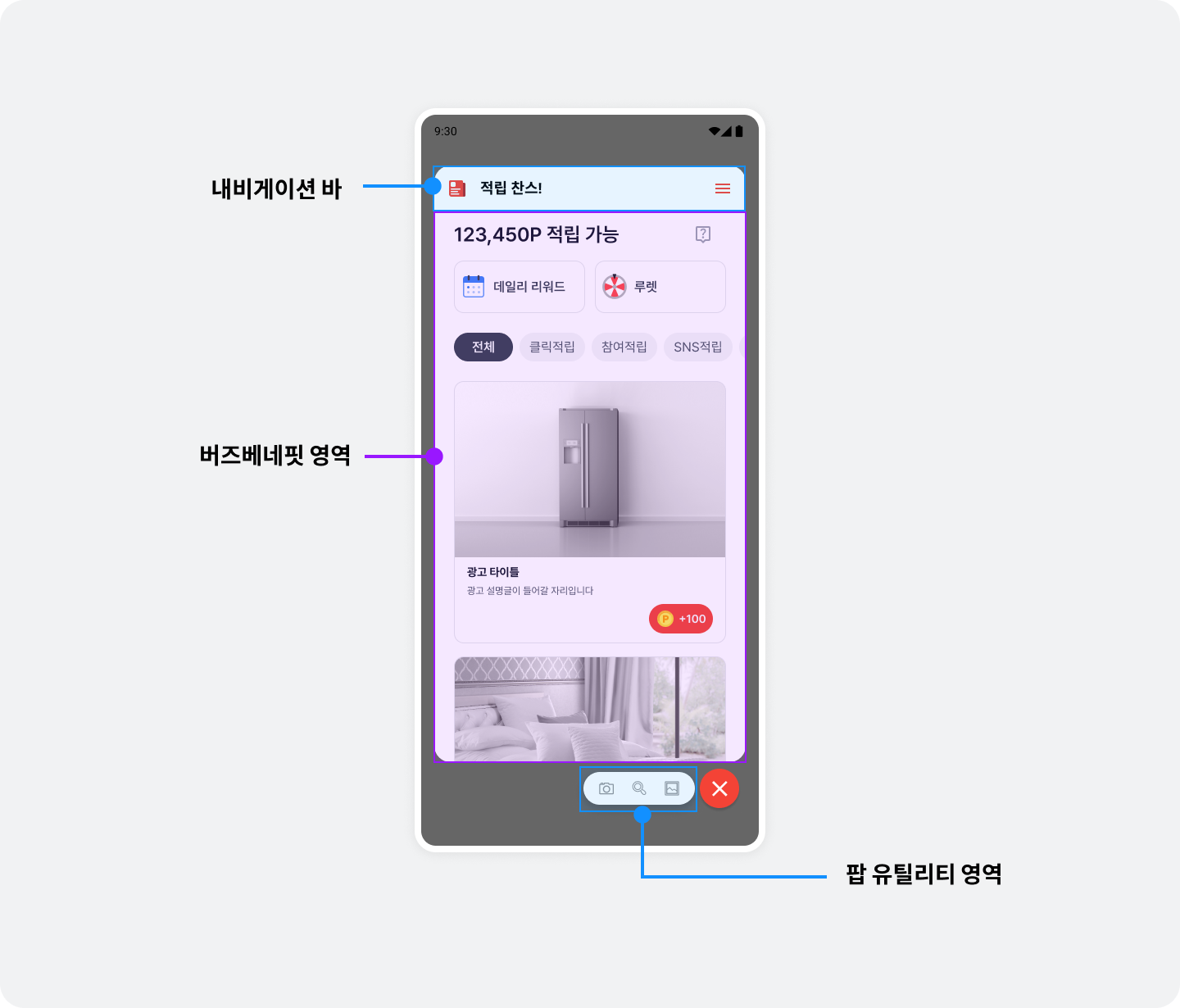
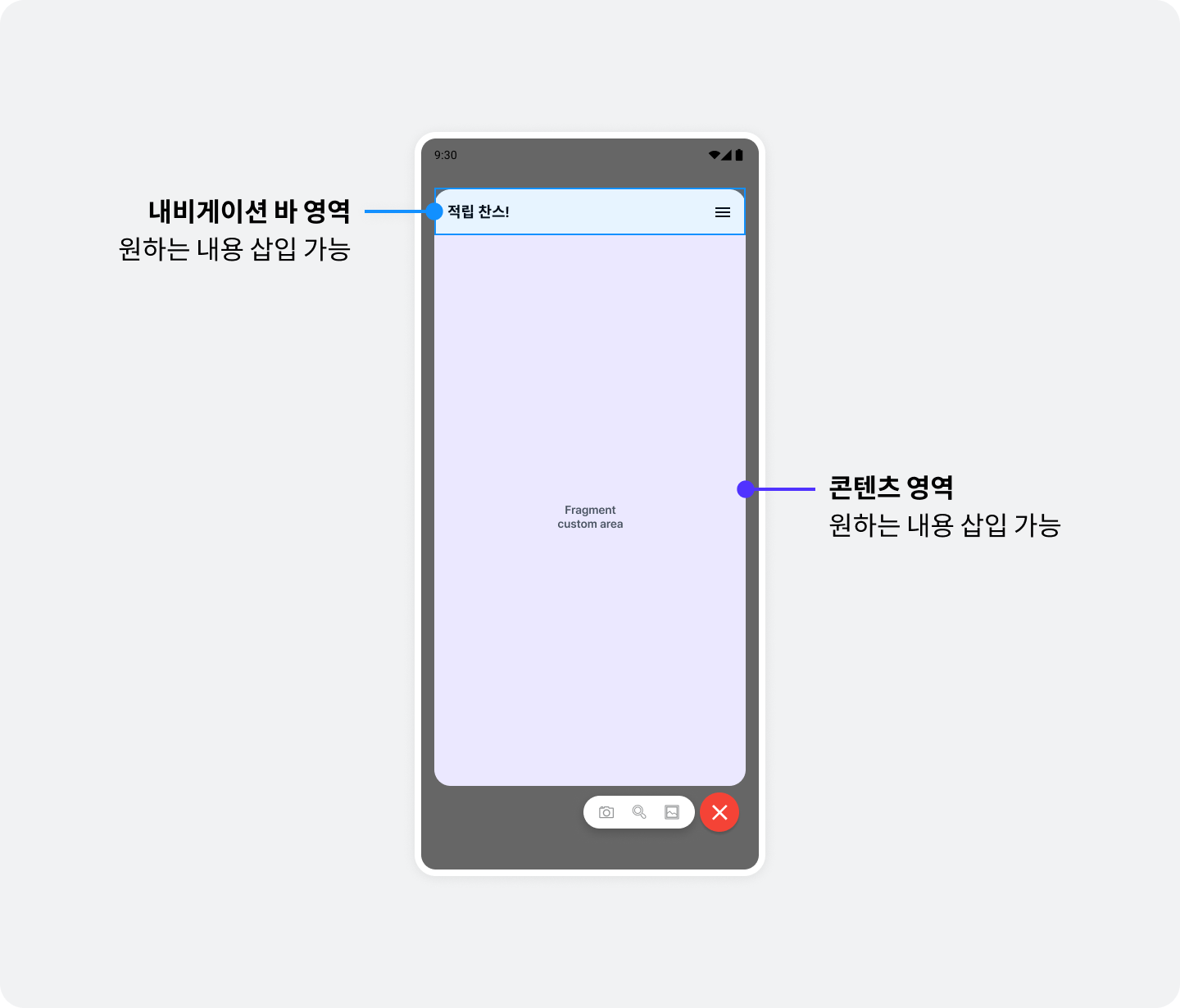
Pop BenefitHub's separate overlay has been replaced by regular BenefitHub. The navigation bar, utility area, custom pages, custom Pop close icon, and Pop message area features have been removed. Remove the related code.
The navigation bar and utility area features have been removed.
Custom pages (the content area) have been removed.
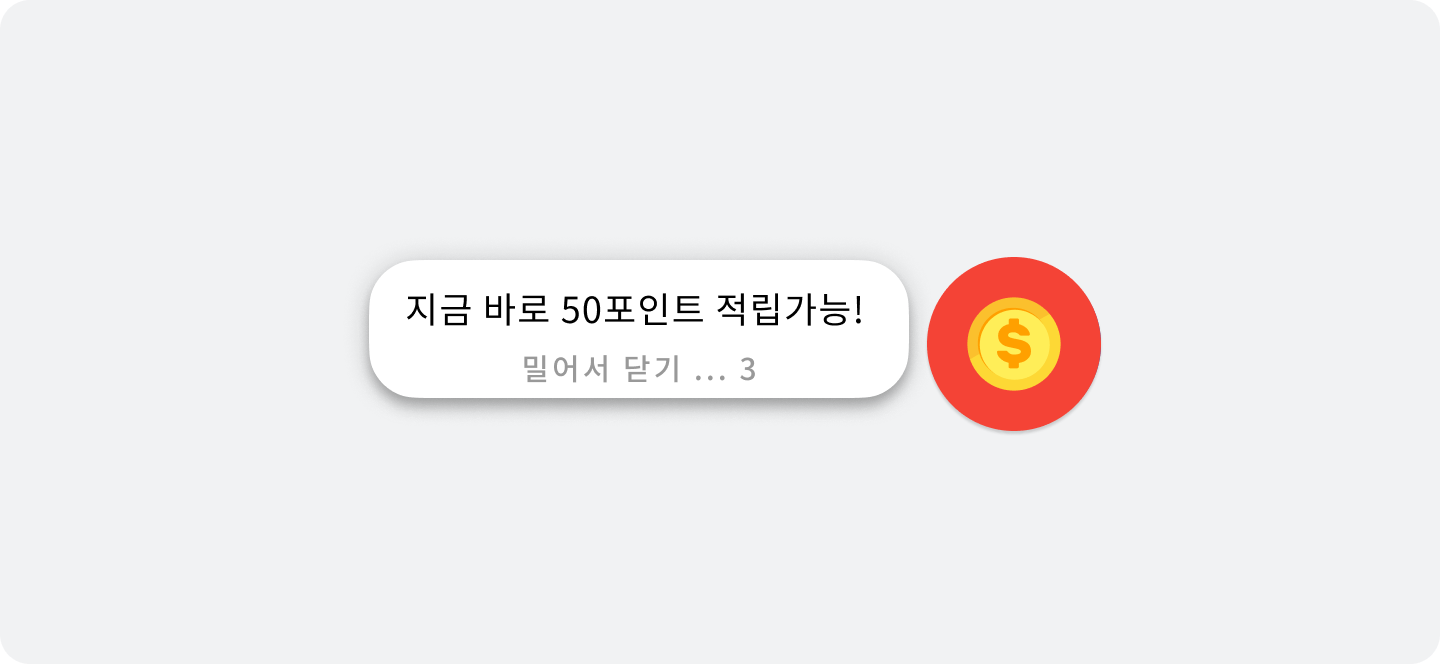
The Pop message area has been removed.
Changes to BuzzAdPopTheme configuration
- The name and package path of
BuzzAdPopThemehave changed. BuzzAdPopThemeis now called directly without creating an object instance.
- import com.buzzvil.buzzad.benefit.pop.BuzzAdPop
- import com.buzzvil.buzzad.benefit.pop.BuzzAdPopTheme
+ import com.buzzvil.buzzbenefit.pop.BuzzPopTheme

- val buzzAdPopTheme = BuzzAdPopTheme.getDefault()
-     .iconResId(R.drawable.your_pop_icon)
-     .rewardReadyIconResId(R.drawable.your_pop_icon_reward_ready)
-     .popFeedCloseIconResId(R.drawable.your_pop_icon_feed_close)
- BuzzAdPop.getInstance().setTheme(buzzAdPopTheme)

+ // SDK 초기화 전에 호출합니다.
+ BuzzPopTheme.iconResId = R.drawable.your_pop_icon
+ BuzzPopTheme.rewardReadyIconResId = R.drawable.your_pop_icon_reward_ready
Default navigation bar UI removed
- import com.buzzvil.buzzad.benefit.pop.toolbar.DefaultPopToolbarHolder
- import com.buzzvil.buzzad.benefit.pop.toolbar.PopToolbar
-
- class YourPopToolbarHolder : DefaultPopToolbarHolder() {
-     override fun getView(activity: Activity, unitId: String): View {
-         super.toolbar = PopToolbar(activity) // PopToolbar 에서 제공하는 기본 Template 사용
-         toolbar.setTitle("TemplatePopToolbarHolder") // 내비게이션 바 타이틀 문구를 변경합니다.
-         toolbar.setIconResource(R.mipmap.ic_launcher) // 내비게이션 바 좌측 아이콘을 변경합니다.
-         toolbar.setBackgroundColor(Color.LTGRAY) // 내비게이션 바 배경색을 변경합니다.
-
-         addSettingsMenuItemView(activity) // 메뉴 버튼 추가 (메뉴 안에 문의하기 버튼이 있습니다)
-         addInquiryMenuItemView(activity) // 문의하기 버튼은 이 함수를 통해 간단하게 추가 가능합니다.
-         addRightMenuItemView(activity) // custom 버튼 추가
-
-         return toolbar
-     }
-
-     // custom 버튼 추가는 toolbar.buildPopMenuItemView 를 사용하여 PopMenuImageView 를 생성하고
-     // toolbar.addRightMenuButton 를 사용하여 toolbar 에 추가합니다.
-     private fun addRightMenuItemView(activity: Activity) {
-         val menuItemView = super.toolbar.buildPopMenuItemView(activity, R.mipmap.ic_launcher)
-         menuItemView.setOnClickListener {
-             super@YourPopToolbarHolder.showInquiry(activity) // 문의하기 페이지로 연결합니다.
-         }
-         toolbar.addRightMenuButton(menuItemView)
-     }
- }
Custom navigation bar view removed
- import android.app.Activity
- import android.graphics.Color
- import android.view.View
- import com.buzzvil.buzzad.benefit.pop.toolbar.DefaultPopToolbarHolder
- import com.buzzvil.buzzad.benefit.pop.toolbar.PopToolbar
-
- class CustomPopToolbarHolder: DefaultPopToolbarHolder() {
-     override fun getView(activity: Activity, unitId: String): View {
-         super.toolbar = PopToolbar(activity) // PopToolbar에서 제공하는 기본 Template 사용
-         toolbar.setTitle("Custom Title") // 내비게이션 바 타이틀 문구를 변경합니다.
-         toolbar.setIconResource(R.mipmap.ic_launcher) // 내비게이션 바 좌측 아이콘을 변경합니다.
-         toolbar.setBackgroundColor(Color.LTGRAY) // 내비게이션 바 배경색을 변경합니다.
-
-         super.addSettingsMenuItemView(activity) // 메뉴 버튼 추가 (메뉴 안에 문의하기 버튼이 있습니다)
-         super.addInquiryMenuItemView(activity) // 문의하기 버튼은 이 함수를 통해 간단하게 추가 가능합니다.
-         addRightMenuItemView(activity) // custom 버튼 추가
-         return toolbar
-     }
-
-     // custom 버튼 추가는 toolbar.buildPopMenuItemView 를 사용하여 PopMenuImageView 를 생성하고
-     // toolbar.addRightMenuButton 를 사용하여 toolbar 에 추가합니다.
-     private fun addRightMenuItemView(activity: Activity) {
-         val menuItemView = toolbar.buildPopMenuItemView(activity, R.drawable.ic_launcher_foreground)
-         menuItemView.setOnClickListener {
-             super.showInquiry(activity) // 문의하기 페이지로 연결합니다.
-         }
-
-         toolbar.addRightMenuButton(menuItemView)
-     }
}
- import com.buzzvil.buzzad.benefit.pop.PopConfig
- import com.buzzvil.buzzad.benefit.presentation.feed.FeedConfig
-
- val popFeedConfig = FeedConfig.Builder("YOUR_POP_UNIT_ID")
-     .build()
-
- PopConfig.Builder(popFeedConfig)
-     .popToolbarHolderClass(CustomPopToolbarHolder::class.java)
-     .build()
Pop utility area removed
- import android.content.Context
- import android.view.LayoutInflater
- import android.view.View
- import android.view.ViewGroup
- import com.buzzvil.buzzad.benefit.pop.feedutility.PopUtilityLayoutHandler
-
- class CustomPopUtilityLayoutHandler(val context: Context): PopUtilityLayoutHandler(context) {
-     override fun onCreateView(parent: ViewGroup?): View {
-         val inflater = LayoutInflater.from(context)
-         return inflater.inflate(R.layout.your_pop_utility_view, parent, false)
-     }
- }
- import com.buzzvil.buzzad.benefit.pop.PopConfig
- import com.buzzvil.sample.buzzvilsdksample.pop.CustomPopUtilityLayoutHandler
-
- PopConfig.Builder(popFeedConfig)
-     .popUtilityLayoutHandlerClass(CustomPopUtilityLayoutHandler::class.java)
-     .build()
Pop close icon removed
- import com.buzzvil.buzzad.benefit.pop.BuzzAdPop
- import com.buzzvil.buzzad.benefit.pop.BuzzAdPopTheme
-
- val buzzAdPopTheme = BuzzAdPopTheme.getDefault()
-     .popFeedCloseIconResId(R.drawable.your_pop_icon_feed_close)
- BuzzAdPop.getInstance().setTheme(buzzAdPopTheme)
Pop message area removed
- Remove classes that extend
PopAdMessageView. - Remove calls to
popAdMessageViewClass()onPopConfig.Builder().
- import android.content.Context
- import android.view.LayoutInflater
- import android.widget.TextView
- import com.buzzvil.buzzad.benefit.pop.message.PopAdMessageView
-
- class CustomPopAdMessageView: PopAdMessageView {
-     private lateinit var textTitle: TextView
-     private lateinit var textDescription: TextView
-
-     constructor(context: Context): super(context) {
-         val view = LayoutInflater.from(context).inflate(R.layout.your_pop_ad_message_view, this)
-         this.textTitle = view.findViewById(R.id.textTitle)
-         this.textDescription = view.findViewById(R.id.textDescription)
-     }
-
-     override fun updateView(reward: Int, remainSeconds: Int) {
-         textTitle.text = "$reward 포인트 적립 가능합니다."
-         textDescription.text = "$remainSeconds 초 후에 닫힙니다."
-     }
-
-     override fun getDurationInSeconds(): Int {
-         return 5
-     }
-
-     override fun getMessage(): String {
-         return textTitle.text.toString()
-     }
- }
- import com.buzzvil.buzzad.benefit.pop.PopConfig
-
- PopConfig.Builder(applicationContext, "POP_UNIT_ID")
-     .popAdMessageViewClass(CustomPopAdMessageView::class.java)
Additional Pop features
Change the page shown in Pop BenefitHub
Set BuzzBenefitHubConfig on PopConfig during initialization to open a page other than the Pop BenefitHub main page directly.
For details about BuzzBenefitHubConfig, see Change BenefitHub's initial page.
// 팝에서 사용할 BuzzBenefitHubConfig 생성
val popBuzzBenefitHubConfig = BuzzBenefitHubConfig.Builder()
    .queryParams(BuzzBenefitHubPage.MAIN.toRedirectQueryParams())
    .build()

val buzzPopConfig = BuzzPopConfig.Builder()
    .buzzPopBenefitHubConfig(popBuzzBenefitHubConfig)
    .build()

val buzzBenefitConfig = BuzzBenefitConfig.Builder("YOUR_APP_ID")
    .setBuzzPopConfig(buzzPopConfig) // BuzzBenefitConfig에 BuzzPopConfig를 설정합니다.
    .build()
In-app Pop
Remove all in-app Pop code.
In-app Pop show/hide removed
- import com.buzzvil.buzzad.benefit.pop.inapppop.BuzzAdInAppPop
-
- class MainActivity : AppCompatActivity() {
-     private lateinit var buzzAdInAppPop: BuzzAdInAppPop
-
-     override fun onCreate(savedInstanceState: Bundle?) {
-         super.onCreate(savedInstanceState)
-         buzzAdInAppPop = BuzzAdInAppPop.Builder(this).build()
-     }
-
-     override fun onResume() {
-         super.onResume()
-         buzzAdInAppPop.show(this)
-     }
-
-     override fun onPause() {
-         super.onPause()
-         buzzAdInAppPop.hide()
-     }
- }
In-app Pop button icon removed
- import com.buzzvil.buzzad.benefit.pop.inapppop.BuzzAdInAppPop
- import com.buzzvil.buzzad.benefit.pop.inapppop.BuzzAdInAppPopTheme
-
- val buzzAdInAppPopTheme = BuzzAdInAppPopTheme.getDefault()
-     .iconResId(R.drawable.your_pop_icon_default) // (선택) Pop 버튼의 기본 아이콘
-     .rewardReadyIconResId(R.drawable.your_pop_icon_reward) // (선택) 적립 가능한 포인트가 있는 경우의 Pop 버튼 아이콘
-
- buzzAdInAppPop = BuzzAdInAppPop.Builder(this)
-     .theme(buzzAdInAppPopTheme) // 위에서 생성한 객체 전달
-     .build()
BuzzBanner
Integrate BuzzBanner
No changes.
Integrate additional ADNs to increase BuzzBanner revenue
- The package names of ADN dependency libraries have changed.
- Before:
com.avatye.cashblock:ad-plus-xxx - After:
com.avatye.adcash:archive-xxx
- Before:
- MezzoMedia is now bundled with AdCash. Remove its separate dependency.
Buzzvil SDK 6.9.+ 버전에서는 AdCash 3.2.2.32 버전을 사용하세요.
  // 모듈 레벨의 build.gradle

  dependencies {
-     implementation "com.avatye.cashblock:ad-plus-adfit:$adCashVersion"
+     implementation "com.avatye.adcash:archive-adfit:$adCashVersion"

-     implementation "com.avatye.cashblock:ad-plus-admob:$adCashVersion"
+     implementation "com.avatye.adcash:archive-admob:$adCashVersion"

-     implementation "com.avatye.cashblock:ad-plus-applovin:$adCashVersion"
+     implementation "com.avatye.adcash:archive-applovin:$adCashVersion"

-     implementation "com.avatye.cashblock:ad-plus-cauly:$adCashVersion"
+     implementation "com.avatye.adcash:archive-cauly:$adCashVersion"

+     // fan 대신 facebook-audience 을 사용하세요.
-     implementation "com.avatye.cashblock:ad-plus-fan:$adCashVersion"
+     implementation "com.avatye.adcash:archive-facebook-audience:$adCashVersion"

-     implementation "com.avatye.cashblock:ad-plus-fyber:$adCashVersion"
+     implementation "com.avatye.adcash:archive-fyber:$adCashVersion"

-     // MezzoMedia 의존성을 제거하세요.
-     implementation "com.avatye.cashblock:ad-plus-mezzomedia:$adCashVersion"

+     // mobon 대신 mobwith 를 사용하세요.
-     implementation "com.avatye.cashblock:ad-plus-mobon:$adCashVersion"
+     implementation "com.avatye.adcash:archive-mobwith:$adCashVersion"

-     implementation "com.avatye.cashblock:ad-plus-pangle:$adCashVersion"
+     implementation "com.avatye.adcash:archive-pangle:$adCashVersion"

-     implementation "com.avatye.cashblock:ad-plus-unity:$adCashVersion"
+     implementation "com.avatye.adcash:archive-unity:$adCashVersion"

-     implementation ("com.avatye.cashblock:ad-plus-vungle:$adCashVersion")
+     implementation ("com.avatye.adcash:archive-vungle:$adCashVersion") {
          exclude group: 'com.squareup.okhttp3', module: 'okhttp'
      }
  }
UI configuration
Global theme
Primary color
With the transition from Feed (BenefitHub) to web-based BenefitHub, this is now configured in the Buzzvil dashboard.
You can change the primary color of key UI elements across all integrated placements, including dialog buttons and bottom sheet confirmation buttons. Send your preferred color to your Buzzvil representative at help@buzzvil.com.
Reward icon
Reward icons are no longer used in any default design except the Pop icon, so this feature has been removed. Remove the related code.
- import com.buzzvil.buzzad.benefit.BuzzAdBenefitConfig
- import com.buzzvil.buzzad.benefit.presentation.BuzzAdTheme
- import com.buzzvil.sdk.BuzzvilSdk
-
- class App : Application() {
-     override fun onCreate() {
-         super.onCreate()
-
-         val buzzAdBenefitConfig = ...
-
-         // BuzzvilSdk.initialize()를 호출하기 전에  GlobalTheme을 설정합니다.
-         val buzzAdTheme = BuzzAdTheme()
-             .rewardIcon(R.drawable.your_reward_icon)
-             .participatedIcon(R.drawable.your_participated_icon)
-         BuzzAdTheme.setGlobalTheme(buzzAdTheme)
-
-         // Buzzvil SDK 초기화
-         BuzzvilSdk.initialize(...)
-     }
- }
Implement a custom CTA button
- The name and package path of
CtaViewhave changed.
- import com.buzzvil.buzzad.benefit.presentation.theme.CtaView
+ import com.buzzvil.buzzbenefit.BuzzCtaView
Changes to BuzzAdTheme (Global Theme) configuration
- The name and package path of
BuzzAdThemehave changed. BuzzAdThemeis now called directly without creating an object instance.
- import com.buzzvil.buzzad.benefit.presentation.BuzzAdTheme
+ import com.buzzvil.buzzbenefit.pop.BuzzPopTheme

  // SDK 초기화 전에 호출합니다.
- val buzzAdTheme = BuzzAdTheme()
-     .ctaViewClass(CustomCtaView::class.java)
- BuzzAdTheme.setGlobalTheme(buzzAdTheme)
+ BuzzTheme.setCustomBuzzCtaView(YourCustomBuzzCtaView::class.java)
BenefitHub UI configuration
Mission Pack
With the transition from Feed (BenefitHub) to web-based BenefitHub, configuring the Mission Pack background gradient has been removed. Remove the related code.
- import com.buzzvil.buzzad.benefit.BuzzAdBenefitConfig
- import com.buzzvil.buzzad.benefit.presentation.feed.BuzzAdFeed
- import com.buzzvil.buzzad.benefit.presentation.feed.BuzzAdFeedTheme
- import com.buzzvil.sdk.BuzzvilSdk
-
- class App : Application() {
-     override fun onCreate() {
-         super.onCreate()
-
-         val buzzAdBenefitConfig = ...
-
-         // BuzzvilSdk.initialize()를 호출하기 전에 GlobalTheme을 설정합니다.
-         val buzzAdFeedTheme = BuzzAdFeedTheme.getDefaultFeedTheme()
-             .missionPackGradientColors(intArrayOf(0xAF568DE8.toInt(), 0xAFF4FFB3.toInt()))
-             .missionPackGradientColorPositions(floatArrayOf(0.0f, 1.0f))
-         BuzzAdFeed.setDefaultTheme(buzzAdTheme)
-
-         // Buzzvil SDK 초기화
-         BuzzvilSdk.initialize(...)
-     }
- }
Navigation bar
Feed (BenefitHub) has become web-based BenefitHub. Related settings are now configured in the Buzzvil dashboard. Remove the related code and send your requested changes to your Buzzvil representative at help@buzzvil.com.
- import com.buzzvil.buzzad.benefit.presentation.feed.BuzzAdFeed
- import com.buzzvil.buzzad.benefit.presentation.feed.BuzzAdFeedTheme
-
- val buzzAdFeedTheme = BuzzAdFeedTheme.getDefault()
-     .navigationBarTitle(R.string.your_custom_title)
- BuzzAdFeed.setDefaultTheme(buzzAdFeedTheme)
User profile entry banner
This feature was removed with the transition from Feed (BenefitHub) to web-based BenefitHub. Remove the related code.
- import com.buzzvil.buzzad.benefit.presentation.feed.BuzzAdFeed
- import com.buzzvil.buzzad.benefit.presentation.feed.BuzzAdFeedTheme
- import com.buzzvil.sdk.BuzzvilSdk
-
- class App : Application() {
-     override fun onCreate() {
-         super.onCreate()
-
-         val buzzAdBenefitConfig = ...
-
-         // BuzzvilSdk.initialize()를 호출하기 전에 FeedTheme을 설정합니다.
-         val buzzAdFeedTheme = BuzzAdFeedTheme()
-             .profileBannerIcon(R.drawable.your_profile_banner_icon)
-         BuzzAdFeed.setDefaultTheme(buzzAdFeedTheme)
-
-         // Buzzvil SDK 초기화
-         BuzzvilSdk.initialize(...)
-     }
- }
Header
This feature was removed with the transition from Feed (BenefitHub) to web-based BenefitHub. Remove the related code.
- import com.buzzvil.buzzad.benefit.presentation.feed.header.FeedHeaderViewAdapter
-
- class CustomFeedHeaderViewAdapter: FeedHeaderViewAdapter {
-     override fun onCreateView(context: Context, parent: ViewGroup): View {
-         val inflater = context.getSystemService(Context.LAYOUT_INFLATER_SERVICE) as LayoutInflater
-         return inflater.inflate(R.layout.feed_header_layout, parent, false)
-     }
-
-     override fun onBindView(view: View, reward: Int) {
-         val rewardTextView: TextView = view.findViewById(R.id.textReward)
-         rewardTextView.text = reward.toString()
-     }
-
-     override fun onDestroyView() {
-         // Use this callback for clearing memory
-     }
- }
Ad category filters
Feed (BenefitHub) has become web-based BenefitHub. Related settings are now configured in the Buzzvil dashboard. Send your requested changes to your Buzzvil representative at help@buzzvil.com.
- import com.buzzvil.buzzad.benefit.presentation.BuzzAdTheme
- import com.buzzvil.sdk.BuzzvilSdk
-
- class App : Application() {
-     override fun onCreate() {
-         super.onCreate()
-
-         val buzzAdBenefitConfig = ...
-
-         // BuzzvilSdk.initialize()를 호출하기 전에 GlobalTheme을 설정합니다.
-         val buzzAdTheme = BuzzAdTheme()
-             .usePrimaryColorInFilter(true) // true: primary color, false: monocrhome
-         BuzzAdTheme.setGlobalTheme(buzzAdTheme)
-
-         // Buzzvil SDK 초기화
-         BuzzvilSdk.initialize(...)
-     }
- }
Ad design
This feature was removed with the transition from Feed (BenefitHub) to web-based BenefitHub. Remove the related code.
- import com.buzzvil.buzzad.benefit.feed.benefithub.list.adapter.BenefitHubAdViewAdapter
- import com.buzzvil.buzzad.benefit.presentation.feed.FeedConfig
UI when no ads are available
This feature was removed with the transition from Feed (BenefitHub) to web-based BenefitHub. Remove the related code.
- import com.buzzvil.buzzad.benefit.presentation.feed.BuzzAdFeed
- import com.buzzvil.buzzad.benefit.presentation.feed.BuzzAdFeedTheme
- import com.buzzvil.sdk.BuzzvilSdk
-
- class App : Application() {
-     override fun onCreate() {
-         super.onCreate()
-
-         val buzzAdBenefitConfig = ...
-
-         // BuzzvilSdk.initialize()를 호출하기 전에 FeedTheme을 설정합니다.
-         val buzzAdFeedTheme = BuzzAdFeedTheme()
-             .noFillErrorImage(R.drawable.your_no_fill_error_image)
-             .noFillErrorTitle(R.string.your_no_fill_error_title)
-             .noFillErrorDescription1st(R.string.your_no_fill_error_description_1st)
-             .noFillErrorDescription2nd(R.string.your_no_fill_error_description_2nd)
-             .noFillErrorDescription3rd(R.string.your_no_fill_error_description_3rd)
-             .noFillErrorDescriptionFinalAllFilter(R.string.your_no_fill_error_description_final_all_filter)
-             .noFillErrorDescriptionFinalOtherFilters(R.string.your_no_fill_error_description_final_other_filters)
-             .noFillErrorButton1st(R.string.your_no_fill_error_button_1st)
-             .noFillErrorButton2nd(R.string.your_no_fill_error_button_2nd)
-             .noFillErrorButton3rd(R.string.your_no_fill_error_button_3rd)
-             .noFillErrorButtonFinalAllFilter(R.string.your_no_fill_error_button_final_all_filter)
-             .noFillErrorButtonFinalOtherFilters(R.string.your_no_fill_error_button_final_other_filters)
-         BuzzAdFeed.setDefaultTheme(buzzAdFeedTheme)
-
-         // Buzzvil SDK 초기화
-         BuzzvilSdk.initialize(...)
-     }
- }
User profile error UI
This feature was removed with the transition from Feed (BenefitHub) to web-based BenefitHub. Remove the related code.
- import com.buzzvil.buzzad.benefit.presentation.feed.BuzzAdFeed
- import com.buzzvil.buzzad.benefit.presentation.feed.BuzzAdFeedTheme
-
- class App : Application() {
-     override fun onCreate() {
-         super.onCreate()
-
-         val buzzAdBenefitConfig = ...
-
-         // BuzzvilSdk.initialize()를 호출하기 전에 FeedTheme을 설정합니다.
-         val buzzAdFeedTheme = BuzzAdFeedTheme()
-             .userProfileErrorImage(R.drawable.your_user_profile_error_image)
-             .userProfileErrorTitle(R.string.your_user_profile_error_title)
-             .userProfileErrorDescription(R.string.your_user_profile_error_description)
-         BuzzAdFeed.setDefaultTheme(buzzAdFeedTheme)
-
-         // Buzzvil SDK 초기화
-         BuzzvilSdk.initialize(...)
-     }
- }
Server error UI
This feature was removed with the transition from Feed (BenefitHub) to web-based BenefitHub. Remove the related code.
- import com.buzzvil.buzzad.benefit.presentation.feed.BuzzAdFeed
- import com.buzzvil.buzzad.benefit.presentation.feed.BuzzAdFeedTheme
- import com.buzzvil.sdk.BuzzvilSdk
-
- class App : Application() {
-     override fun onCreate() {
-         super.onCreate()
-
-         val buzzAdBenefitConfig = ...
-
-         // BuzzvilSdk.initialize()를 호출하기 전에 FeedTheme을 설정합니다.
-         val buzzAdFeedTheme = BuzzAdFeedTheme()
-             .serverErrorImage(R.drawable.your_server_error_image)
-             .serverErrorTitle(R.string.your_user_profile_error_title)
-             .serverErrorDescription(R.string.your_server_error_description)
-         BuzzAdFeed.setDefaultTheme(buzzAdFeedTheme)
-
-         // Buzzvil SDK 초기화
-         BuzzvilSdk.initialize(...)
-     }
- }
Other error screen UI
This feature was removed with the transition from Feed (BenefitHub) to web-based BenefitHub. Remove the related code.
- import com.buzzvil.buzzad.benefit.presentation.feed.BuzzAdFeed
- import com.buzzvil.buzzad.benefit.presentation.feed.BuzzAdFeedTheme
- import com.buzzvil.sdk.BuzzvilSdk
-
- class App : Application() {
-     override fun onCreate() {
-         super.onCreate()
-
-         val buzzAdBenefitConfig = ...
-
-         // BuzzvilSdk.initialize()를 호출하기 전에 FeedTheme을 설정합니다.
-         val buzzAdFeedTheme = BuzzAdFeedTheme()
-             .privacyPolicyErrorImage(R.drawable.your_privacy_policy_error_image)
-             .agePolicyErrorImage(R.drawable.your_age_policy_error_image)
-             .networkErrorImage(R.drawable.your_nework_error_image)
-             .unknownErrorImage(R.drawable.your_unknown_error_image)
-         BuzzAdFeed.setDefaultTheme(buzzAdFeedTheme)
-
-         // Buzzvil SDK 초기화
-         BuzzvilSdk.initialize(...)
-     }
- }
Prompt to add Pop
This feature was removed with the transition from Feed (BenefitHub) to web-based BenefitHub. Remove the related code.
- import com.buzzvil.buzzad.benefit.presentation.feed.BuzzAdFeed
- import com.buzzvil.buzzad.benefit.presentation.feed.BuzzAdFeedTheme
- import com.buzzvil.sdk.BuzzvilSdk
-
- class App : Application() {
-     override fun onCreate() {
-         super.onCreate()
-
-         val buzzAdBenefitConfig = ...
-
-         // BuzzvilSdk.initialize()를 호출하기 전에 FeedTheme을 설정합니다.
-         val buzzAdFeedTheme = BuzzAdFeedTheme()
-             .popModalImage(R.drawable.your_pop_modal_image)
-         BuzzAdFeed.setDefaultTheme(buzzAdFeedTheme)
-
-         // Buzzvil SDK 초기화
-         BuzzvilSdk.initialize(...)
-     }
- }
Custom UI for consent to share personal information with third parties
- The name and package path of
PrivacyPolicyManagerhave changed. PrivacyPolicyManager.revokeConsent()has been removed. To withdraw consent, contact your Buzzvil representative at help@buzzvil.com.
- import com.buzzvil.buzzad.benefit.BuzzAdBenefit
+ import com.buzzvil.buzzbenefit.BuzzBenefit

- BuzzAdBenefit.getPrivacyPolicyManager().grantConsent()
+ lifecycleScope.launch(Dispatchers.IO) {
+     // SDK 초기화를 하지 않으면 privacyPolicyManager는 null을 반환합니다.
+
+     // 개인정보 동의 여부를 확인합니다.
+     val isConsentGranted: Result<Boolean>? = BuzzBenefit.privacyPolicyManager?.isConsentGranted()
+
+     // 직접 구현한 개인정보 제3자 제공 동의 UI에서 동의를 받았을 경우 아래 코드를 실행하면, 베네핏허브 진입 시 개인정보 제3자 제공 동의 UI가 노출되지 않으면서 광고 할당이 정상적으로 진행 됩니다.
+     val result: Result<Unit>? = BuzzBenefit.privacyPolicyManager?.grantConsent()
+ }

- BuzzAdBenefit.getPrivacyPolicyManager().revokeConsent()
Custom in-app browser
Remove all custom in-app browser code.
- import com.buzzvil.buzzad.benefit.presentation.Launcher
- import com.buzzvil.buzzad.benefit.presentation.Launcher.LauncherEventListener
- import com.buzzvil.buzzad.browser.BuzzAdJavascriptInterface

- BuzzAdBenefit.setLauncher(CustomLauncher())
User experience features
Configure the dark theme
The Buzzvil SDK automatically applies the dark theme according to your app's theme setting. To keep it in light or dark mode, contact your Buzzvil representative at help@buzzvil.com.
Add user support for action-based ads
- The name and package path of
BuzzAdBenefithave changed. - Opening the support page without a Unit ID now shows participation history for all units.
- import com.buzzvil.buzzad.benefit.BuzzAdBenefit
+ import com.buzzvil.buzzbenefit.BuzzBenefit

- BuzzAdBenefit.getInstance().showInquiryPage(Context, YOUR_UNIT_ID)
+ BuzzBenefit.showInquiryPage(Context)
Change video ad playback conditions
Changing video ad playback conditions has been removed. Remove the related code.
- import com.buzzvil.buzzad.benefit.BuzzAdBenefit
- import com.buzzvil.buzzad.benefit.core.models.AutoplayType
- import com.buzzvil.buzzad.benefit.core.models.UserPreferences
-
- val userPreferences = UserPreferences.Builder(BuzzAdBenefit.getUserPreferences())
-     .autoplayType(AutoplayType.ON_WIFI)
-     // .autoplayType(AutoplayType.DISABLED) // 동영상 광고를 자동으로 재생하지 않습니다.
-     // .autoplayType(AutoplayType.ENABLED) //  동영상 광고를 항상 자동재생합니다.
-     .build()
- BuzzAdBenefit.setUserPreferences(userPreferences)
Check ad types
NativeAdandNativeAd2have been merged intoBuzzNativeAd.
- import com.buzzvil.buzzad.benefit.presentation.nativead.NativeAd
- import com.buzzvil.buzzad.benefit.nativead2.api.NativeAd2
+ import com.buzzvil.buzzbenefit.buzznative.BuzzNativeAd
Troubleshooting
An error code appears
- Some error code names in
BuzzAdErrorhave changed.
- import com.buzzvil.buzzad.benefit.core.ad.AdError
+ import com.buzzvil.buzzbenefit.BuzzAdError

- AdError.INVALID_PARAMETERS
+ BuzzAdError.Type.CLIENT_ERROR

- AdError.PRIVACY_POLICY_NOT_ALLOWED
+ BuzzAdError.Type.PRIVACY_POLICY_NOT_GRANTED