Getting started
Complete the setup below before using the Buzzvil Android SDK (referred to below as the Buzzvil SDK).
Requirements
- Android 5.0 Lollipop (API level 21) or later
- compileSdkVersion 35 or later
- Android Studio Ladybug or later
- Android Gradle Plugin 8.8 or later
- Gradle 8.10.2 or later
- Kotlin 1.9.25 or later
- JDK 1.8
Obtain integration IDs
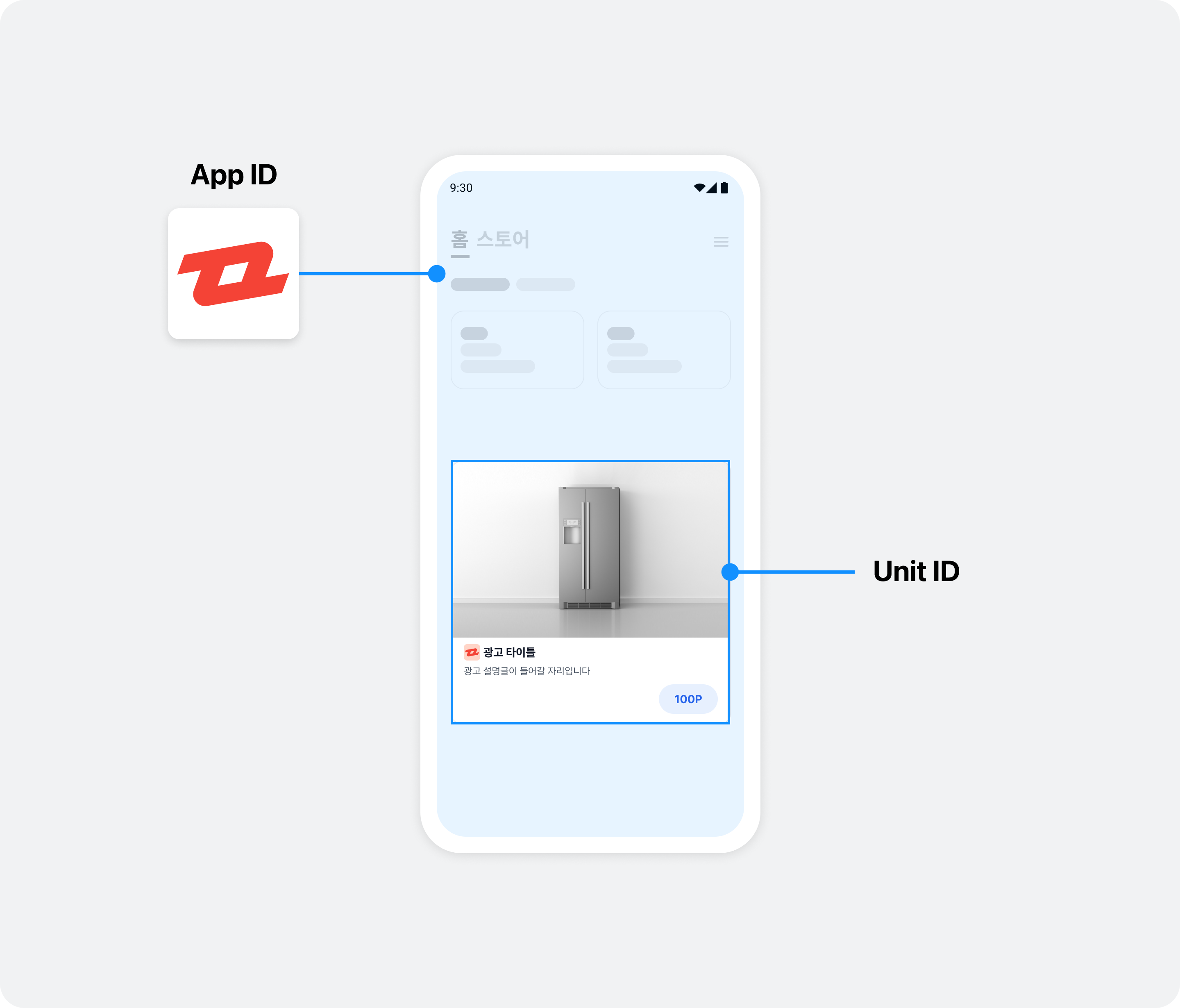
To integrate the Buzzvil SDK, you need a unique identifier for your app (App ID) and for each ad placement (Unit ID). Contact your Buzzvil representative at help@buzzvil.com to obtain them.
| ID type | Description |
|---|---|
| App ID | A unique identifier assigned to each app that integrates the Buzzvil SDK. |
| Unit ID | A unique identifier assigned to each placement created through the Buzzvil SDK. |
Integrate a reward server
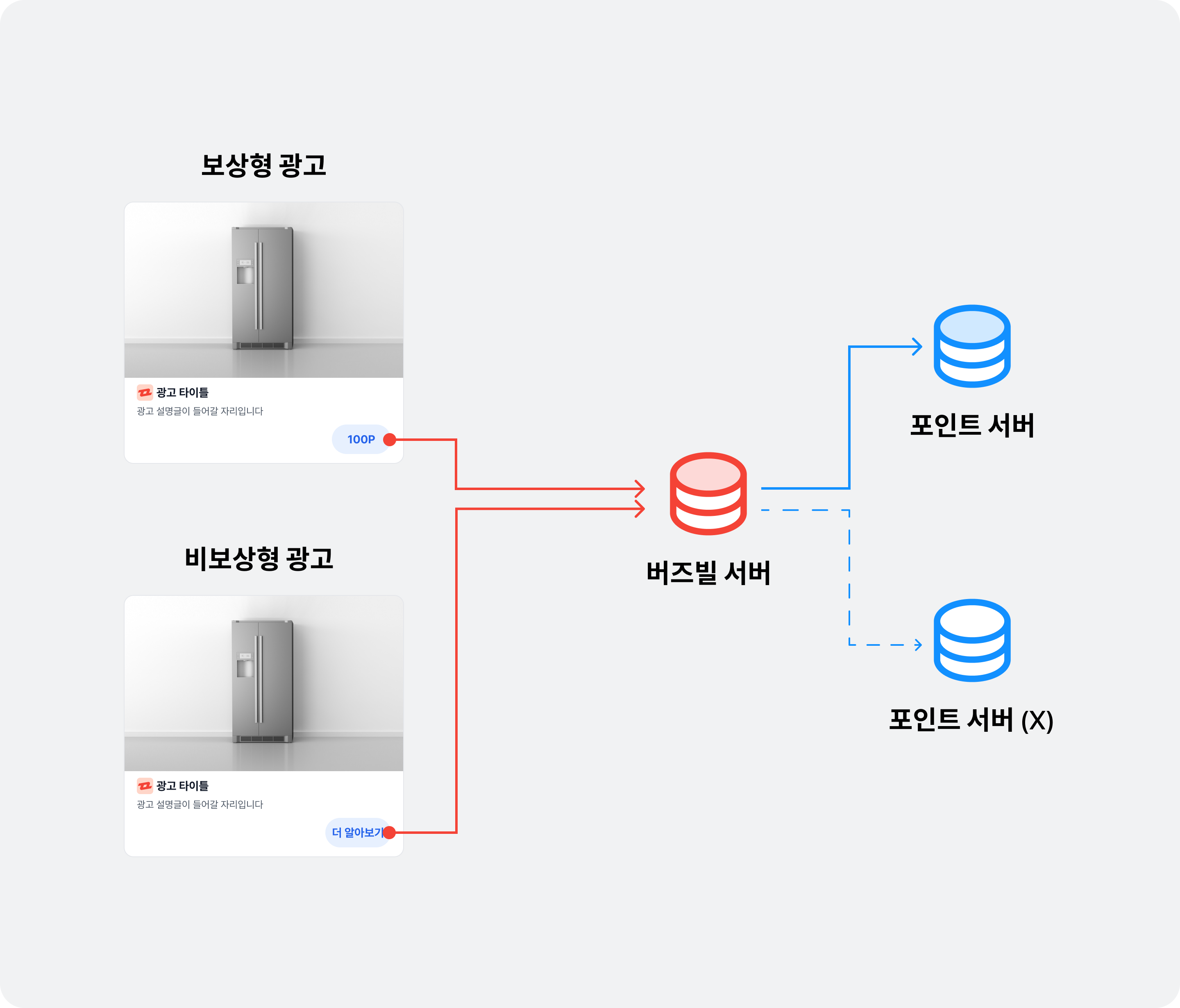
Ads supplied by Buzzvil are classified as rewarded ads, which award points to users, and non-rewarded ads, which do not.
- Non-rewarded ads: You do not need to award points when users engage with these ads, so a point-processing server is not required.
- Rewarded ads: You must award points when users engage with these ads, so you need a server that can process reward requests from the client.
If you have your own server that can process reward requests for rewarded ads, integrate it by following the postback integration guide.
Install the SDK
- Add the Buzzvil Maven repository to
settings.gradle.
// settings.gradle

pluginManagement {
    repositories {
        google()
        mavenCentral()
        gradlePluginPortal()
    }
}
dependencyResolutionManagement {
    repositoriesMode.set(RepositoriesMode.FAIL_ON_PROJECT_REPOS)
    repositories {
        google()
        mavenCentral()
        maven("https://dl.buzzvil.com/public/maven") // 버즈빌 저장소
        maven("https://devrepo.kakao.com/nexus/content/groups/public/") // AdFit
        maven("https://cauly.github.io/cauly-sdk-android-maven/maven-repo") // Cauly
        maven("https://artifact.bytedance.com/repository/pangle") // Pangle
    }
}
- Configure the Buzzvil SDK library in your module-level
build.gradlefile.
// 모듈 레벨의 build.gradle


dependencies {

    val buzzvilBomVersion = "6.9.+"

    api(platform("com.buzzvil:buzzvil-bom:$buzzvilBomVersion"))

    implementation("com.buzzvil:buzzvil-sdk")

}
- Update
compileSdkandtargetSdkto 35 in the module-levelbuild.gradlefile.
// 모듈 레벨의 build.gradle

android {
    compileSdk = 35

    defaultConfig {
        minSdk = 21
        targetSdk = 35
    }
}
Initialize the SDK
After installing the Buzzvil SDK, initialize it with the required information, including your App ID and user profile.
Initialize the Buzzvil SDK
- Call
BuzzvilSdk.initialize()to initialize the SDK.
| Required/recommended | Parameter | Description |
|---|---|---|
| Required | application | The Application Context required to run the SDK. |
| Required | buzzBenefitConfig | The default BenefitHub configuration used by the Buzzvil SDK. |
import android.app.Application
import com.buzzvil.buzzbenefit.BuzzBenefitConfig
import com.buzzvil.sdk.BuzzvilSdk

class YourApp : Application() {
    override fun onCreate() {
        super.onCreate()

        // BuzzBenefit 설정
        val buzzBenefitConfig = BuzzBenefitConfig.Builder("YOUR_APP_ID")
            .build()

        // Buzzvil SDK 초기화
        BuzzvilSdk.initialize(
            application = this@App,
            buzzBenefitConfig = buzzBenefitConfig
        )
    }
}
- Set your Application class in
AndroidManifest.xml.
<manifest>
    <application
        android:name=".YourApp">

        ...

    </application>
</manifest>
Log in
You must log in before requesting an ad allocation. See the table below for the fields in a login request.
❗️❗️❗️ Important ❗️❗️❗️
Although gender and year of birth are marked as recommended, targeted ads cannot be served without them. Most Buzzvil ads are targeted, so you must provide this information for normal ad allocation.
| Required/recommended | User profile | Description |
|---|---|---|
| Required | userId | A unique ID for each user that does not identify them personally (login IDs and email addresses are not allowed). This value must remain unchanged while the user uses your service and is required for ad allocation. Limited to 255 ASCII characters or fewer. ⚠️ Caution If the user ID changes after the app is uninstalled and reinstalled, or you cannot use a fixed ID for another reason, action-based ads cannot be served because of the risk of abuse. Contact your Buzzvil business representative if a user's unique identifier can change. |
| Recommended | gender | The user's gender.
|
| Recommended | birthYear | The user's year of birth. |
The following example registers a user profile with the SDK. You can also delete a registered user profile.
import com.buzzvil.sdk.BuzzvilSdk
import com.buzzvil.sdk.BuzzvilSdkLoginListener
import com.buzzvil.sdk.BuzzvilSdkUser

// 유저 정보를 구성합니다.
val buzzvilSdkUser = BuzzvilSdkUser(
    userId = "YOUR_USER_ID",
    gender = BuzzvilSdkUser.Gender.MALE,
    birthYear = 1980,
)

// 유저 정보로 로그인을 요청합니다.
BuzzvilSdk.login(
    buzzvilSdkUser = buzzvilSdkUser,
    // (선택) 로그인 상태를 확인할 수 있는 리스너를 등록합니다.
    listener = object : BuzzvilSdkLoginListener {
        override fun onSuccess() {
            // 로그인에 성공한 경우 호출됩니다.
            // `BuzzvilSdk.isLoggedIn`이 true 상태가 됩니다.
            // onSuccess가 호출된 이후부터 광고 할당이 가능합니다.
        }

        override fun onFailure(errorType: BuzzvilSdkLoginListener.ErrorType) {
            // 로그인에 실패한 경우 호출됩니다.
            // NOT_INITIALIZED: SDK 초기화를 하지 않고 로그인을 시도한 경우
            // INVALID_USER_ID: 적절하지 않은 값을 입력한 경우 (e.g. userId가 빈 문자열인 경우)
            // UNKNOWN: 그 외 알 수 없는 오류
        }
    }
)

// 로그인 상태를 확인합니다.
val isLoggedIn: Boolean = BuzzvilSdk.isLoggedIn

// 로그아웃을 호출하면 로컬에 저장된 모든 유저 정보가 삭제됩니다.
BuzzvilSdk.logout()
Sample code
See the GitHub sample code for examples of actual implementations.
Frequently asked questions
| Question | Answer |
|---|---|
| What changed to support Android 14? | See the release notes for the Android 14 compatibility changes in Buzzvil SDK 5.13.x. |