FlexAd
Learn how to add and configure a FlexAd placement and implement additional features through the SDK interface.
Key features
FlexAd is a new ad placement that upgrades the existing native placement. It accelerates app monetization by serving multiple ad formats—VAST video, static images, and network ads—in a single placement based on priority. It also provides dynamic features that encourage users to engage with more ads.
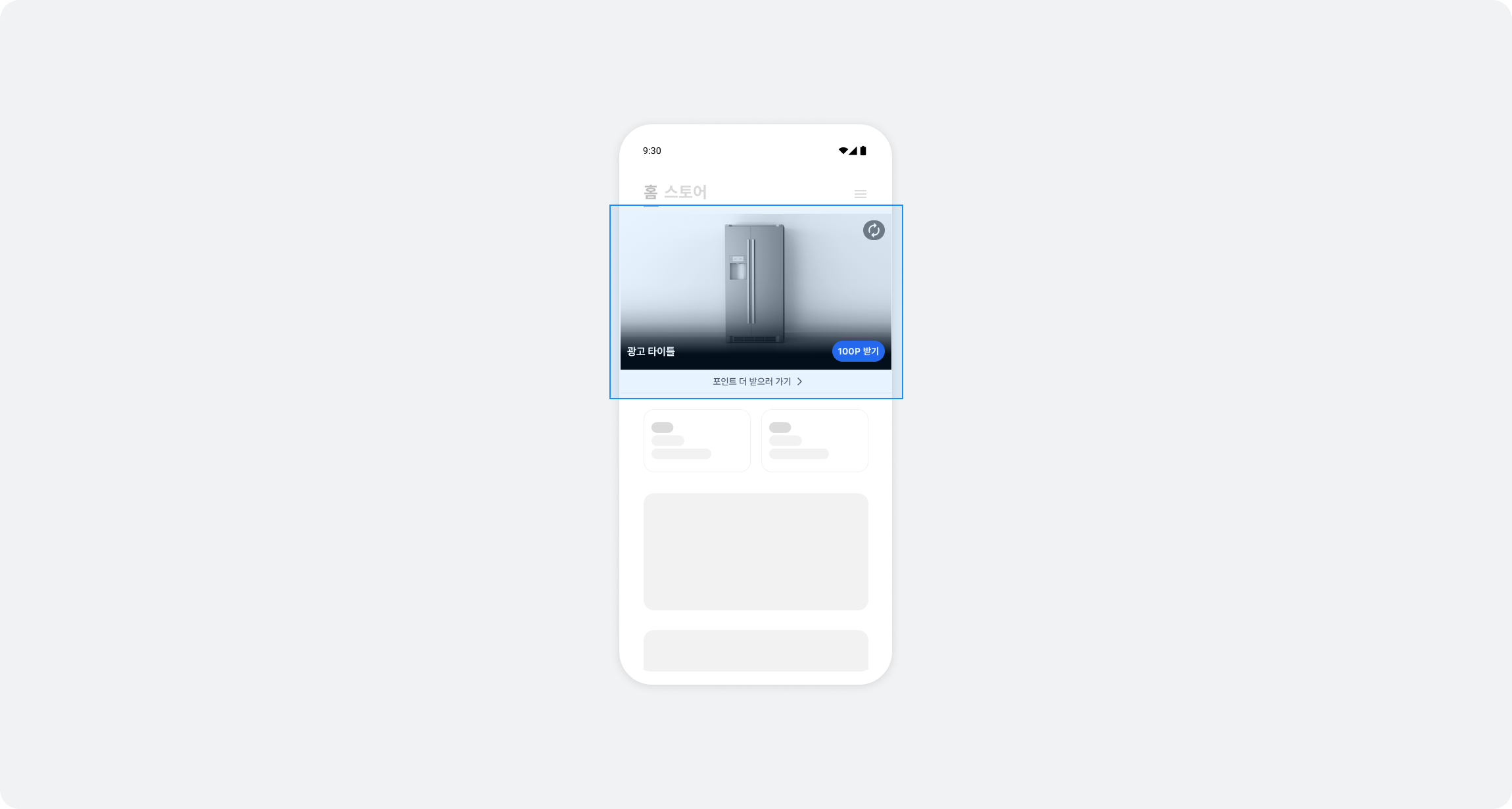
FlexAd automatically switches between ad formats in a single placement and provides the following features:
- Multiple ad formats: Unified support for VAST video, static images, and network ads in one placement
- Automatic ad refresh: Automatically switches to the next ad when the user completes participation
- Viewability tracking: Automatically pauses and resumes based on viewability (at least 50% visible)
Integration
Follow these steps to integrate FlexAd into your app.
Step 1. Prepare
- Buzzvil SDK version
- Single-ad type (
normal, default): v6.7.0 or later - Carousel type (
carousel): v6.8.0 or later
- Single-ad type (
- Complete Getting started.
- Obtain a Unit ID for the FlexAd placement (referred to below as
YOUR_FLEXAD_UNIT_ID).
Step 2. Configure the ad layout
Review the FlexAd view structure and add BuzzFlexAdView in code.
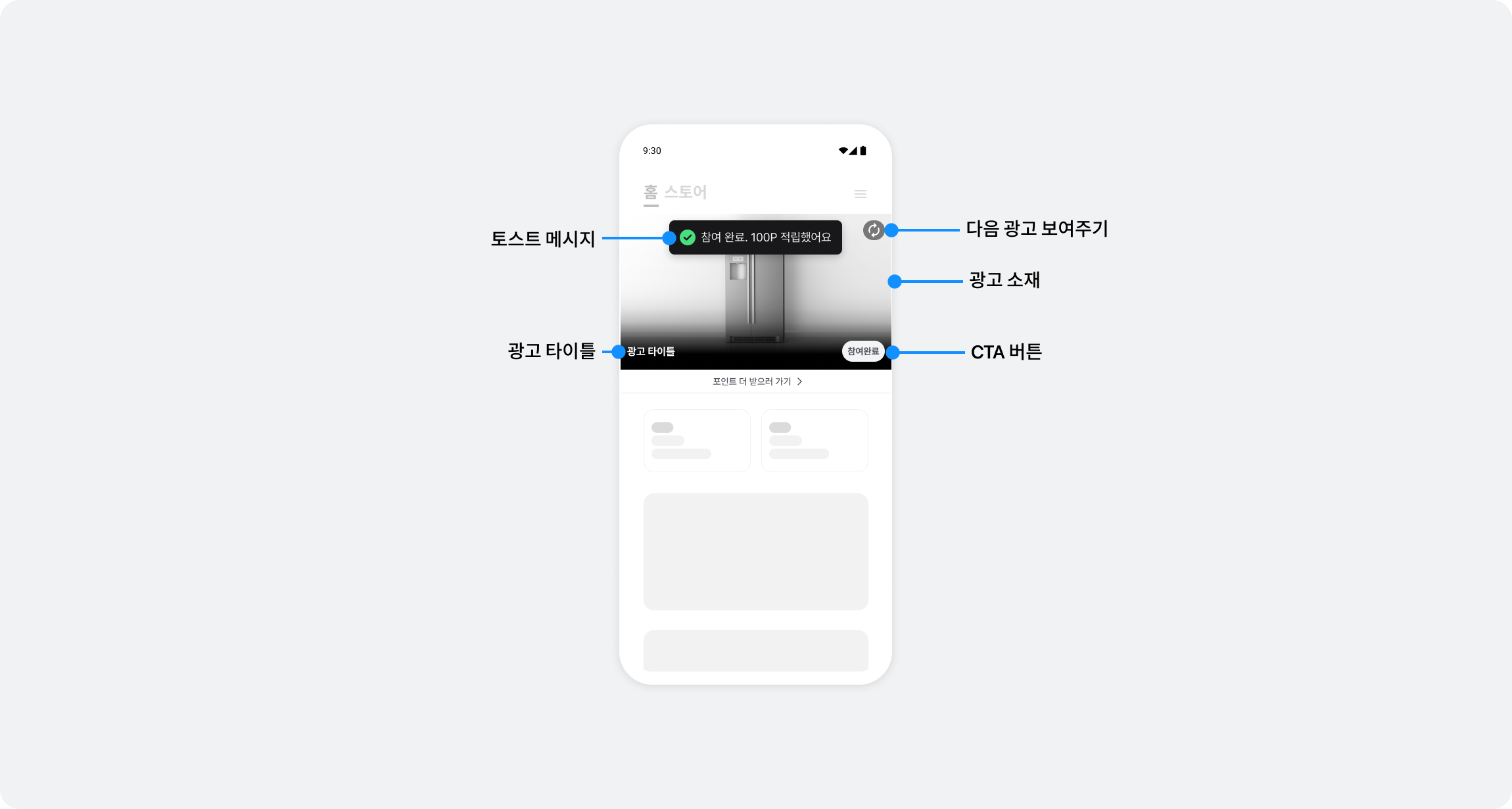
View structure
BuzzFlexAdView consists of the following areas:
| Area | Description | Size |
|---|---|---|
| Ad content | Displays loading states, VAST video, static images, and other content | 16:9 aspect ratio |
| BenefitHub CTA | Bottom button that opens BenefitHub (included automatically) | Approximately 40pt |
| Divider | Separates the placement from the content below (included automatically) | 1pt |
Therefore, the ad content is 16:9, but the total height of BuzzFlexAdView is the 16:9 height plus approximately 41pt.
Configure in code
import UIKit
import BuzzvilSDK

class FlexAdViewController: UIViewController {
    private let buzzFlexAdView = BuzzFlexAdView()

    override func viewDidLoad() {
        super.viewDidLoad()

        // FlexAd 뷰 설정
        view.addSubview(buzzFlexAdView)

        // 제약 조건 설정 (wrap_content 형태)
        buzzFlexAdView.translatesAutoresizingMaskIntoConstraints = false
        NSLayoutConstraint.activate([
            buzzFlexAdView.topAnchor.constraint(equalTo: view.safeAreaLayoutGuide.topAnchor),
            buzzFlexAdView.leadingAnchor.constraint(equalTo: view.leadingAnchor),
            buzzFlexAdView.trailingAnchor.constraint(equalTo: view.trailingAnchor)
            // 높이는 자동 계산됨 (16:9 콘텐츠 + 하단 CTA + 구분선)
        ])

        // 그 외 추가 콘텐츠 설정
        setupAdditionalContent()
    }
}
Step 3. Display ads
Create a BuzzFlex object, set its delegate, and load an ad. Call bind() inside a delegate callback.
import UIKit
import BuzzvilSDK

class FlexAdViewController: UIViewController {
    private let buzzFlexAdView = BuzzFlexAdView()

    // 기본값: 단일형(normal)
    private let buzzFlex = BuzzFlex(unitId: YOUR_FLEXAD_UNIT_ID)
    // 캐러셀형으로 표시하려면 아래처럼 생성하세요 (v6.8.0 이상)
    // private let buzzFlex = BuzzFlex(unitId: YOUR_FLEXAD_UNIT_ID, type: .carousel)

    override func viewDidLoad() {
        super.viewDidLoad()

        setupViews()

        // 1. Delegate 설정 (반드시 load() 이전에)
        buzzFlex.delegate = self

        // 2. (Optional) 주요 색상 설정
        buzzFlex.setPrimaryColor(.systemBlue)

        // 3. load() 호출 (Delegate가 설정된 상태에서)
        buzzFlex.load()
    }
}

// MARK: - BuzzFlexDelegate
extension FlexAdViewController: BuzzFlexDelegate {
    func buzzFlexOnSuccess() {
        // load() 완료 후 호출됨
        // 여기서 bind() 호출
        buzzFlexAdView.bind(buzzFlex)
    }

    func buzzFlexOnFailure(_ error: Error) {
        // 광고 할당에 실패했습니다
        if let buzzError = error as? BuzzError {
            switch buzzError {
            case .agePolicy:
                // age policy 위반: UI 숨김
                buzzFlexAdView.isHidden = true

            case .emptyResponse:
                // 할당 가능한 광고 없음: 일시적 상황으로 bind() 호출
                buzzFlexAdView.bind(buzzFlex)

            default:
                // 기타 에러: bind() 호출
                buzzFlexAdView.bind(buzzFlex)
            }
        }
    }

    func buzzFlexOnClicked() {
        // 유저가 광고를 클릭했습니다
    }
}
Step 4. Test the basic integration
After completing the basic integration, check the following:
- Ads are allocated and displayed correctly.
- The placement automatically switches to the next ad after participation.
- The BenefitHub entry point works correctly.
Additional features
Customize the primary color
You can set the primary color of the FlexAd UI:
let buzzFlex = BuzzFlex(unitId: YOUR_FLEXAD_UNIT_ID)

// 색상 설정
buzzFlex.setPrimaryColor(.systemBlue)

buzzFlex.delegate = ...
buzzFlex.load()
UI elements such as the reward pill and progress bar use the primary color you configure.
Ad operation policy (mandatory requirements)
Ad request policy
- Make the initial ad request only once when the app screen opens.
- Subsequent ad requests (reallocations) are allowed only after a clear user action, such as a screen transition.
- Automatically refreshing ads at fixed time intervals is prohibited.
Excessive ad requests can harm the user experience, ad performance, and revenue.
Error handling
This section explains how to handle errors that may occur during FlexAd integration.
Error codes
Cast the Error returned by the buzzFlexOnFailure() callback to BuzzError to identify the cause of an error.
| Error code | Description | Cause | Resolution |
|---|---|---|---|
.notInitialized | SDK not initialized | SDK initialization in Getting started was not completed | Check SDK initialization |
.serverError | Server error (HTTP 500) | Internal Buzzvil server error | Check the network and retry |
.clientError | Client error (HTTP 400) | Invalid request or expired token | Check the Unit ID and login state |
.connectionTimeout | Network timeout | Unstable or slow network connection | Check the network |
.emptyResponse | No ad allocated | No ads are available for allocation | Check whether the FlexAd placement is enabled |
.waitingForResponse | Awaiting response | The previous request is still in progress | Wait long enough before retrying |
.agePolicy | Google policy requirement not met | The user was identified as aged 14 or younger | Recheck the age information |
.privacyPolicyNotGranted | Missing personal information consent | The user has not consented to personal information collection | Ask the user to consent to collection |
.unknown | Unknown error | An exception that cannot be identified | See Troubleshooting and contact your Buzzvil representative |
For an agePolicy error, remove the placement or customize the subsequent behavior.
Error handling example
extension FlexAdViewController: BuzzFlexDelegate {
    func buzzFlexOnFailure(_ error: Error) {
        guard let buzzError = error as? BuzzError else { return }
        switch buzzError {
        case .emptyResponse:
            // 광고 미할당: UI 숨김 처리
            buzzFlexAdView.isHidden = true

        case .connectionTimeout:
            // 네트워크 오류: 재시도 버튼 제공
            showRetryButton()

        case .serverError:
            // 서버 오류: 사용자에게 안내
            let alert = UIAlertController(
                title: "알림",
                message: "서버 오류가 발생했습니다. 잠시 후 다시 시도해주세요.",
                preferredStyle: .alert
            )
            alert.addAction(UIAlertAction(title: "확인", style: .default))
            present(alert, animated: true)

        default:
            // 기타 오류
            print("FlexAd 로드 실패: \(error.localizedDescription)")
        }
    }

    func buzzFlexOnSuccess() {
        // 성공 처리
        buzzFlexAdView.isHidden = false
    }

    func buzzFlexOnClicked() {
        // 클릭 처리
    }
}
Frequently asked questions
| Question | Answer |
|---|---|
| What if no ad is allocated? | Check the error type in the buzzFlexOnFailure() callback. Check the network connection, or contact your Buzzvil representative at help@buzzvil.com to confirm that the FlexAd placement is enabled. |
| Does the placement automatically switch to the next ad after participation? | Yes. FlexAd automatically switches to the next ad when the user completes participation. No additional implementation is needed. |
| Can I use only specific ad formats? | FlexAd is designed to use all formats together for an optimized ad experience. Selecting only specific formats is not supported. |
| Can I add custom behavior when an ad is clicked? | We recommend only logging or analytics in the buzzFlexOnClicked() callback. Avoid adding business logic that could conflict with automatic ad behavior. |
| Only BenefitHub ads appear | Check the integration and logs. Integration, configuration, or server errors may cause only BenefitHub in-house ads to appear. |