BuzzBanner
BuzzBanner is a non-rewarded ad product that increases inventory revenue while taking the user experience into account. You can integrate BuzzBanner below Feed and the ad participation instructions page, or at any other location you choose.
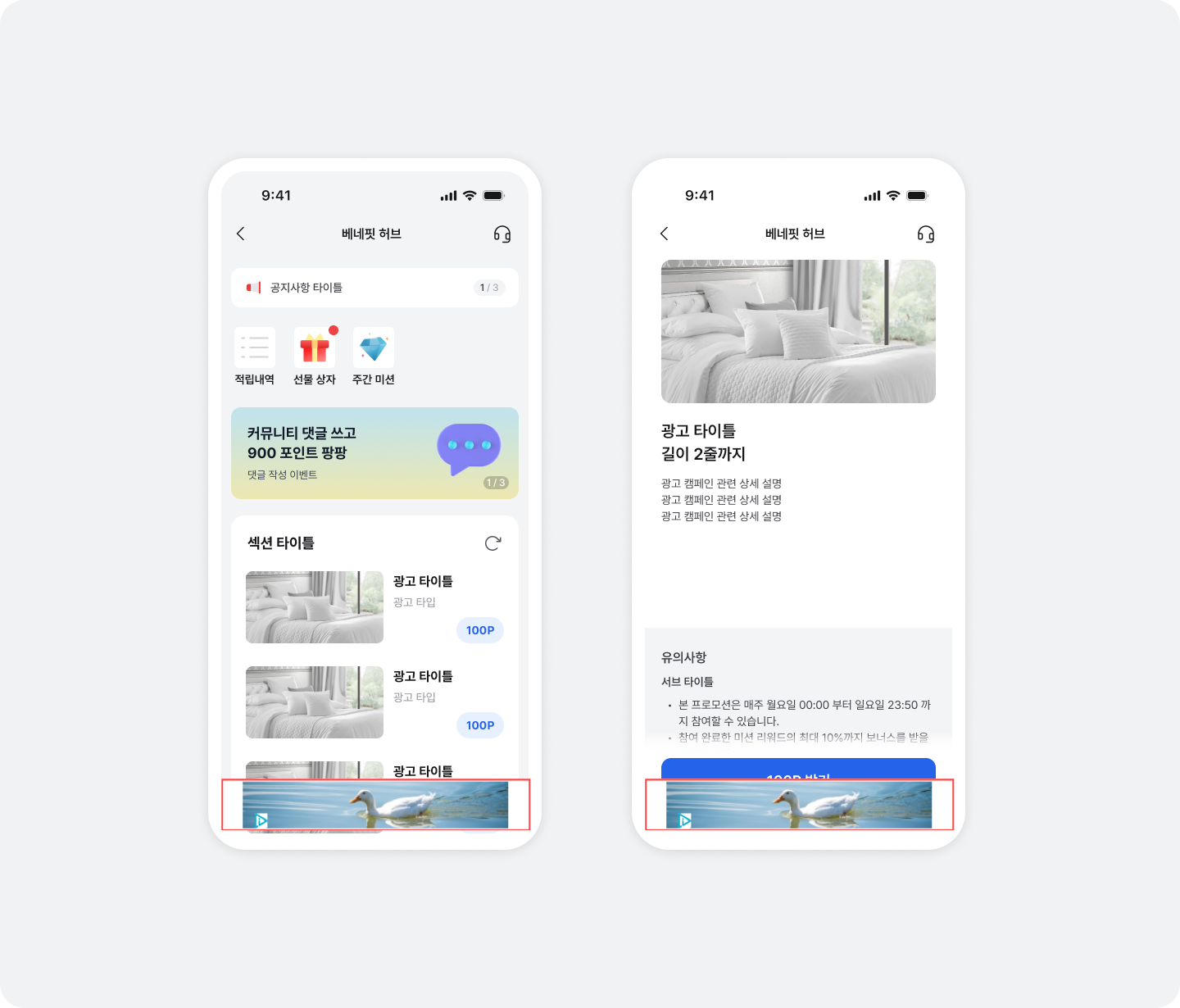
Integrate BuzzBanner
Integrate below Feed and ad participation instructions
You can easily integrate BuzzBanner below Feed and the ad participation instructions page without code changes. Contact your Buzzvil representative to integrate it.
Integrate BuzzBanner at a custom location
Follow these steps to integrate BuzzBanner wherever you choose.
- Choose a BuzzBanner size.
BuzzBanner sizes
| Size | Enum |
|---|---|
| Banner 320 x 50 | BuzzBannerSize.w320h50 |
| Banner 320 x 100 | BuzzBannerSize.w320h100 |
| Banner dynamic | BuzzBannerSize.dynamic |
| Banner 300 x 250 | BuzzBannerSize.w300h250 |
- Contact your Buzzvil representative to obtain a Placement ID and Banner Size for the integration.
| ID type | Description |
|---|---|
| Placement Id | A unique ID that identifies each ad placement. The banner size must match the PlacementId for ads to be allocated and displayed correctly. |
| Banner Size | Determines the size of the displayed BuzzBanner. |
- Add
BuzzBannerViewat the desired location.
import UIKit
import BuzzvilSDK

final class ViewController: UIViewController {
  private lazy var bannerView: BuzzBannerView = {
    let bannerView = BuzzBannerView(frame: .zero)
    bannerView.delegate = self
    return bannerView
  }()

  override func viewDidLoad() {
    super.viewDidLoad()

    let config = BuzzBannerConfig.Builder(placementId: "YOUR_PLACEMENT_ID")
      .setSize(.w320h50)
      .build()
    bannerView.setConfig(rootViewController: self, config: config)

    view.addSubview(bannerView)

    // ...
  }

  override func viewWillAppear(_ animated: Bool) {
    super.viewWillAppear(animated)

    bannerView.requestAd()
  }

  override func viewWillDisappear(_ animated: Bool) {
    super.viewWillDisappear(animated)

    bannerView.removeAd()
  }
}

extension ViewController: BuzzBannerViewDelegate {
  func bannerView(_ bannerView: BuzzBannerView, didLoadApid: String) {
    // Banner에 광고가 할당 되었을 때 호출 됩니다.
  }

  func bannerView(_ bannerView: BuzzBannerView, didFailApid: String, error: Error) {
    // Banner에 광고 할당이 실패했을 때 호출 됩니다.
  }

  func bannerView(_ bannerView: BuzzBannerView, didClickApid: String) {
    // Banner가 클릭되었을 때 호출 됩니다.
  }

  func bannerView(_ bannerView: BuzzBannerView, didRemoveApid: String) {
    // Banner가 제거되었을 떄 호출 됩니다.
  }
}
@import BuzzvilSDK;

@interface ViewController () <BuzzBannerViewDelegate>

@property (nonatomic, strong, readonly) BuzzBannerView *bannerView;

@end

@implementation ViewController

- (void)viewDidLoad {
  [super viewDidLoad];

  [self setupView];
}

- (void)setupView {
  BuzzBannerConfig * config = [BuzzBannerConfig configWith:^(BuzzBannerConfigBuilder * _Nonnull builder) {
    builder.placementId = @"YOUR_PLACEMENT_ID";
    builder.size = BuzzBannerSizeW320h50;
  }];
  _bannerView = [[BuzzBannerView alloc] initWithFrame:CGRectZero];
  [_bannerView setConfigWithRootViewController:self config:config];

  [self.view addSubview:_bannerView];
}

- (void)viewWillAppear:(BOOL)animated {
  [super viewWillAppear:animated];

  [_bannerView requestAd];
}

- (void)viewWillDisappear:(BOOL)animated{
  [super viewWillDisappear:animated];

  [_bannerView removeAd];
}

#pragma mark - BuzzBannerViewDelegate

- (void)bannerView:(BuzzBannerView * _Nonnull)bannerView didLoadApid:(NSString * _Nonnull)didLoadApid {
  // Banner에 광고가 할당 되었을 때 호출 됩니다.
}

- (void)bannerView:(BuzzBannerView * _Nonnull)bannerView didFailApid:(NSString * _Nonnull)didFailApid error:(NSError * _Nonnull)error {
  // Banner에 광고 할당이 실패했을 때 호출 됩니다.
}

- (void)bannerView:(BuzzBannerView * _Nonnull)bannerView didClickApid:(NSString * _Nonnull)didClickApid {
  // Banner가 클릭되었을 때 호출 됩니다.
}

- (void)bannerView:(BuzzBannerView * _Nonnull)bannerView didRemoveApid:(NSString * _Nonnull)didRemoveApid {
  // Banner가 제거되었을 떄 호출 됩니다.
}

@end
Integrate additional ADNs to increase BuzzBanner revenue
This section explains how to integrate additional ad networks to maximize BuzzBanner revenue.
AdFit (Kakao)
-
Download the Adapter and add the files in the adfit directory to your application project.
-
Add the AdFit dependency to
Podfile.
pod 'AdFitSDK', '= 3.18.3'
- No separate initialization code is required.
GAM (Google AdMob)
-
Download the Adapter and add the files in the admob directory to your application project.
-
Add the GAM SDK dependency to
Podfile.
pod 'Google-Mobile-Ads-SDK', '= 12.14.0'
- Call the initialization code below.
import GoogleMobileAds

GADMobileAds.sharedInstance().start(completionHandler: nil)
@import GoogleMobileAds;

[GADMobileAds.sharedInstance startWithCompletionHandler:nil];
AppLovin
-
Download the Adapter and add the files in the applovin directory to your application project.
-
Add the AppLovin SDK dependency to
Podfile.
pod 'AppLovinSDK', '= 13.5.1'
-
Contact your Buzzvil representative at help@buzzvil.com to obtain an integration key.
-
Call the initialization code below.
import AppLovinSDK

let initConfig = ALSdkInitializationConfiguration(sdkKey: "YOUR_APPLOVIN_SDK_KEY") { builder in
  builder.mediationProvider = ALMediationProviderMAX
}
ALSdk.shared().initialize(with: initConfig) { sdkConfig in }
@import AppLovinSDK;

ALSdkInitializationConfiguration *initConfig = [ALSdkInitializationConfiguration configurationWithSdkKey: @"YOUR_APPLOVIN_SDK_KEY" builderBlock:^(ALSdkInitializationConfigurationBuilder *builder) {
  builder.mediationProvider = ALMediationProviderMAX;
}];

[[ALSdk shared] initializeWithConfiguration: initConfig completionHandler:^(ALSdkConfiguration *sdkConfig) {}];
Cauly
-
Download the Adapter and add
CaulyAdapter.handCaulyAdapter.mfrom the cauly directory to your application project. -
Add the Cauly SDK dependency to
Podfile.
pod 'CaulySDK', :git => 'https://github.com/cauly/CaulySDK_iOS.git', :tag => '3.1.22'
-
Contact your Buzzvil representative at help@buzzvil.com to obtain an integration key.
-
Call the initialization code below.
import CaulySDK

if let adSetting = CaulyAdSetting.global() {
  CaulyAdSetting.setLogLevel(CaulyLogLevelInfo)
  adSetting.appId = "YOUR_CAULY_APP_ID"
  adSetting.appCode = "YOUR_CAULY_APP_CODE"
  adSetting.animType = CaulyAnimNone
  adSetting.closeOnLanding = true
} else {
  print("Cauly failed")
}
@import CaulySDK;

if ([CaulyAdSetting globalSetting]) {
  [CaulyAdSetting setLogLevel:CaulyLogLevelInfo];
  CaulyAdSetting *adSetting = [CaulyAdSetting globalSetting];
  adSetting.appId = @"YOUR_CAULY_APP_ID";
  adSetting.appCode = @"YOUR_CAULY_APP_CODE";
  adSetting.animType = CaulyAnimNone;
  adSetting.closeOnLanding = YES;
} else {
  NSLog(@"Cauly failed");
}
FAN (Facebook Audience Network)
-
Download the Adapter and add the files in the facebook directory to your application project.
-
Add the FAN SDK dependency to
Podfile.
pod 'FBAudienceNetwork', '= 6.21.0'
- No separate initialization code is required.
Pangle
-
Download the Adapter and add the files in the pangle directory to your application project.
-
Add the Pangle SDK dependency to
Podfile.
pod 'Ads-Global', '= 7.8.0.3'
-
Contact your Buzzvil representative at help@buzzvil.com to obtain an integration key.
-
Call the initialization code below.
import PAGAdSDK

let config = PAGConfig.share()
config.appID = "YOUR_PANGLE_APP_ID"
PAGSdk.start(with: config) { success, error in
  if success {
    print("Pangle succeed")
  }
}
@import PAGAdSDK;

PAGConfig *config = [PAGConfig shareConfig];
config.appID = @"YOUR_PANGLE_APP_ID";
[PAGSdk startWithConfig:config completionHandler:^(BOOL success, NSError * _Nonnull error) {
  if (success) {
    NSLog(@"Pangle succeed");
  }
}];
UnityAds
-
Download the Adapter and add the files in the unityads directory to your application project.
-
Add the UnityAds SDK dependency to
Podfile.
pod 'UnityAds', '= 4.16.4'
- No separate initialization code is required.
Vungle
-
Download the Adapter and add the files in the vungle directory to your application project.
-
Add the Vungle SDK dependency to
Podfile.
pod 'VungleAds', '= 7.6.2'
-
Contact your Buzzvil representative at help@buzzvil.com to obtain an integration key.
-
Call the initialization code below.
import VungleAdsSDK

VungleAds.initWithAppId("YOUR_VUNGLE_APP_ID") { error in
  if let error = error {
    print("Vungle failed")
  } else {
    print("Vungle succeed")
  }
}
@import VungleAdsSDK;

[VungleAds initWithAppId:@"YOUR_VUNGLE_APP_ID" completion:^(NSError * _Nullable error) {
  if (error) {
    NSLog(@"Vungle failed");
  } else {
    NSLog(@"Vungle succeed");
  }
}];