Native
Learn how to add and configure native placements and implement additional features through the SDK interface.
Key features
The Buzzvil SDK's native inventory displays ads customized for your app that blend naturally into its screens. After a user engages with an ad, the next ad appears automatically, continuously serving ads in a single placement to accelerate app monetization. It also provides dynamic features that encourage users to engage with more ads.
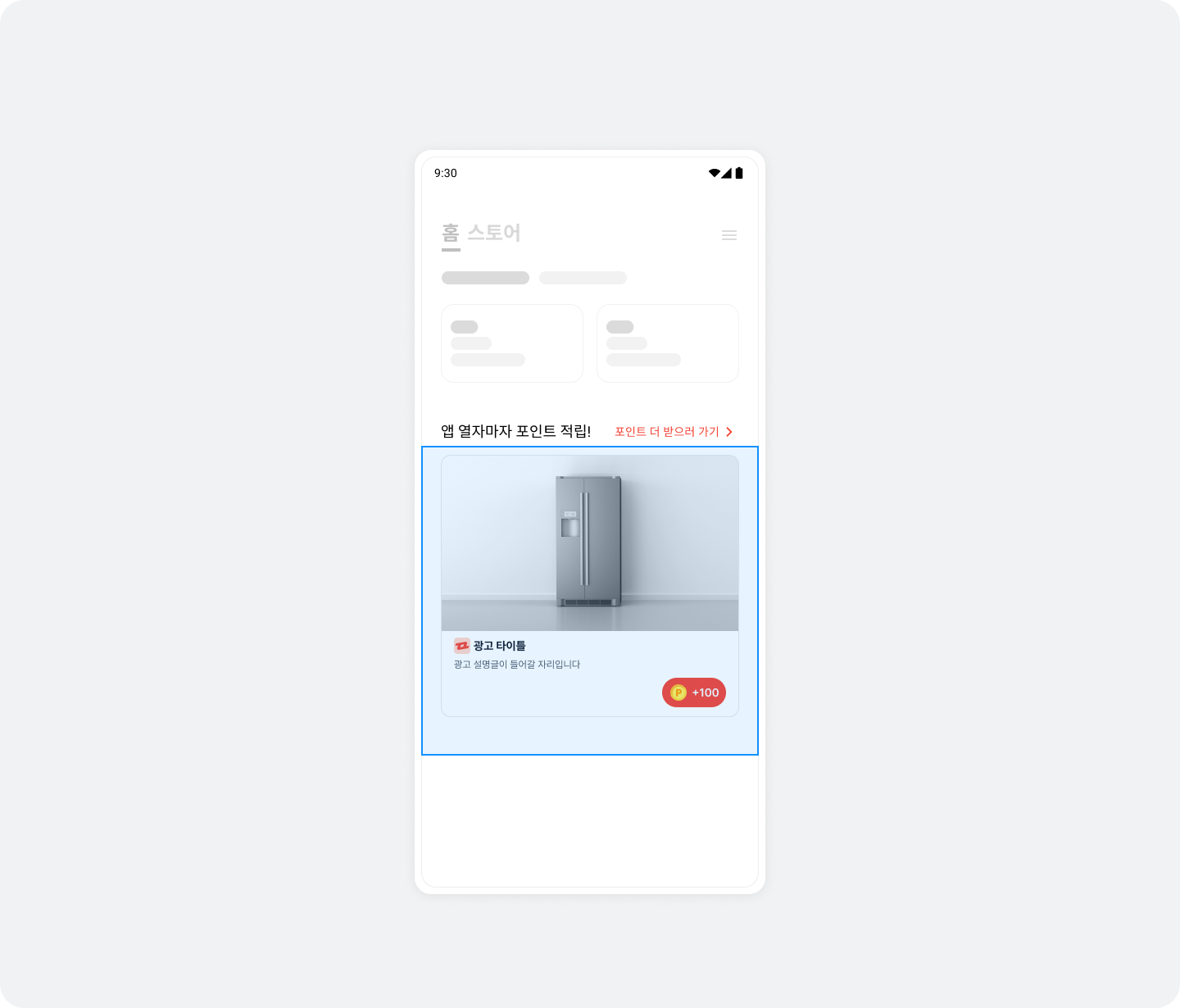
Integration
Follow these steps to integrate native placements into your app.
Step 1. Prepare
- Complete Getting started.
- Obtain a Unit ID for the native placement (referred to below as
YOUR_NATIVE_UNIT_ID).
Step 2. Configure the ad layout
See the illustration and table below for the components and UI of a native ad layout.
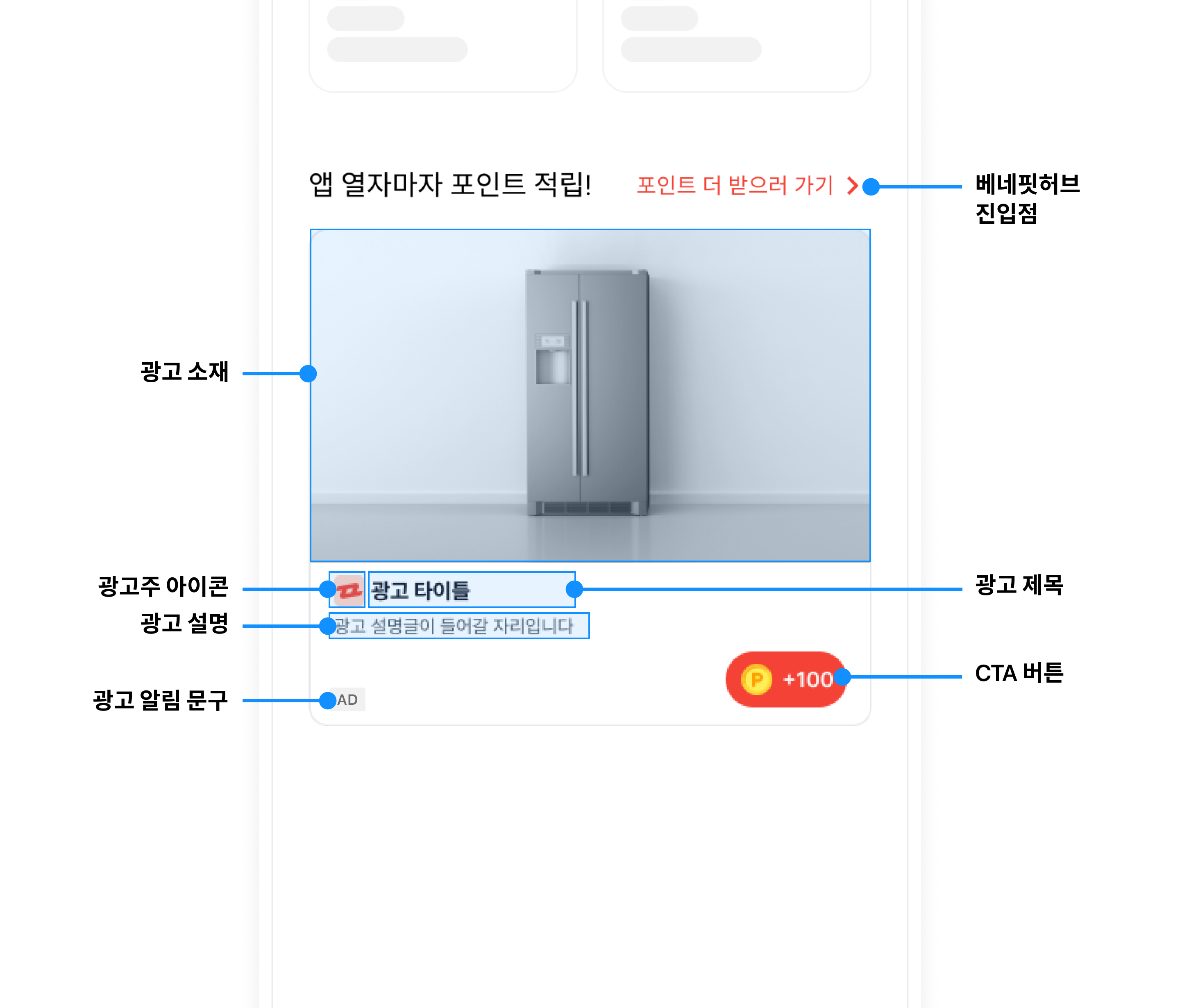
| Component | Description |
|---|---|
| Ad title (required) | The ad's title. We recommend no more than 10 characters. You can replace part of the text with an ellipsis as needed, regardless of character count. |
| Ad creative (required) |
|
| Ad description (required) | A detailed description of the ad. We recommend no more than 40 characters. You can replace part of the text with an ellipsis as needed, regardless of character count. |
| Advertiser icon (required) |
|
| CTA button (required) |
|
BenefitHub entry point (NativeToFeedLayout) (required) | A UI (NativeToFeedLayout) that opens BenefitHub when tapped. Add it to the NativeAd2View layout. |
| Ad disclosure (recommended) | Text identifying the content as an ad (for example, 광고, ad, 스폰서, or Sponsored). |
Build the native ad layout in an activity or fragment according to the structure below. Implement a layout (your_native_ad.xml) that meets the specifications of NativeAd2View.
The following is an example layout for NativeAd2View.
<com.buzzvil.buzzad.benefit.nativead2.api.NativeAd2View
    android:id="@+id/nativeAd2View">


    <com.buzzvil.buzzad.benefit.presentation.media.MediaView
        android:id="@+id/mediaView"
        ...생략... />
    <TextView
        android:id="@+id/textTitle"
        ...생략... />
    <TextView
        android:id="@+id/textDescription"
        ...생략... />
    <ImageView
        android:id="@+id/imageIcon"
        ...생략... />
    <com.buzzvil.buzzad.benefit.presentation.media.DefaultCtaView
        android:id="@+id/ctaView"
        ...생략... />
    <com.buzzvil.buzzad.benefit.presentation.feed.navigation.NativeToFeedLayout
        android:id="@+id/your_native_to_feed_layout">

        ...생략...
    </com.buzzvil.buzzad.benefit.presentation.feed.navigation.NativeToFeedLayout>
</com.buzzvil.buzzad.benefit.nativead2.api.NativeAd2View>
Set the Native Unit ID on NativeToFeedLayout in your code.
val nativeToFeedLayout = findViewById(R.id.your_native_to_feed_layout)
nativeToFeedLayout.setNativeUnitId(YOUR_NATIVE_UNIT_ID)
Display the base reward amount
Display the base reward (BaseReward) earned simply by entering BenefitHub in NativeToFeedLayout to encourage clicks.
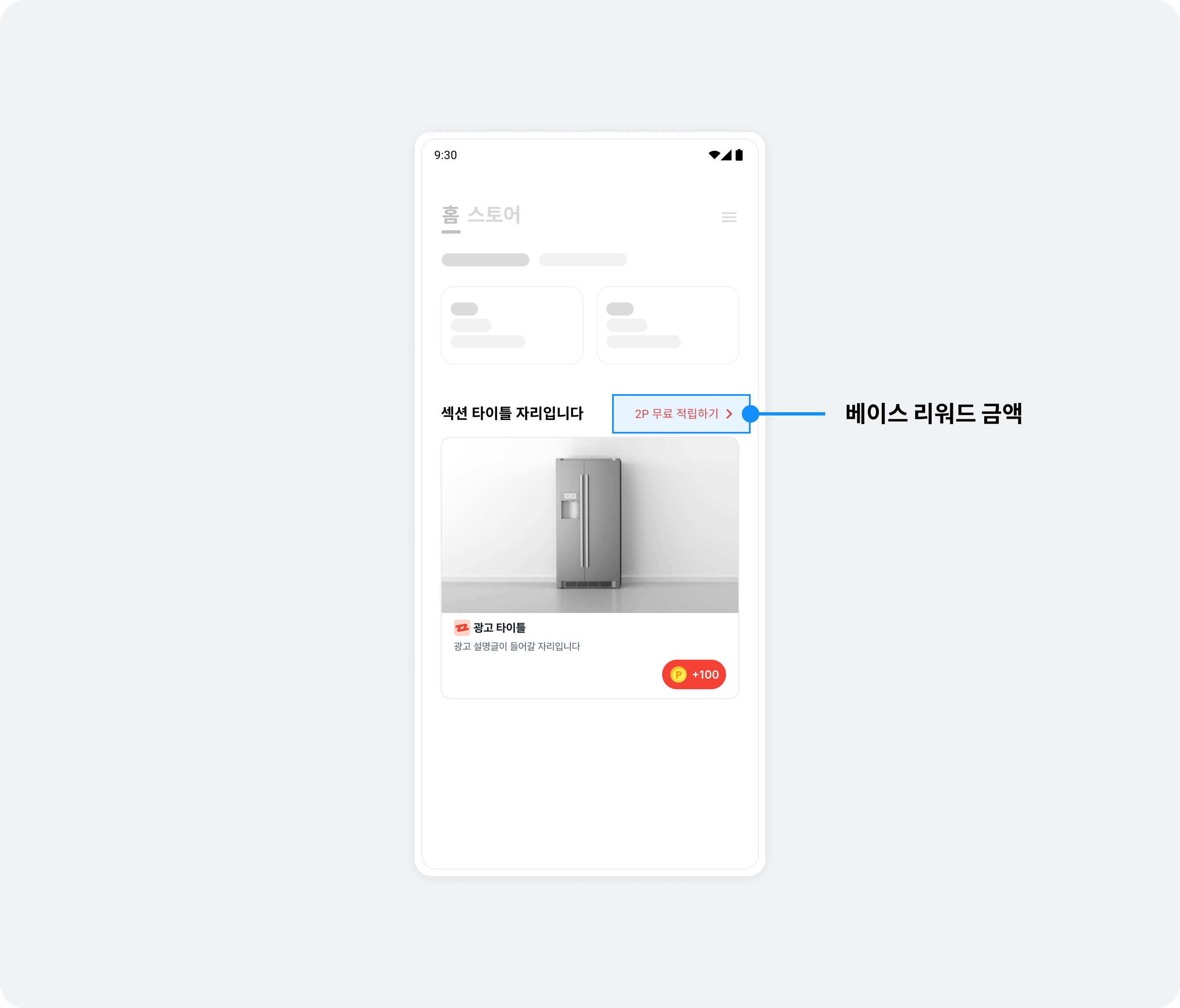
The following example displays base reward points in NativeToFeedLayout.
import com.buzzvil.buzzad.benefit.BaseRewardManager
import com.buzzvil.buzzad.benefit.BuzzAdBenefit

BuzzAdBenefit.getBaseRewardManager()?.getAvailableFeedBaseReward(YOUR_FEED_ID, object : BaseRewardManager.BaseRewardListener {
    override fun onBaseRewardLoaded(reward: Int) {
        if (reward < 1) {
            nativeToFeedText.text = "더 많은 참여 기회 보기"
        } else {
            nativeToFeedText.text = "$reward 포인트 받고 더 많은 참여 기회 보기"
        }
    }
})
Step 3. Display ads
Follow these steps and the sample code to display ads in the ad layout.
- Use
NativeAd2ViewBinder.Builderto set all required views, includingnativeAd2ViewandMediaView, then callbuild()to create aNativeAd2ViewBinderobject. - Optionally register NativeAd2StateChangedListener to implement UI for each ad request state.
- Call
bind()on the newNativeAd2ViewBinderobject to allocate and display an ad automatically.- If allocation fails, no ad is displayed. Use NativeAd2StateChangedListener to define failure behavior.
- When the user completes participation (the CTA view shows the completion label
참여 완료(Participation complete)) and returns to the native placement, it automatically refreshes to the next ad.
import com.buzzvil.buzzad.benefit.core.ad.AdError
import com.buzzvil.buzzad.benefit.nativead2.api.NativeAd2
import com.buzzvil.buzzad.benefit.nativead2.api.NativeAd2StateChangedListener
import com.buzzvil.buzzad.benefit.nativead2.api.NativeAd2ViewBinder

val nativeAd2View = findViewById(R.id.nativeAd2View)
val mediaView = findViewById(R.id.mediaView)
val titleTextView = findViewById(R.id.textTitle)
val descriptionTextView = findViewById(R.id.textDescription)
val iconImageView = findViewById(R.id.imageIcon)
val ctaView = findViewById(R.id.ctaView)

// 광고 레이아웃을 설정합니다.
val binder: NativeAd2ViewBinder = NativeAd2ViewBinder.Builder()
    .nativeAd2View(nativeAd2View)
    .mediaView(mediaView)
    .titleTextView(titleTextView)
    .descriptionTextView(descriptionTextView)
    .iconImageView(iconImageView)
    .ctaView(ctaView)
    .build(Constant.YOUR_NATIVE_ID)

// (Optional) 광고 요청 상태에 따른 UI를 구현합니다.
binder.addNativeAd2StateChangedListener(object : NativeAd2StateChangedListener {
    override fun onRequested() {
        // 광고 할당을 요청한 상태입니다.
        // 이후에는 onNext(), onComplete(), onError() 중 하나가 호출됩니다.
        // 광고 자동 갱신을 시도할 때마다 반복적으로 호출됩니다.
        // 로딩 화면 등을 구현할 수 있습니다.
        Toast.makeText(this@MainActivity, "onRequested", Toast.LENGTH_SHORT).show()
    }

    override fun onNext(nativeAd2: NativeAd2) {
        // 광고 할당에 성공하면 호출됩니다.
        // 이후에 광고 갱신 시 onRequested()가 다시 호출됩니다.
        // 광고 자동 갱신을 성공할 때마다 반복적으로 호출됩니다.
        // 로딩 화면 등을 구현한 경우, 여기에서 로딩을 종료합니다.
        Toast.makeText(this@MainActivity, "onNext", Toast.LENGTH_SHORT).show()
    }

    override fun onComplete() {
        // 더 이상 갱신할 수 있는 광고가 없을 때 호출됩니다.
        // 로딩 화면 등을 구현한 경우, 여기에서 로딩을 종료합니다.
        Toast.makeText(this@MainActivity, "onComplete", Toast.LENGTH_SHORT).show()
    }

    override fun onError(adError: AdError) {
        // 최초 광고 할당에 실패하면 호출됩니다.
        // 로딩 화면 등을 구현한 경우, 여기에서 로딩을 종료합니다.
        Toast.makeText(this@MainActivity, "onError: ${adError.adErrorType.name}", Toast.LENGTH_SHORT).show()
    }
})

// 광고 할당 및 표시를 자동으로 수행합니다.
binder.bind()
Step 4. Test the basic integration
After completing the basic integration, verify that ads are allocated and displayed correctly. Also check that NativeToFeedLayout (the layout in the native placement that opens BenefitHub) works and opens BenefitHub when clicked.
Ad operation policy (mandatory requirements)
1. Do not refresh ads
- Make the initial ad request only once when the app screen opens.
- Subsequent ad requests (reallocations) are allowed only after a clear user action, such as a screen transition.
- Automatically refreshing ads at fixed intervals or continuously requesting new ads is prohibited.
Excessive ad requests can harm the user experience, ad performance, and revenue.
2. Do not selectively use only impression-based ads
- Buzzvil combines different ad types to provide an optimized ad experience.
- API integrations must not selectively use only a specific ad type, such as impression-based ads.
- SDK integrations must not request ads from another platform when impression-based ads are unavailable.
- Operate all ad types in balance according to Buzzvil's ad logic.
Restricting or selectively using ad types negatively affects Buzzvil's ad operation strategy and revenue optimization.
Additional features
This section explains how to implement additional native placement features.
Use a native overlay
Native overlays require no separate integration or implementation. When a user returns to your app after participating in a native ad, an overlay appears over the completed ad to encourage entry into BenefitHub. The overlay contains text and an icon, covering the entire native area (NativeAdView) to encourage a click. It disappears automatically when the user clicks Close, or clicks the overlay and then returns.
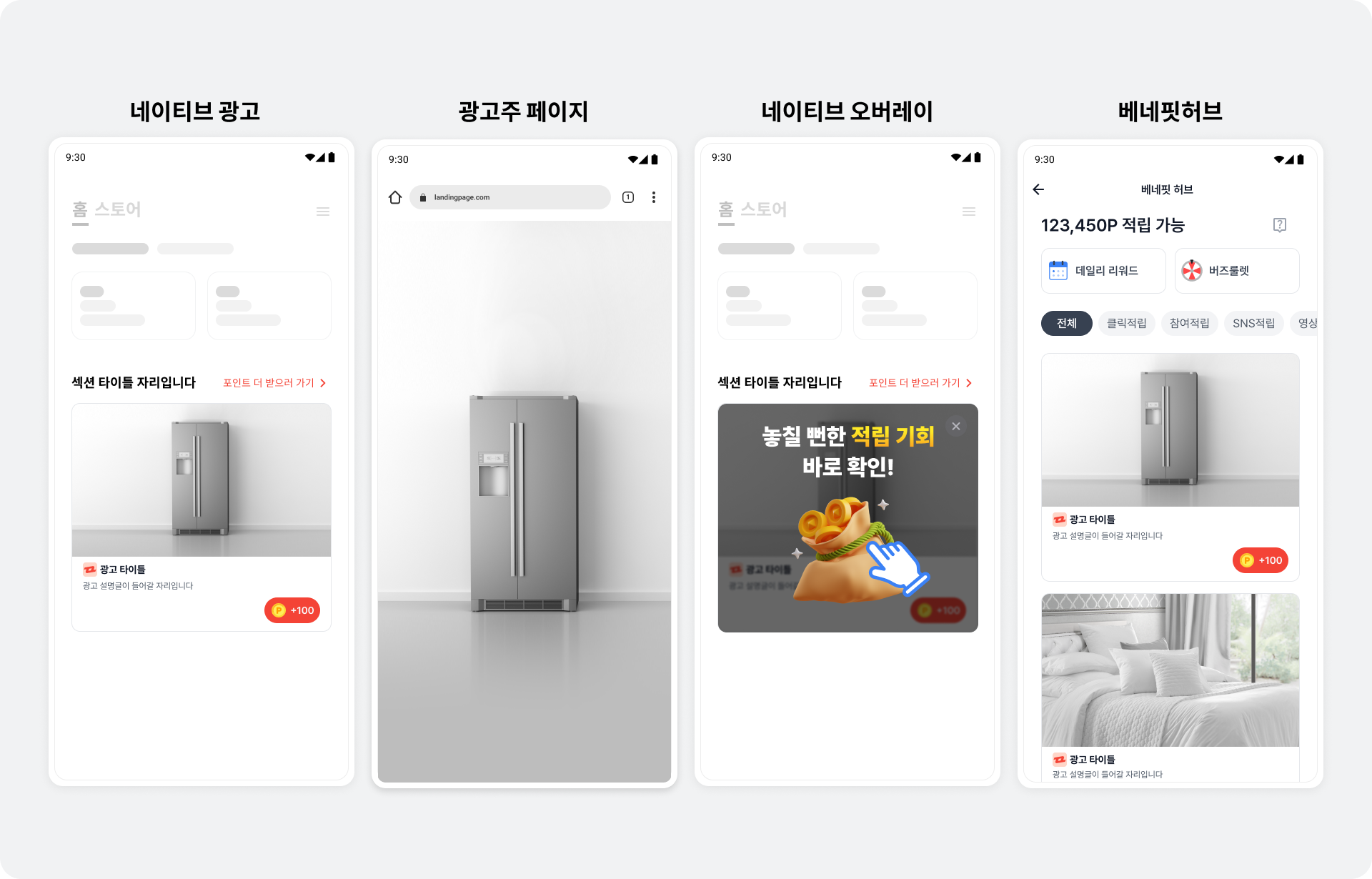
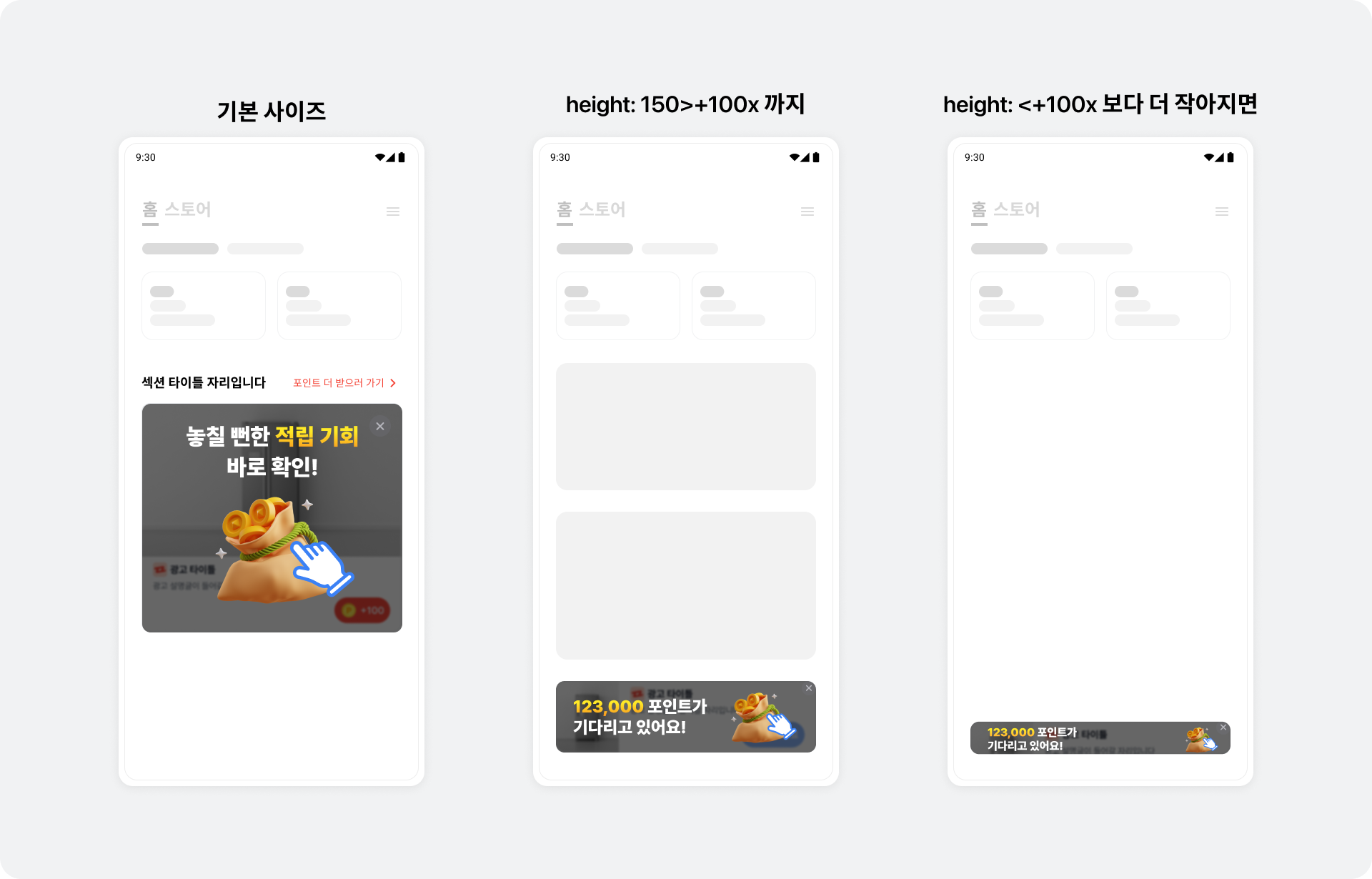
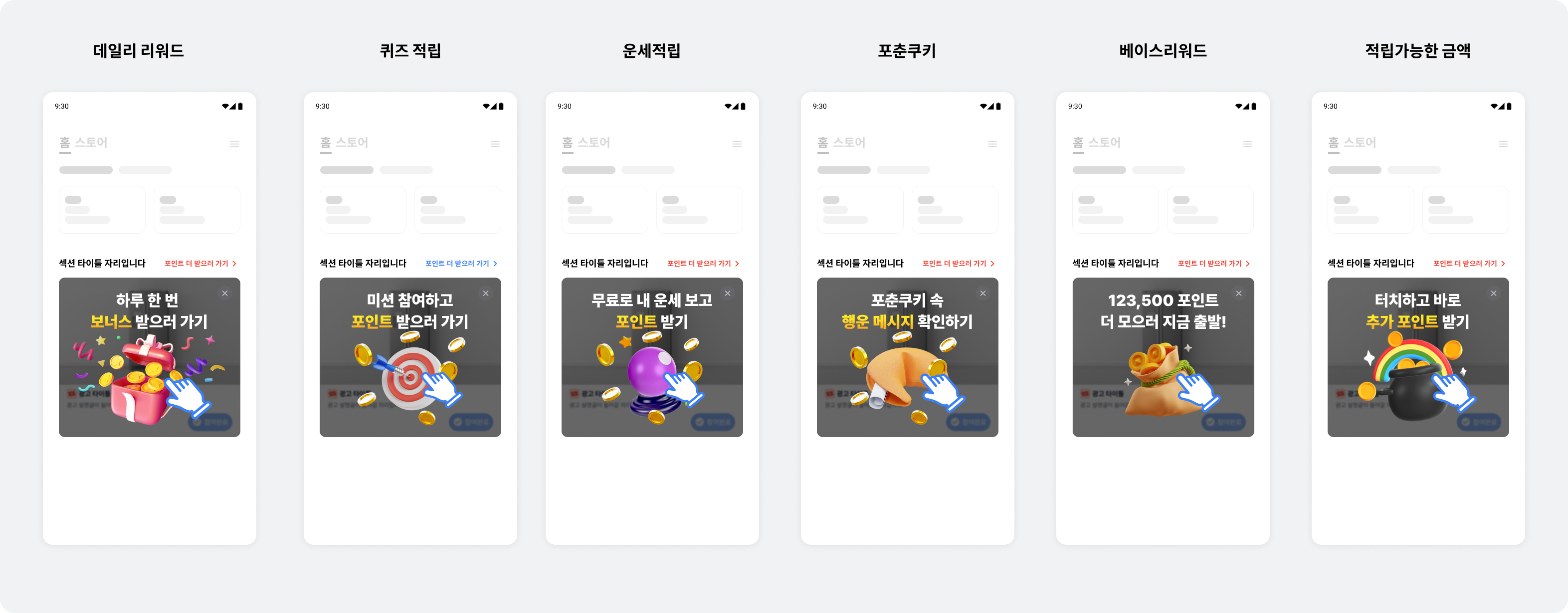
Overlay UIs adapt to the native placement's size. To increase BenefitHub entry rates, the overlay shows different ad or content product UIs based on the user's past participation and preferences. Each UI type opens the following landing page.
- Daily Reward: BenefitHub's Daily Reward bottom sheet
- This does not appear unless Daily Reward is enabled in BenefitHub.
- See here for details about Daily Reward.
- Quiz rewards: BenefitHub's content rewards filter
- Fortune-telling rewards: BenefitHub's content rewards filter
- Fortune Cookie: BenefitHub's content rewards filter
- Base reward: BenefitHub
- This does not appear unless base rewards are enabled in BenefitHub.
- Total available rewards: BenefitHub
- Default UI: BenefitHub
- Appears when a server communication error occurs.
Register an ad event listener
Receive ad callbacks through NativeAd2EventListener. Register the listener before calling NativeAd2ViewBinder.bind().
The following example registers an ad event listener on NativeAd2ViewBinder.
import com.buzzvil.buzzad.benefit.nativead2.api.NativeAd2
import com.buzzvil.buzzad.benefit.nativead2.api.NativeAd2EventListener
import com.buzzvil.buzzad.benefit.presentation.reward.RewardResult

// (Optional) 광고 이벤트 리스너를 등록합니다.
// 로그 기록, 단순 알림 외에 다른 동작을 추가하는 것을 권장하지 않습니다. 직접 구현한 동작이 네이티브에서 제공하는 기능(광고 자동 갱신 등)과 충돌할 수 있습니다.
binder.addNativeAd2EventListener(object : NativeAd2EventListener {
    override fun onImpressed(nativeAd2: NativeAd2) {
        // Native 광고가 유저에게 노출되었을 때 호출됩니다.
    }

    override fun onClicked(nativeAd2: NativeAd2) {
        // 유저가 Native 광고를 클릭했을 때 호출됩니다.
    }

    override fun onRewardRequested(nativeAd2: NativeAd2) {
        // 리워드 적립을 요청했을 때 호출됩니다.
    }

    override fun onParticipated(nativeAd2: NativeAd2) {
        // 유저가 광고 참여를 완료하였을 때 호출됩니다.
    }

    override fun onRewarded(nativeAd2: NativeAd2, rewardResult: RewardResult) {
        // 리워드가 적립되었을 때 호출됩니다.
    }
})

binder.bind()
Reward result types (RewardResult)
| RewardResult | Result | Description |
|---|---|---|
SUCCESS | Success | The reward was credited successfully. |
ALREADY_PARTICIPATED | Failure | The reward for this ad has already been credited. |
MISSING_REWARD | Failure | The ad has no reward. |
TOO_SHORT_TO_PARTICIPATE | Failure | The user returned from the ad landing page too quickly. |
NETWORK_TIMEOUT | Failure | A network timeout occurred. |
NETWORK_TIMEOUT_IN_POWER_SAVE_MODE | Failure | A network timeout occurred because of the device's power-saving mode (절전모드). |
BROWSER_NOT_LAUNCHED | Failure | The browser did not launch to display the ad landing page. |
REQUEST_ERROR | Failure | The request is invalid. |
UNKNOWN_NETWORK_ERROR | Failure | An unknown network error occurred. |
UNKNOWN_SERVER_ERROR | Failure | An unknown server error occurred. |
UNKNOWN_CLIENT_ERROR | Failure | An unknown client error occurred. |
UNKNOWN_ERROR | Failure | An unknown error occurred. |
- When a user enables power-saving mode (
절전모드) on their device, background execution restrictions make rewards for click-based ads (CPC, CPM) likely to fail. UseRewardResult.NETWORK_TIMEOUT_IN_POWER_SAVE_MODEto explain the failure to users who have enabled power-saving mode (절전모드).
Add clickable areas
In addition to the default clickable MediaView and CtaView, add more clickable views using addClickableView() of NativeAd2ViewBinder.Builder, as shown below.
import com.buzzvil.buzzad.benefit.nativead2.api.NativeAd2ViewBinder

val viewBinder = NativeAd2ViewBinder.Builder()
    .nativeAd2View(customNativeAd2View)
    .mediaView(mediaView)
    .titleTextView(textTitle)
    .descriptionTextView(textDescription)
    .iconImageView(imageIcon)
    .ctaView(ctaView)
    // 클릭이 되도록 하고 싶은 뷰를 추가합니다.
    .addClickableView(textTitle)
    // addClickableView를 여러 번 호출하여 여러 개의 클릭 가능 영역을 추가할 수 있습니다.
    .addClickableView(discountPercentageText)
    .addClickableView(priceText)
    .addClickableView(originalPriceText)
    .build()
Implement a carousel
A carousel is a UI that displays multiple ads through horizontal scrolling. Use the Buzzvil SDK to create a carousel in a native placement and implement its required features. Optional features can further improve the user experience.
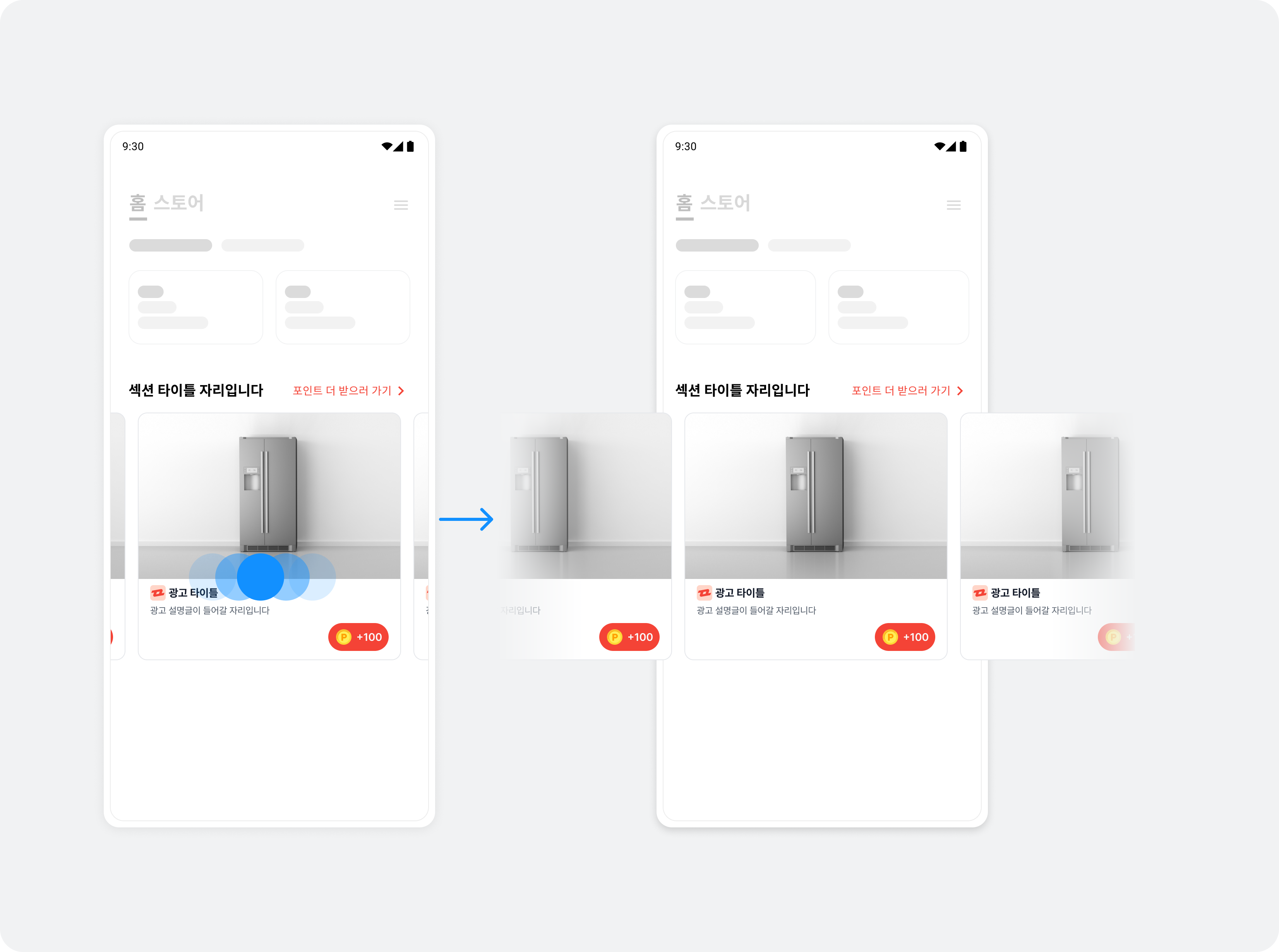
Implement basic carousel features
Step 1. Allocate ads
To allocate multiple ads in a native placement, use NativeAd2Pool, which controls duplicate ad allocation.
Call NativeAd2Pool.init() to check how many ads can currently be allocated.
import com.buzzvil.buzzad.benefit.core.ad.AdError
import com.buzzvil.buzzad.benefit.nativead2.api.NativeAd2Pool
import com.buzzvil.buzzad.benefit.nativead2.api.NativeAd2PoolInitListener

private fun initCarouselPool() {
    // 광고 중복 할당을 막기 위해 하나의 캐러셀에 하나의 NativeAd2Pool 인스턴스를 생성하여 사용합니다.
    val carouselPool = NativeAd2Pool(Constant.YOUR_NATIVE_ID)
    val REQUEST_AD_COUNT = 5

    // 현재 할당 받을 수 있는 광고의 갯수를 확인합니다.
    carouselPool.init(REQUEST_AD_COUNT, object : NativeAd2PoolInitListener {
        override fun onLoaded(adCount: Int) {
            // TODO 할당 받은 광고 갯수(adCount)만큼 아이템 리스트를 만들어 RecyclerView 어댑터를 초기화 합니다.
        }

        override fun onError(adError: AdError) {
            // TODO 광고 레이아웃을 숨김 처리 하는 등 적절한 에러 처리를 할 수 있습니다.
        }
    })
}
Step 2. Create a RecyclerView
Use RecyclerView to lay out item views horizontally and an adapter to manage them, creating a carousel in a native placement with the Buzzvil SDK.
Follow these steps to create RecyclerView.
-
Add
RecyclerViewwhere you want the carousel.<androidx.recyclerview.widget.RecyclerView android:id="@+id/carouselRecyclerView" android:layout_width="match_parent" android:layout_height="wrap_content" android:orientation="horizontal" app:layoutManager="androidx.recyclerview.widget.LinearLayoutManager" tools:listitem="@layout/your_native_ad_view" /> -
Define a layout for each item of
RecyclerViewin the view layout file (your_native_ad_view.xml).
```xml
<?xml version="1.0" encoding="utf-8"?>

<com.buzzvil.buzzad.benefit.nativead2.api.NativeAd2View xmlns:android="http://schemas.android.com/apk/res/android"
    xmlns:card_view="http://schemas.android.com/apk/res-auto"
    xmlns:tools="http://schemas.android.com/tools"
    android:id="@+id/nativeAd2View"
    android:layout_width="match_parent"
    android:layout_height="wrap_content">
    ...
</com.buzzvil.buzzad.benefit.nativead2.api.NativeAd2View>
```
3. Declare a NativeAd2CarouselItem class for each item in RecyclerView.
> ✏️ **Note**<br />`RecyclerView` can also contain BenefitHub entry points. For extensibility, declare `NativeAd2CarouselItem` as a base class and derive each item type from it. See [BenefitHub entry slide](#베네핏허브-진입-슬라이드) below.
The following example declares the base class `NativeAd2CarouselItem` and extends it with `NativeAd2Item`.
```kotlin
sealed class NativeAd2CarouselItem {
// 리사이클러 뷰에서 해당 아이템이 네이티브 2.0인지 타입을 구분하기 위한 클래스입니다.
data object NativeAd2Item : NativeAd2CarouselItem()
// TODO 베네핏허브 진입 슬라이드를 위한 클래스 추가
}
```
Step 3. Implement the RecyclerView adapter
Follow these steps to implement the RecyclerView adapter and ViewHolder.
-
Implement
NativeAd2CarouselViewHolderto bind NativeAd2View.import com.buzzvil.buzzad.benefit.nativead2.api.NativeAd2Pool import com.buzzvil.buzzad.benefit.nativead2.api.NativeAd2ViewBinder import com.buzzvil.sample.buzzvilsdksample.databinding.CarouselItemBinding class NativeAd2CarouselViewHolder( binding: CarouselItemBinding ) : RecyclerView.ViewHolder(binding.root) { private val nativeAd2ViewBinder: NativeAd2ViewBinder init { val nativeAd2View = binding.nativeAd2View val mediaView = binding.adMediaView val titleTextView = binding.adTitleText val descriptionTextView = binding.adDescriptionText val iconImageView = binding.adIconImage val ctaView = binding.adCtaView // NativeAd2View와 하위 컴포넌트를 바인드합니다. nativeAd2ViewBinder = NativeAd2ViewBinder.Builder() .nativeAd2View(nativeAd2View) .mediaView(mediaView) .titleTextView(titleTextView) .descriptionTextView(descriptionTextView) .iconImageView(iconImageView) .ctaView(ctaView) .build(Constant.YOUR_NATIVE_ID) } fun setPool(carouselPool: NativeAd2Pool, adKey: Int) { // 해당 position(adKey)에 해당하는 NativeAd2ViewBinder가 carouselPool을 사용하도록 합니다. nativeAd2ViewBinder.setPool(adKey, carouselPool) } fun bind(position: Int) { // NativeAd2ViewBinder의 bind()를 호출하면 광고 할당 및 갱신이 자동으로 수행됩니다. nativeAd2ViewBinder.bind(position) } fun unbind(position: Int) { // unbind를 반드시 호출하여 뷰를 재사용할 때 문제가 발생하지 않게 합니다. nativeAd2ViewBinder.unbind(position) } } -
Implement an adapter (
NativeAd2CarouselAdapter) to manage the carousel.
```kotlin
import com.buzzvil.buzzad.benefit.nativead2.api.NativeAd2Pool
import com.buzzvil.sample.buzzvilsdksample.databinding.CarouselItemBinding
import com.buzzvil.sample.buzzvilsdksample.nativead.carousel.NativeAd2CarouselItem
import com.buzzvil.sample.buzzvilsdksample.nativead.carousel.NativeAd2CarouselViewHolder

class NativeAd2CarouselAdapter(
    private val list: List<NativeAd2CarouselItem>,
    private val carouselPool: NativeAd2Pool
) : RecyclerView.Adapter<NativeAd2CarouselViewHolder?>() {

    override fun onCreateViewHolder(parent: ViewGroup, viewType: Int): NativeAd2CarouselViewHolder {
        val inflater = parent.context.getSystemService(Context.LAYOUT_INFLATER_SERVICE) as LayoutInflater
        val binding = CarouselItemBinding.inflate(inflater, parent, false)
        return NativeAd2CarouselViewHolder(binding)
    }

    override fun getItemCount(): Int {
        return list.size
    }

    override fun onBindViewHolder(holder: NativeAd2CarouselViewHolder, position: Int) {
        // 해당 position에 해당하는 NativeAd2ViewBinder가 carouselPool을 사용하도록 합니다.
        holder.setPool(carouselPool, position)
        holder.bind(position)
    }

    override fun onViewRecycled(holder: NativeAd2CarouselViewHolder) {
        super.onViewRecycled(holder)

        // unbind를 반드시 호출하여 뷰를 재사용할 때 문제가 발생하지 않게 합니다.
        holder.unbind(holder.adapterPosition)
    }
}
```
Step 4. Bind to an activity or Fragment
The following example creates the NativeAd2CarouselAdapter implemented above in an activity (NativeAd2CarouselActivity).
- Implement
buildCarouselItems()to create an item list whose size equals the number of allocated ads (adCount). - In
NativeAd2PoolInitListener.onLoaded(), usebuildCarouselItems()to createNativeAd2CarouselAdapterand set it on the RecyclerView.
The following is an example implementation of NativeAd2CarouselActivity.
import com.buzzvil.buzzad.benefit.core.ad.AdError
import com.buzzvil.buzzad.benefit.nativead2.api.NativeAd2Pool
import com.buzzvil.buzzad.benefit.nativead2.api.NativeAd2PoolInitListener

private fun initCarouselPool() {
    // 광고 중복 할당을 막기 위해 하나의 캐러셀에 하나의 NativeAd2Pool 인스턴스를 생성하여 사용합니다.
    val carouselPool = NativeAd2Pool(Constant.YOUR_NATIVE_ID)
    val REQUEST_AD_COUNT = 5

    // 현재 할당 받을 수 있는 광고의 갯수를 확인합니다.
    carouselPool.init(REQUEST_AD_COUNT, object : NativeAd2PoolInitListener {
        override fun onLoaded(adCount: Int) {
            // 어댑터를 초기화합니다.
            initCarouselAdapter(adCount, carouselPool)
        }

        override fun onError(adError: AdError) {
            // TODO 광고 레이아웃을 숨김 처리 하는 등 적절한 에러 처리를 할 수 있습니다.
        }
    })
}

private fun initCarouselAdapter(adCount: Int, carouselPool: NativeAd2Pool) {
    // 할당 받은 광고 갯수(adCount) 크기의 아이템 리스트를 만들어 NativeAd2CarouselAdapter를 생성합니다.
    val list = buildCarouselItems(adCount)
    val adapter = NativeAd2CarouselAdapter(list, carouselPool)

    // RecyclerView에 어댑터를 설정합니다.
    binding.carouselRecyclerView.adapter = adapter
}

private fun buildCarouselItems(adCount: Int): List<NativeAd2CarouselItem> {
    // adCount 크기의 배열을 생성합니다.
    val carouselItems = arrayOfNulls<NativeAd2CarouselItem>(adCount)

    // 배열을 NativeAd2Item으로 채웁니다.
    carouselItems.fill(NativeAd2Item)

    return carouselItems.toList().filterNotNull()
}
Run the app to see the carousel in action. Then complete the integration by following Implement required carousel features below.
Implement required carousel features
The Buzzvil SDK provides a slide page and entry point into BenefitHub, where users can find a variety of ads and filter them to suit their preferences.
BenefitHub entry slide
Add a Carousel To Feed Slide anywhere in the carousel, with no limit on the number of slides. These provide entry points between ads to BenefitHub, a placement optimized for monetization. The SDK provides the following classes.
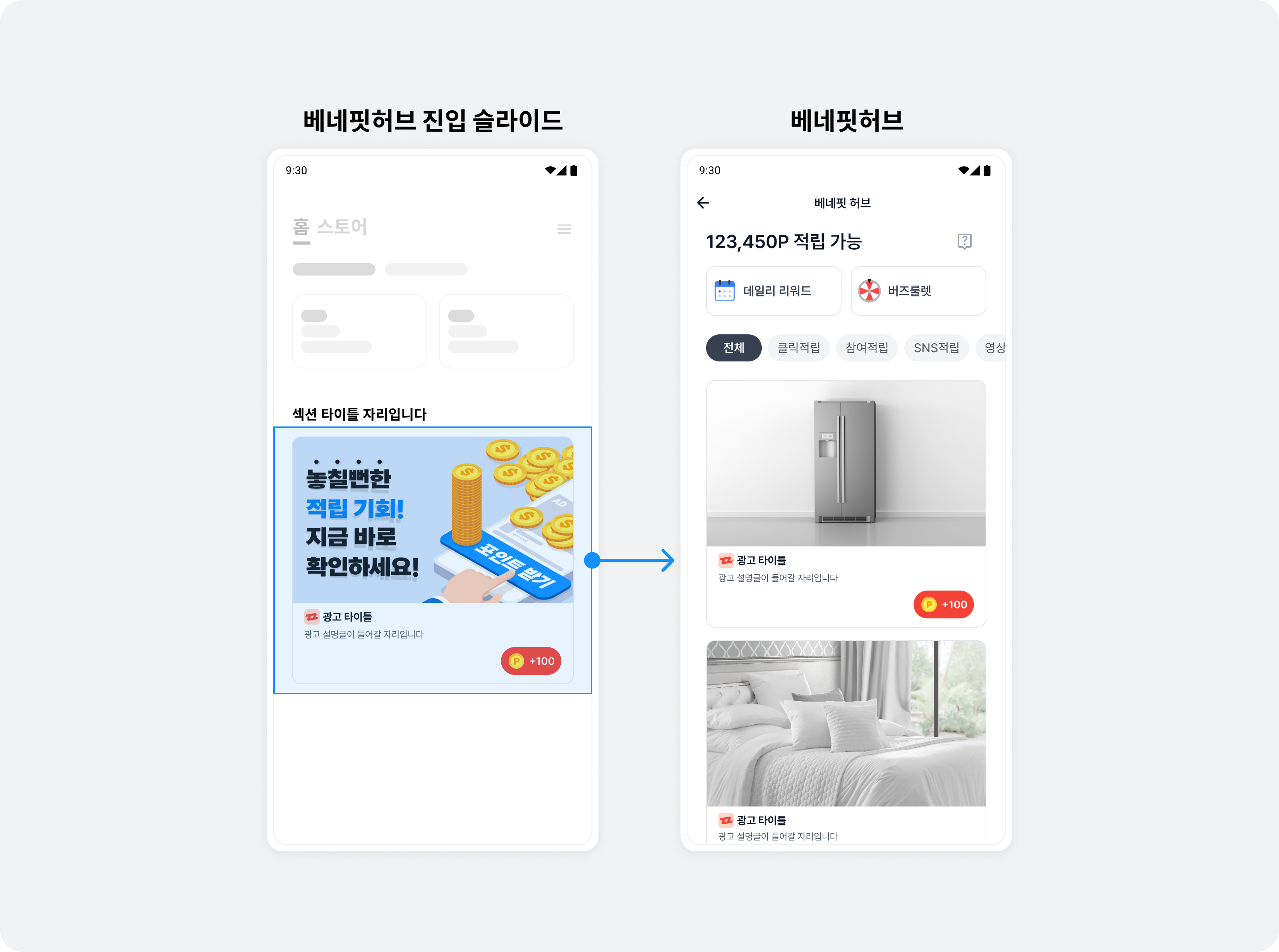
| Code | Description |
|---|---|
FeedPromotion | Holds the image and text resources displayed on a BenefitHub entry slide. |
FeedPromotionFactory | Creates FeedPromotion objects.
|
FeedPromotionViewBinder | Connects FeedPromotion to NativeAd2View for display.
|
Follow these steps to implement a BenefitHub entry slide.
-
Add a class declaration in
NativeAd2CarouselItemfor the BenefitHub entry slide.The following example adds
CarouselToFeedSlideItemto the existingNativeAd2CarouselItemimplementation.import com.buzzvil.buzzad.benefit.presentation.feed.entrypoint.FeedPromotion sealed class NativeAd2CarouselItem { // RecyclerView에서 해당 아이템이 네이티브 2.0인지 타입을 구분하기 위한 클래스입니다. data object NativeAd2Item : NativeAd2CarouselItem() // RecyclerView에서 해당 아이템이 베네핏허브 진입 슬라이드인지 타입을 구분하기 위한 클래스입니다. data class CarouselToFeedSlideItem(val feedPromotion: FeedPromotion) : NativeAd2CarouselItem() } -
Implement the adapter (
NativeAd2CarouselAdapter) and ViewHolder (NativeAd2CarouselViewHolder) to handleCarouselToFeedSlideItem.i. In
NativeAd2CarouselViewHolder, selectFeedPromotionViewBinderaccording to the item type.import com.buzzvil.buzzad.benefit.presentation.feed.entrypoint.FeedPromotion import com.buzzvil.buzzad.benefit.presentation.feed.entrypoint.FeedPromotionViewBinder class NativeAd2CarouselViewHolder( binding: CarouselItemBinding ) : RecyclerView.ViewHolder(binding.root) { ... private val carouselToFeedViewBinder: FeedPromotionViewBinder init { ... // CarouselToFeedSlideItem을 위한 바인더를 빌드합니다. carouselToFeedViewBinder = FeedPromotionViewBinder.Builder(nativeAd2View, mediaView) .titleTextView(titleTextView) .descriptionTextView(descriptionTextView) .iconImageView(iconImageView) .ctaView(ctaView) .build() } ... fun bind(position: Int, feedPromotion: FeedPromotion) { // FeedPromotion 객체를 뷰에 바인드합니다. carouselToFeedViewBinder.bind(feedPromotion) } fun unbind(position: Int) { // unbind를 반드시 호출하여 뷰를 재사용할 때 문제가 발생하지 않게 합니다. ... carouselToFeedViewBinder.unbind() } }The following example shows the complete
NativeAd2CarouselViewHolderimplementation.import com.buzzvil.buzzad.benefit.nativead2.api.NativeAd2Pool import com.buzzvil.buzzad.benefit.nativead2.api.NativeAd2ViewBinder import com.buzzvil.buzzad.benefit.presentation.feed.entrypoint.FeedPromotion import com.buzzvil.buzzad.benefit.presentation.feed.entrypoint.FeedPromotionViewBinder class NativeAd2CarouselViewHolder( binding: CarouselItemBinding ) : RecyclerView.ViewHolder(binding.root) { private val nativeAd2ViewBinder: NativeAd2ViewBinder private val carouselToFeedViewBinder: FeedPromotionViewBinder init { val nativeAd2View = binding.nativeAd2View val mediaView = binding.adMediaView val titleTextView = binding.adTitleText val descriptionTextView = binding.adDescriptionText val iconImageView = binding.adIconImage val ctaView = binding.adCtaView // NativeAd2View와 하위 컴포넌트를 바인드합니다. nativeAd2ViewBinder = NativeAd2ViewBinder.Builder() .nativeAd2View(nativeAd2View) .mediaView(mediaView) .titleTextView(titleTextView) .descriptionTextView(descriptionTextView) .iconImageView(iconImageView) .ctaView(ctaView) .build(Constant.YOUR_NATIVE_ID) // CarouselToFeedSlideItem을 위한 바인더를 빌드합니다. carouselToFeedViewBinder = FeedPromotionViewBinder.Builder(nativeAd2View, mediaView) .titleTextView(titleTextView) .descriptionTextView(descriptionTextView) .iconImageView(iconImageView) .ctaView(ctaView) .build() } fun setPool(carouselPool: NativeAd2Pool, adKey: Int) { // 해당 position(adKey)에 해당하는 NativeAd2ViewBinder가 carouselPool을 사용하도록 합니다. nativeAd2ViewBinder.setPool(adKey, carouselPool) carouselToFeedViewBinder.setPool(carouselPool) } fun bind(position: Int) { // NativeAd2ViewBinder의 bind()를 호출하면 광고 할당 및 갱신이 자동으로 수행됩니다. nativeAd2ViewBinder.bind(position) } fun bind(position: Int, feedPromotion: FeedPromotion) { // FeedPromotion 객체를 뷰에 바인드합니다. carouselToFeedViewBinder.bind(feedPromotion) } fun unbind(position: Int) { // unbind를 반드시 호출하여 뷰를 재사용할 때 문제가 발생하지 않게 합니다. nativeAd2ViewBinder.unbind(position) carouselToFeedViewBinder.unbind() } }ii. In
onBindeViewHolderofNativeAd2CarouselAdapter, connect the bind function to call forCarouselToFeedSlideItem.class NativeAd2CarouselAdapter( ... ) : RecyclerView.Adapter<NativeAd2CarouselViewHolder?>() { ... override fun onBindViewHolder(holder: NativeAd2CarouselViewHolder, position: Int) { ... // 아이템의 타입을 구분하여 적절한 bind() 함수를 호출합니다. val item = list[position] if (item is NativeAd2Item) { holder.bind(position) } else if (item is CarouselToFeedSlideItem) { holder.bind(position, item.feedPromotion) } } ... }The following example shows the complete
NativeAd2CarouselAdapterimplementation.import com.buzzvil.buzzad.benefit.nativead2.api.NativeAd2Pool class NativeAd2CarouselAdapter( private val list: List<NativeAd2CarouselItem>, private val carouselPool: NativeAd2Pool ) : RecyclerView.Adapter<NativeAd2CarouselViewHolder?>() { override fun onCreateViewHolder(parent: ViewGroup, viewType: Int): NativeAd2CarouselViewHolder { val inflater = parent.context.getSystemService(Context.LAYOUT_INFLATER_SERVICE) as LayoutInflater val binding = CarouselItemBinding.inflate(inflater, parent, false) return NativeAd2CarouselViewHolder(binding) } override fun getItemCount(): Int { return list.size } override fun onBindViewHolder(holder: NativeAd2CarouselViewHolder, position: Int) { // 해당 position에 해당하는 NativeAd2ViewBinder가 carouselPool을 사용하도록 합니다. holder.setPool(carouselPool, position) // 아이템의 타입을 구분하여 적절한 bind() 함수를 호출합니다. val item = list[position] if (item is NativeAd2Item) { holder.bind(position) } else if (item is CarouselToFeedSlideItem) { holder.bind(position, item.feedPromotion) } } override fun onViewRecycled(holder: NativeAd2CarouselViewHolder) { super.onViewRecycled(holder) // unbind를 반드시 호출하여 뷰를 재사용할 때 문제가 발생하지 않게 합니다. holder.unbind(holder.adapterPosition) } } -
In
buildCarouselItems(), which builds the item list for the adapter, insertFeedPromotionat the desired position.The following example places the BenefitHub entry slide at the end of the carousel.
import com.buzzvil.buzzad.benefit.presentation.feed.entrypoint.FeedPromotionFactory

private fun buildCarouselItems(adCount: Int): List<NativeAd2CarouselItem> {
    // 마지막 페이지에 CarouselToFeedSlideItem을 추가하기 위해 1개 더 큰 사이즈로 배열을 생성합니다.
    val carouselItems = arrayOfNulls<NativeAd2CarouselItem>(adCount + 1)

    // 배열을 NativeAd2Item으로 채웁니다.
    carouselItems.fill(NativeAd2Item)

    // 마지막 아이템은 CarouselToFeedSlideItem으로 설정합니다.
    val carouselToFeedSlideItem = CarouselToFeedSlideItem(FeedPromotionFactory(Constant.YOUR_NATIVE_ID).buildForCarousel())
    carouselItems[carouselItems.size - 1] = carouselToFeedSlideItem

    return carouselItems.toList().filterNotNull()
}
BenefitHub entry point
Add a Carousel To Feed Link below the carousel so users can open BenefitHub.
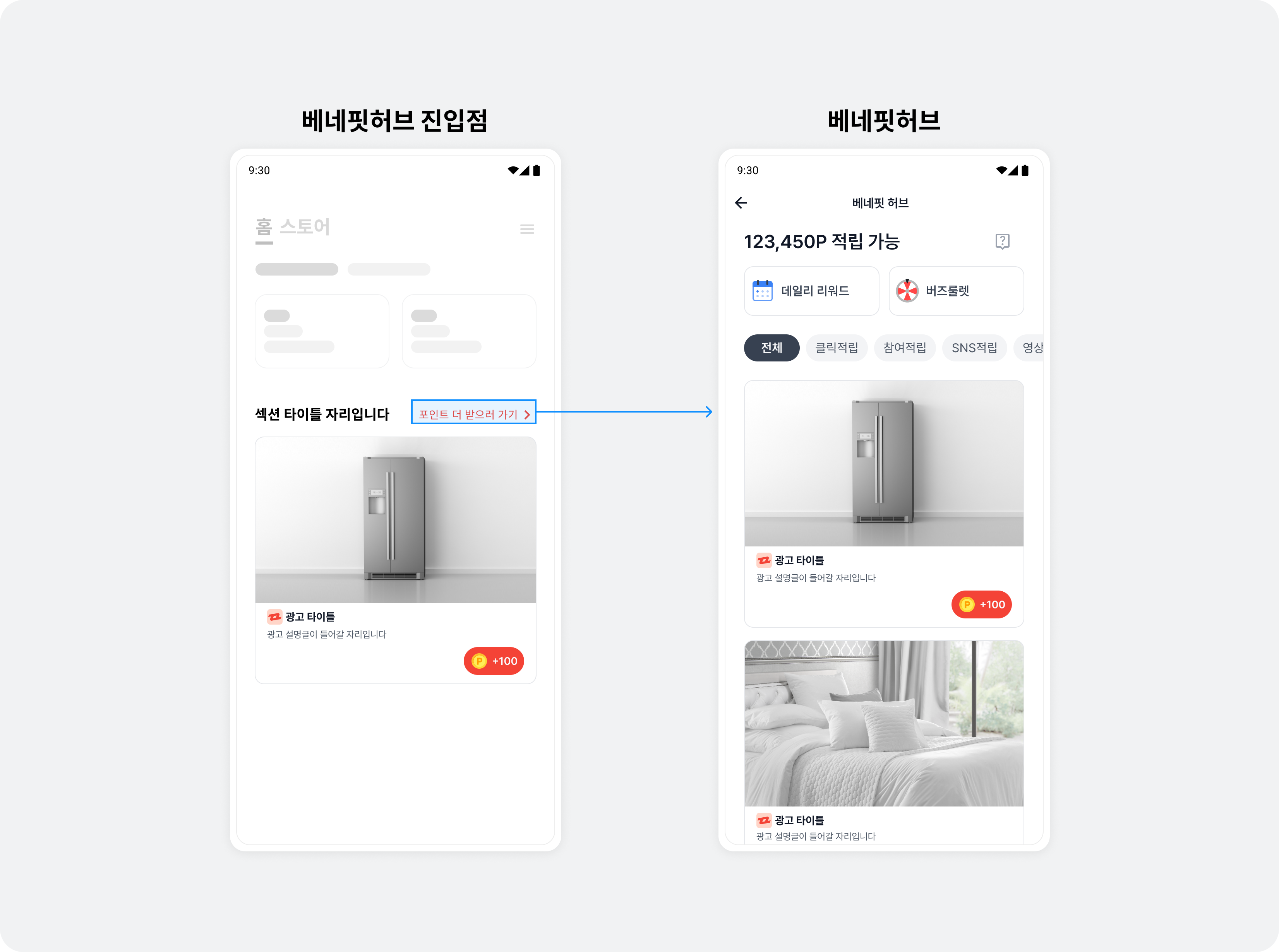
Follow these steps to implement the BenefitHub entry point.
-
Add
FeedEntryViewbelow the RecyclerView used for the carousel.Find the complete
activity_native_ad2_carousel.xmlcode here.<androidx.recyclerview.widget.RecyclerView android:id="@+id/carouselRecyclerView" ... /> <com.buzzvil.buzzad.benefit.presentation.feed.entrypoint.FeedEntryView android:id="@+id/toFeedLink" android:layout_width="wrap_content" android:layout_height="wrap_content" android:layout_gravity="right" android:layout_marginTop="16dp" android:layout_marginEnd="36dp" app:buzzvilFeedEntryViewName="carousel_to_feed_link"> <LinearLayout android:layout_width="wrap_content" android:layout_height="wrap_content" android:orientation="horizontal"> <TextView style="@style/NativeCarouselToFeedLink" android:layout_width="wrap_content" android:layout_height="wrap_content" android:text="포인트 더 받으러 가기" /> <ImageView android:layout_width="16dp" android:layout_height="16dp" android:scaleType="centerInside" android:src="@drawable/ic_chevron_right" /> </LinearLayout> </com.buzzvil.buzzad.benefit.presentation.feed.entrypoint.FeedEntryView> -
Set the visibility of the BenefitHub entry point according to the ad allocation response.
- Show the carousel and BenefitHub entry point when there are ads to display.
- Hide the carousel and BenefitHub entry point while ads have not yet loaded, if an error occurs, or if there are no ads.
The following example changes the visibility of
RecyclerView(the carousel) andFeedEntryViewinNativeAd2CarouselActivityaccording to whether the allocation request succeeded.import com.buzzvil.buzzad.benefit.core.ad.AdError import com.buzzvil.buzzad.benefit.nativead2.api.NativeAd2Pool import com.buzzvil.buzzad.benefit.nativead2.api.NativeAd2PoolInitListener private fun initCarouselPool() { // 광고 중복 할당을 막기 위해 하나의 캐러셀에 하나의 NativeAd2Pool 인스턴스를 생성하여 사용합니다. val carouselPool = NativeAd2Pool(Constant.YOUR_NATIVE_ID) val REQUEST_AD_COUNT = 5 // 현재 할당 받을 수 있는 광고의 갯수를 확인합니다. carouselPool.init(REQUEST_AD_COUNT, object : NativeAd2PoolInitListener { override fun onLoaded(adCount: Int) { // 어댑터를 초기화합니다. initCarouselAdapter(adCount, carouselPool) binding.carouselRecyclerView.visibility = View.VISIBLE binding.toFeedLink.visibility = View.VISIBLE } override fun onError(adError: AdError) { // TODO 광고 레이아웃을 숨김 처리 하는 등 적절한 에러 처리를 할 수 있습니다. binding.carouselRecyclerView.visibility = View.GONE binding.toFeedLink.visibility = View.GONE } }) } -
Fix the position of the BenefitHub entry point.
Different lengths of ad description text (
textDescription) can produce different line counts, making the entry point shift between slides. Set a fixedlinesvalue on the description view to keep it in a consistent position.The following example sets the description view's lines value to
2.<TextView android:id="@+id/textDescription" android:ellipsize="end" android:lines="2" />
Run the app to see the BenefitHub entry slide on the last carousel page and the entry point below the carousel. Then see Implement optional carousel features below to provide a user-friendly UI and UX.
Implement optional carousel features
This section presents some of the ways you can add features to a carousel. Adapt the code to your needs.
Implement infinite looping
You can implement an infinite loop that lets users scroll continuously through a finite set of carousel items. There are many approaches; this guide uses a simple method in which the adapter's getItemCount() returns a very large value.
Follow these steps to implement an infinite loop.
-
Modify the adapter (
NativeAd2CarouselAdapter) to accept theisInfiniteLoopEnabledparameter.class NativeAd2CarouselAdapter( ... private val isInfiniteLoopEnabled: Boolean, ) : RecyclerView.Adapter<NativeAd2CarouselViewHolder>() { ... } -
Change the implementation of
getItemCount()inNativeAd2CarouselAdapter. When using position, take the remainder after division by the list size to obtain the actual index.
-
getItemCount(): To make the RecyclerView appear to have infinite data, returnInteger.MAX_VALUEwhenisInfiniteLoopEnabledistrueand there are items to display. -
getItemPosition(): Use the remainder ofpositiondivided by the list size to return the actual index.import com.buzzvil.buzzad.benefit.nativead2.api.NativeAd2Pool class NativeAd2CarouselAdapter( private val list: List<NativeAd2CarouselItem>, private val carouselPool: NativeAd2Pool, private val isInfiniteLoopEnabled: Boolean, ) : RecyclerView.Adapter<NativeAd2CarouselViewHolder>() { override fun onCreateViewHolder(parent: ViewGroup, viewType: Int): NativeAd2CarouselViewHolder { val inflater = parent.context.getSystemService(Context.LAYOUT_INFLATER_SERVICE) as LayoutInflater val binding = CarouselItemBinding.inflate(inflater, parent, false) return NativeAd2CarouselViewHolder(binding) } override fun getItemCount(): Int { val actualItemCount = list.size return if (isInfiniteLoopEnabled && actualItemCount > 0) { // 무한 루프를 쉽게 구현하는 방법으로 매우 큰 수를 여기서 반환합니다. Int.MAX_VALUE } else actualItemCount } override fun onBindViewHolder(holder: NativeAd2CarouselViewHolder, position: Int) { // position 대신 itemPosition을 사용합니다. val itemPosition = getItemPosition(position) // 해당 position에 해당하는 NativeAd2ViewBinder가 carouselPool을 사용하도록 합니다. holder.setPool(carouselPool, itemPosition) // 아이템의 타입을 구분하여 적절한 bind() 함수를 호출합니다. val item = list[itemPosition] if (item is NativeAd2Item) { holder.bind(itemPosition) } else if (item is CarouselToFeedSlideItem) { holder.bind(itemPosition, item.feedPromotion) } } override fun onViewRecycled(holder: NativeAd2CarouselViewHolder) { super.onViewRecycled(holder) // position 대신 itemPosition을 사용합니다. val itemPosition = getItemPosition(holder.adapterPosition) // unbind를 반드시 호출하여 뷰를 재사용할 때 문제가 발생하지 않게 합니다. holder.unbind(itemPosition) } private fun getItemPosition(position: Int): Int { return if (isInfiniteLoopEnabled) { position % list.size } else { position } } }
-
Add
NativeAd2CarouselAdapter(isInfiniteLoopEnabled)to the activity (NativeAd2CarouselActivity).import com.buzzvil.buzzad.benefit.nativead2.api.NativeAd2Pool private fun initCarouselAdapter(adCount: Int, carouselPool: NativeAd2Pool) { // 무한 스크롤을 적용합니다. val isInfiniteLoopEnabled = true // 할당 받은 광고 갯수(adCount) 크기의 아이템 리스트를 만들어 NativeAd2CarouselAdapter를 생성합니다. val list = buildCarouselItems(adCount) val adapter = NativeAd2CarouselAdapter(list, carouselPool, isInfiniteLoopEnabled) // RecyclerView에 어댑터를 설정합니다. binding.carouselRecyclerView.adapter = adapter if (isInfiniteLoopEnabled) { // 적당히 큰 수의 position으로 이동하여 무한 스크롤 효과를 구현합니다. binding.carouselRecyclerView.layoutManager?.scrollToPosition(list.size * 10000) } }
Implement a loading screen
Use NativeAd2StateChangedListener to show a loading screen during refreshes after ad participation, visually indicating network request delays.
import com.buzzvil.buzzad.benefit.core.ad.AdError
import com.buzzvil.buzzad.benefit.nativead2.api.NativeAd2
import com.buzzvil.buzzad.benefit.nativead2.api.NativeAd2StateChangedListener
import com.buzzvil.buzzad.benefit.presentation.feed.entrypoint.FeedPromotion

class NativeAd2CarouselViewHolder(
    private val binding: CarouselItemBinding
) : RecyclerView.ViewHolder(binding.root) {
    ...

    init {
        ...

        // 광고 로딩 상태에 따라 로딩 뷰를 보여주거나 숨깁니다.
        nativeAd2ViewBinder.addNativeAd2StateChangedListener(object : NativeAd2StateChangedListener {
            override fun onComplete() {
                setLoadingView(false)
            }

            override fun onError(adError: AdError) {
                setLoadingView(false)
            }

            override fun onNext(nativeAd2: NativeAd2) {
                setLoadingView(false)
            }

            override fun onRequested() {
                setLoadingView(true)
            }
        })

        ...
    }

    ...

    fun bind(position: Int, feedPromotion: FeedPromotion) {
        ...

        // 베네핏허브 진입 슬라이드는 로딩 뷰가 필요 없기 때문에 false로 설정합니다.
        setLoadingView(false)
    }

    ...

    private fun setLoadingView(isLoading: Boolean) {
        if (isLoading) {
            binding.loadingView.visibility = View.VISIBLE
        } else {
            binding.loadingView.visibility = View.GONE
        }
    }
}
Register an ad event listener
Record when carousel ad events occur, such as impressions and clicks, to understand user behavior.
import com.buzzvil.buzzad.benefit.nativead2.api.NativeAd2
import com.buzzvil.buzzad.benefit.nativead2.api.NativeAd2EventListener
import com.buzzvil.buzzad.benefit.nativead2.api.NativeAd2ViewBinder
import com.buzzvil.buzzad.benefit.presentation.reward.RewardResult

class NativeAd2CarouselViewHolder(
    private val binding: CarouselItemBinding
) : RecyclerView.ViewHolder(binding.root) {
    private val nativeAd2ViewBinder: NativeAd2ViewBinder

    init {
        ...

        // NativeAd2View와 하위 컴포넌트를 바인드합니다.
        nativeAd2ViewBinder = NativeAd2ViewBinder.Builder()
            .nativeAd2View(nativeAd2View)
            .mediaView(mediaView)
            .titleTextView(titleTextView)
            .descriptionTextView(descriptionTextView)
            .iconImageView(iconImageView)
            .ctaView(ctaView)
            .build(Constant.YOUR_NATIVE_ID)


        // 필요에 따라 광고 이벤트 상태를 받아올 수 있는 NativeAd2EventListener를 설정하세요.
        // 로그 기록, 단순 알림 외에 다른 동작을 추가하는 것을 권장하지 않습니다.
        // 자동 갱신 등 네이티브 2.0의 기능과 직접 구현한 동작이 충돌할 수 있습니다.
        nativeAd2ViewBinder.addNativeAd2EventListener(object : NativeAd2EventListener {
            override fun onClicked(nativeAd2: NativeAd2) {}
            override fun onImpressed(nativeAd2: NativeAd2) {}
            override fun onParticipated(nativeAd2: NativeAd2) {}
            override fun onRewardRequested(nativeAd2: NativeAd2) {}
            override fun onRewarded(nativeAd2: NativeAd2, rewardResult: RewardResult) {}
        })

        ...
    }
    ...
}
Partially show neighboring ads
Use RecyclerView's padding and clipToPadding properties to reduce item sizes and partially show the previous and next ads, encouraging users to scroll.
<androidx.recyclerview.widget.RecyclerView
    android:id="@+id/carouselRecyclerView"
    android:layout_width="match_parent"
    android:layout_height="wrap_content"
    android:clipToPadding="false"
    android:orientation="horizontal"
    android:paddingHorizontal="32dp"
    app:layoutManager="androidx.recyclerview.widget.LinearLayoutManager"
    tools:listitem="@layout/view_native_ad2_item" />
Add spacing between ads
There are several ways to set spacing between ad items in a RecyclerView. This guide uses ItemDecoration. Follow these steps.
-
Implement
PaddingDividerDecorationby extendingRecyclerView.ItemDecoration.class PaddingDividerDecoration(private val paddingDp: Int) : RecyclerView.ItemDecoration() { override fun getItemOffsets(outRect: Rect, view: View, parent: RecyclerView, state: RecyclerView.State) { super.getItemOffsets(outRect, view, parent, state) // 여백을 한 쪽만 설정하면 PagerSnapHelper가 약간 어긋나게 동작하므로, 양쪽에 동일하게 여백을 넣습니다. val paddingPx = paddingDp.dpToPx() / 2 outRect.left = paddingPx outRect.right = paddingPx } private fun Int.dpToPx(): Int { return (this * Resources.getSystem().displayMetrics.density).toInt() } } -
Add
PaddingDividerDecorationto the RecyclerView.
import com.buzzvil.buzzad.benefit.nativead2.api.NativeAd2Pool

private fun initCarouselAdapter(adCount: Int, carouselPool: NativeAd2Pool) {
    ...

    // 양 옆 여백 설정
    binding.carouselRecyclerView.addItemDecoration(PaddingDividerDecoration(16))

    ...
}