Buzzvil SDK 5.13.x, BuzzAd 3.54.x, BuzzScreen 4.48.x, BuzzBooster SDK 4.13.x (Android, May 2024)
🔥 Important announcements
Update to the latest SDK for Android 14 support
- Required versions: Buzzvil SDK 5.13.x or later, BuzzBooster SDK 4.13.x or later, and BuzzAd SDK 3.54.x or later.
- Update deadline: August 31, 2024.
- Risk of not updating: Store review rejection or crashes that prevent app use.
Buzzvil periodically provides guidance on store policy and development environment changes to support sustainable app development and operation. If you do not update to the latest Buzzvil SDK by Google Play's Android 14 deadline, your app may fail store review or crash. Update to the latest SDK by August 31.
Key changes for Android 14 policy compliance
The main changes affected by Android 14 policy are listed below.
❗️ Caution
This SDK version includes multiple Android 14 compatibility changes in addition to foreground service (FGS) type declarations. You must update even if you do not use BuzzScreen or Pop.
| Key change | Description |
|---|---|
| Foreground service (FGS) type declaration | The new SDK declares the FGS type as specialUse.✅ Important See Declare foreground service types when submitting your app for the materials and steps required for store review. |
| Removed full-screen intents |
✅ Important If you use BuzzScreen SDK, update before May 31, 2024. |
| Removed the BuzzAdPush module |
|
| Updated internal behavior for OpenJDK 17 | Updated internal behavior for OpenJDK 17. ✅ Important Older SDK versions may cause IllegalArgumentException crashes during app use. These crashes can directly reduce revenue, so update to the latest SDK. |
| Updated ad serving libraries | Replaced the ad serving libraries with versions that support Android 14. ✅ Important Older SDK versions may cause app crashes and directly reduce revenue. Update to the latest SDK. |
| Changed how Pop is provided | Pop is now opt-in: add the module in your code. See Prepare Pop for Buzzvil SDK or Pop prerequisites for BuzzAd SDK. |
Declare foreground service (FGS) types when submitting your app
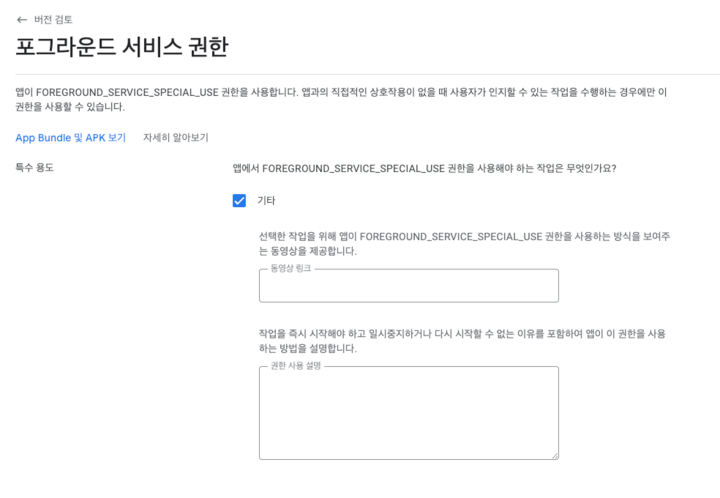
The SDK uses foreground services for the lock screen and Pop features. The service type is declared as SpecialUse. When submitting an app integrated with Buzzvil SDK 5.13.x or later to Google Play, developers must provide a video demonstrating FGS usage and a detailed description of the feature.
To help partners using the lock screen or Pop with app review, Buzzvil provides general demonstration videos and permission usage descriptions. Follow the instructions for your features when declaring FGS types.
Figure 1. Declare foreground service information in Play Console > Production > Create new release > Error in step 2 > Go to declaration
Lock screen (BuzzScreen)
- Service demonstration video: Link
- Example permission usage description: The feature using the foreground service is the lock screen, which must respond immediately to the user's unlock action. The foreground service runs to receive broadcasts for each action immediately. We use the specialUse permission because no other foreground service category is appropriate.
Pop
- Service demonstration video: Link
- Example permission usage description: The feature using the foreground service is Bubble, which must appear immediately when the user turns on the device screen. The foreground service runs to receive broadcasts for each action immediately. We use the specialUse permission because no other foreground service category is appropriate.
Combined features
- Service demonstration video: Link
- Example permission usage description: The features using the foreground service are the lock screen and Bubble. They must respond immediately when the user turns on the device screen or unlocks the device. The foreground service runs to receive broadcasts for each action immediately. We use the specialUse permission because no other foreground service category is appropriate.
Follow the guidance above and update to the latest SDK by August 31 to avoid store review rejection or crashes that prevent app use.
We will continue working to provide a more reliable service. Thank you.
Buzzvil SDK 5.13.x
📈 Improvements
Added ad preloading for a smoother BenefitHub Fragment experience
You can now use BuzzAdFeed to preload and reload ads when integrating BenefitHub as a Fragment. See Integrate BenefitHub as a Fragment for details.
🐛 Bug fixes
- Fixed incorrect behavior when restarting the app while Native Overlay was visible.